One moves a file. The other governs a process. The difference matters most the moment someone runs the wrong revision.
A sender confirms a transfer succeeded. It doesn't confirm the machinist received the latest engineering-approved version instead of a locally saved copy from three revisions ago. That gap shows up later as scrap, rework, unplanned downtime, or a root-cause investigation that goes nowhere because nobody can say who sent what, or when.
This article breaks down when a standalone sender is genuinely practical, when managed DNC earns its cost, and which questions manufacturing teams should ask before committing to either.
Key Takeaways
- G-code senders transmit files but don't enforce approval, revision, or governance controls on their own
- Managed DNC centralizes program storage so operators pull controlled, approved files instead of scattered local copies
- Senders fit simple, low-risk, single-machine setups; managed DNC fits multi-machine, multi-revision, regulated production
- Evaluate revision traceability and audit history, not just sticker price, before choosing a system
G-Code Senders vs Managed DNC: Quick Comparison
Delivery Model
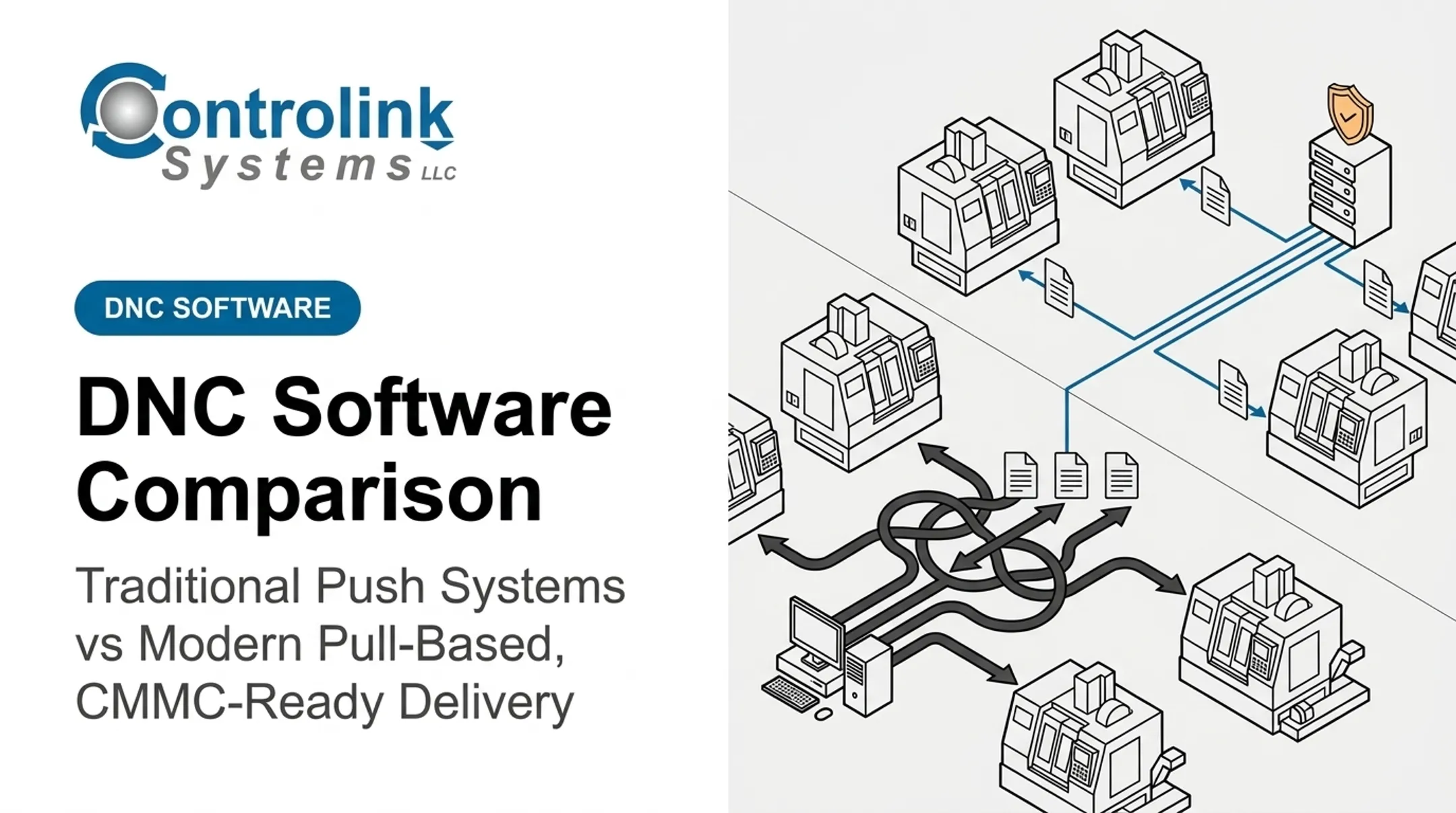
G-code sender: An operator opens a local file, usually saved on a workstation or grabbed from a shared folder, and pushes it directly to a connected machine. Software like CNCjs documents this pattern: connect over a serial port, load the file, visualize the toolpath if supported, and send.
Managed DNC: A controlled central repository routes the approved program to the correct machine or work center. Vendor documentation from GNT Systems describes central release, versioning, and change logs as part of this model.
Revision Control
G-code sender: File naming and version selection depend on local habit: folder structures, operator memory, and whatever naming convention the shop has (or hasn't) enforced.
Managed DNC: Platforms like CIMCO's DNC-Max document version increments and quarantine for modified programs pending review. Exact capabilities vary by platform and should be confirmed before purchase.
Traceability and Accountability
G-code sender: After delivery, it can be genuinely hard to reconstruct who sent which file, when, and whether it was altered locally before the send.
Managed DNC: Delivery records, user identity, timestamps, and machine association are the point of the system, subject to what the specific platform actually logs.
| Factor | G-Code Sender | Managed DNC |
|---|---|---|
| Best fit | Prototyping, single-machine shops, maintenance | Multi-machine, regulated, revision-heavy production |
| Revision control | Manual, operator-dependent | System-enforced (where supported) |
| Audit trail | Often absent | Central to the model |
| Setup complexity | Minimal | Higher, but scales |
| Risk as shop grows | Rises with headcount and machine count | Designed to absorb growth |
Operational Risk and Scalability
Ad-hoc delivery works fine with one machine and one operator. Add machines, shifts, and engineering changes, and the same workflow starts generating:
- Duplicate files with unclear "latest" status
- Dependence on USB drives and single workstations
- Inconsistent naming across operators
- Informal handoffs with no logging
Snavely's Machine ran 30+ CNC machine tools, 10 different control types, and 40 operators. Getting the right program to the right machine had, in their own words, become "quite an ordeal." That was a scale problem, not a software bug.
What Is a G-Code Sender?
A G-code sender is software that transmits machine instructions from a computer to a CNC controller. It doesn't create the toolpath; that's CAM's job. It just moves the finished file.
The typical workflow looks like this:
- Select a communication interface (usually serial/RS-232)
- Connect to the controller
- Load the program file
- Review or visualize it, if the sender supports that
- Send the job, and monitor status if logging is available

Controlink Systems' own Machine Link™ follows this pattern: select a machine control, open the CNC file, prep the machine to receive it, and click [SEND]. There's no built-in approval or revision-selection gate in that workflow. The operator decides which file is correct.
Where Senders Genuinely Excel
- Fast setup with no infrastructure project required
- Direct operator control for hands-on program testing
- Practical fit for one-machine environments where governed-system overhead isn't justified
- Broad protocol options; tools like LinuxCNC document simple file-loading and MDI commands for this kind of direct interaction (LinuxCNC manual)
Communication convenience is not manufacturing governance. A sender can move a file successfully while leaving approval status, naming discipline, and revision selection entirely outside the application. Not every sender supports the same protocols, visualization, or logging — check documentation for the specific tool before assuming feature parity.
Use Cases of a G-Code Sender
Senders still fit a few real shop situations:
- Proving out a brand-new program before release
- Servicing or troubleshooting a single machine
- Running one isolated work center with no shared programs
- Small shops where one person owns file handling end to end
Ad-hoc delivery gets risky fast when:
- Multiple operators copy files onto local drives
- Engineering revisions happen frequently
- Materials are expensive enough that a scrapped part hurts
- Quality requirements demand documented proof of the correct revision
- The same program runs across several machines
Picture a shop testing a new program on one Swiss-type lathe overnight. A sender is perfect: fast, direct, no ceremony.
Now picture that same program approved for production and pushed to five machines across two shifts. Without a governed release step, the "final" version and the "test" version can look identical on the shop floor. The sender remains useful. It just stops being the right system for production control.
What Is Managed DNC?
Managed DNC is a governed CNC program-delivery environment. It centralizes and organizes machine programs, adding workflow controls that basic file transmission doesn't touch. Direct Numerical Control, in its classic definition from Lenze, means central storage, administration, and distribution of machining programs from one computer to many machines.
The Approved-Revision Concept
Here's the core mechanic: engineering or programming personnel release a specific version. Operators access only that authorized version. When the system enforces revision control, superseded or unapproved files cannot become the default choice on the shop floor.
Controlink's Machine Link™ QUICK Serve applies this directly. It continuously scans machines for file requests over wired or wireless serial connections and serves back the latest engineering-approved file, without the operator leaving the machine to go hunting for it.
The real protection comes from the review loop. Program edits made at the machine get routed to engineering instead of quietly becoming the new "standard" file. Ametek, Inc. described exactly this pattern: corrected programs land in an Engineering folder first, where a CNC Engineer reviews changes before they move into the official program library. Nothing skips that gate.

Controls Worth Evaluating
Before assuming a platform delivers governance, check for:
- Role-based access — who can approve, who can only pull files
- Approval status — is "released" distinguishable from "in review"?
- Revision history — can you see what changed and when?
- Check-in/check-out — does it prevent simultaneous conflicting edits?
- Machine or cell assignment — does the right program go to the right machine automatically?
- Transfer confirmation and recovery — what happens if a transfer fails mid-send?
Documentation from Shopfloor Automations describes linking document control directly to delivery, so only approved revisions ever reach the machine without manual intervention. That's the governance layer a basic sender lacks by design.
Integration and Implementation Considerations
Managed DNC often needs to talk to more than just the CNC controller. Controlink routinely interfaces with SQL databases, PLC hardware, and motion controllers, supporting protocols including CAN, UDS, Modbus, Serial, Profinet, and EtherCAT. Confirm ERP, quality-system, or legacy-database integration for the specific platform; do not assume it from general DNC capability.
Before implementing, work through:
- Controller compatibility across your existing machine fleet
- Network reliability on the shop floor (not just the office)
- Operator training and change management
- Migration of legacy files and naming conventions
- Who actually owns the release process going forward
Use Cases of Managed DNC
Managed DNC earns its place fastest in environments where program accuracy is non-negotiable:
- CNC machine shops running multiple controls and shifts
- Automotive suppliers with frequent engineering changes
- Aerospace and defense with strict traceability requirements
- Medical device manufacturing where wrong-revision risk is a compliance issue
- Industrial equipment production across dispersed machine cells
- Research laboratories running one-off, high-value setups
The workflow typically maps like this: program creation → engineering approval → controlled delivery → machine execution → feedback and edits → revision → archival. Each stage has an owner, and each handoff leaves a record.
Controlink's CNC/DNC communications and shop-floor automation work helps manufacturers connect controlled program delivery to the databases, PLCs, and shop software they already run, instead of forcing a one-size-fits-all setup.
G-Code Senders vs Managed DNC: What Is Better?
Neither wins outright. The right answer depends on production complexity, how often revisions change, quality risk, machine count, and, critically, what it costs when the wrong program runs.
Choose a G-code sender when:
- You run a small number of machines
- Programs rarely get shared between people or departments
- Revision complexity is genuinely low
- A manual verification step is already well-defined and followed
Choose managed DNC when:
- Programs get revised frequently
- Multiple people or departments exchange files
- Operators need guaranteed access to the current approved version
- The business needs delivery records for audits or root-cause work
Decision Checklist
Before selecting either system, answer these:
- Source of truth: Where does the "real" approved file live?
- Approval authority: Who can release a revision?
- Revision identification: How does an operator confirm they have the latest version?
- User permissions: Can anyone overwrite or resend an unapproved file?
- Machine compatibility: Does the tool support your controller mix?
- Auditability: Can you reconstruct what ran after an incident?
- Network resilience: What happens if the connection drops mid-transfer?
- Integration: Does it need to connect to ERP, PLM, or quality systems?
- Support: Who do you call when something breaks at 6 a.m.?
A Practical Hybrid Model
Most shops don't have to pick one and abandon the other. A sender can support development work, troubleshooting, or an isolated machine, while managed DNC governs everything released to production.
Controlink's product tiers reflect this split:
- Machine Link™ ($195): standard single-machine transfer
- QUICK Serve ($1,700 for up to 3 machines, scaling to $4,000 for up to 64): automated, engineering-approved delivery as machine count grows
Real-World Examples and Implementation Lessons
Documented, independently verified case studies specifically measuring wrong-revision reduction from DNC adoption are scarce. What is well-documented is the broader value of connecting CNC operations to enterprise systems. NIST's closed-loop CNC manufacturing pilot, run on Boeing 737 leading-edge panel production, connected CNC detection of scrap directly into the ERP reorder workflow. The pilot automated 90% of one previously manual step in that scrap-reorder process. It's an enterprise-integration result, not a pure revision-control benchmark. Even so, it shows the same principle: closing the loop between the machine and the system of record removes manual error points. At CPM, a CNC Swiss-type shop profiled by Modern Machine Shop, connecting machines to a monitoring system and training teams to code downtime and part rejects surfaced problems that had gone unnoticed before. The lesson translates directly to program governance. You can't fix what you can't see, and ad-hoc file handling is largely invisible by design. Controlink's own history offers a smaller-scale version of the same story. Before automated CNC file transfer, operators typed program numbers manually from older databases, and floppy disks got lost or damaged. The ML Send Utility replaced manual entry with direct file transfer to the machine control, cutting out that entry-error risk. Timken Company found the approach notable enough to profile in its internal publication back in August 2000. Lessons that show up across these examples:

- Closing machine-to-system loops removes manual handoffs where wrong files slip through
- Visibility comes first—you can't govern program use you never see
- Higher scrap or lost-file cost strengthens the case for approved-revision delivery If your shop is weighing where CNC/DNC communication fits into your existing systems, Controlink Systems works through exactly this kind of integration question — connecting program delivery to what you're already running, without assuming your setup matches anyone else's.
Conclusion
A G-code sender is a legitimate, effective tool for transmission. The tool does not decide whether the file being transmitted is the right one. That gap is the entire case for managed DNC in any shop where production depends on delivering the correct, approved revision every time. Controlled delivery supports quality, cuts avoidable scrap and downtime, and makes it possible to answer "who ran what, and when" without guessing. Before you choose either path, validate the capabilities of the system you're considering and build a documented release process around it. Software only enforces the revision rules you decide matter.
Frequently Asked Questions
What is a G-code sender?
A G-code sender is software that transmits prepared G-code from a computer to a CNC controller. It does not create programs, and it does not govern revisions or approval on its own.
What is the difference between a G-code sender and a DNC system?
A sender handles direct, one-off file transmission. Managed DNC centralizes storage and adds governance (revision tracking, approval status, and traceability) around delivery.
Why is revision control important for CNC programs?
Outdated or locally modified programs can cause wrong cuts, scrap, and unplanned downtime. Without revision control, root-cause investigations often stall because nobody can confirm which file version actually ran.
Can a G-code sender be used in a production machine shop?
Yes, for low-complexity, low-risk work. Production use still needs safeguards: consistent file naming, manual verification, and clear operator checks for what the software will not catch.
When should a shop move from ad-hoc G-code delivery to managed DNC?
Watch for growth signals: multiple machines, frequent engineering revisions, shared programs across operators, regulated production, recurring wrong-file incidents, or a need for audit records.
Does managed DNC replace CAM software or a G-code sender?
No. CAM creates the toolpath, and managed DNC governs storage, approval, and delivery of the finished program. A sender may still have a role in development or single-machine troubleshooting.