Unplanned downtime costs manufacturers approximately $260,000 per hour, and slow file transfers directly contribute to that figure. This guide explains what multi-threaded file transfer is, the two core types, why it matters in manufacturing environments, and how to choose the right tool or configuration for your shop floor.
Key Takeaways
- Multi-threaded transfer uses multiple simultaneous connections to move files faster than single-threaded methods
- Parallel transfers send multiple files at once; segmented transfers split one large file into chunks
- Slow transfers idle machines, waste time, and put machinists at risk of running outdated program files
- More threads can saturate your network — optimal thread count depends on actual bandwidth
- Purpose-built DNC software sends CNC programs to multiple machines at once, cutting transfer bottlenecks
What Is Multi-Threaded File Transfer?
Multi-threading in file transfer means using multiple connections working in parallel to move data faster—like having four lanes on a highway instead of one. Instead of one connection handling all the work sequentially, multiple connections (threads) share the load, each moving its own slice of data independently.
"Multi-threaded file transfer" is an umbrella term covering any method that uses more than one connection. It doesn't mean the same thing across every tool, though — some apply it to parallel transfers of multiple files, while others use it for segmented transfers of a single large file. That inconsistency is the source of most confusion around the term.
Single-threaded transfers use one connection and one read/write operation at a time. When that connection hits a bottleneck — network latency, disk I/O delays, or protocol overhead — the entire transfer slows down. Speed is capped by the weakest link, not by your actual network or storage capacity.
Multi-threading breaks that constraint. Each thread handles its own read/write slice independently, so combined throughput can approach the real bandwidth ceiling of the network or storage device. Threads also overlap disk I/O latency and TCP acknowledgment waits, keeping the system active instead of sitting idle.
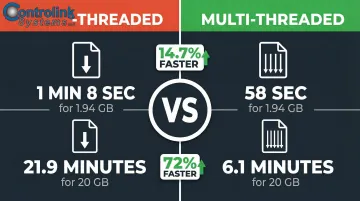
Windows File Explorer illustrates the gap clearly. Robocopy with the /MT switch completed a 1.94GB transfer of 1,307 files in 58 seconds, versus 1 minute 8 seconds with File Explorer — a 14.7% improvement. At larger scale, Robocopy at /MT:128 moved 43,866 files (~20GB) in 6.1 minutes compared to 21.9 minutes single-threaded — a 72% reduction in transfer time.
Two Types of Multi-Threaded Transfers: Parallel vs. Segmented
Not all multi-threaded transfers work the same way. Understanding the difference between parallel and segmented transfers is critical for selecting the right tool for your CNC payloads.
Parallel Transfers
Parallel transfers send multiple files simultaneously, each file using its own dedicated connection or thread. This is the most common form and what most tools mean when they say "multi-threaded." Each file is transferred independently, so if you're moving 50 CNC subprograms from a server to a machine, multiple files move at once rather than one at a time.
Best for: Directories containing many small-to-medium files, such as batches of G-code programs, macros, or configuration files.
Segmented Transfers
A segmented transfer splits a single large file into chunks or segments, and each chunk is transferred over its own connection simultaneously. All segments are then reassembled at the destination. This relies on HTTP Range Requests (RFC 7233), which allow a client to request specific byte ranges of a file (e.g., bytes=500-1233/1234).
Best for: Transferring a single very large file, such as a massive 3D surfacing program, CAD/CAM file, or firmware image.
Side-by-Side Comparison
| Transfer Type | Use Case | Example Payload | Key Benefit |
|---|---|---|---|
| Parallel | Many small-to-medium files | 100 CNC subprograms (50KB–2MB each) | Maximizes throughput for directory transfers |
| Segmented | One very large file | Single 5-axis surfacing program (500MB+) | Accelerates individual large file downloads |
File Integrity and Reassembly
Segmented transfers reassemble chunks at the destination, which means verification matters. A corrupted G-code file that passes silently can send a machine to the wrong coordinates. Two mechanisms protect against this:
- RFC 3230 Instance Digests (e.g.,
Digest: SHA=...) verify that the reassembled file matches the source byte-for-byte. aria2validates each chunk using Metalink checksums during the download, catching corruption before reassembly completes.
Why Multi-Threading File Transfers Matter on the Shop Floor
CNC machine shops routinely transfer G-code and CNC program files from a central server to multiple machines across the floor. With single-threaded serial transfers, each machine waits its turn — creating a queue that multiplies downtime.
The concrete problem: A shop with 10 CNC machines pushing an updated program sequentially — 2 minutes per machine — leaves the last machine waiting 20 minutes before it can start cutting. If multiple machines are queued, the cumulative idle time compounds fast.
Scrap and Error Risk
When transfers are slow, machinists may use cached, outdated versions of programs already loaded on the machine rather than waiting for the latest engineering-approved file. This leads to scrap parts, rework, and quality failures. A root-cause analysis across 12 Tier-1 suppliers showed that program version mismatches contributed to 22% of CNC turning scrap.
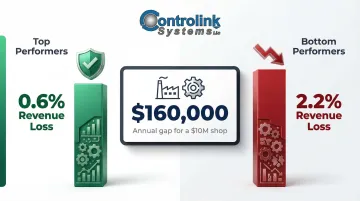
Top-performing facilities lose as little as 0.6% of their revenue to scrap and rework, whereas bottom-performing facilities lose closer to 2.2%. For a $10 million shop, that gap is $160,000 annually — lost to errors that faster, synchronized transfers can prevent.
Machine Utilization and Idle Time
Simultaneous file delivery keeps machines cutting instead of waiting. Eliminating just 5 minutes of idle time per machine per day across a 10-machine shop recovers 50 minutes of production daily — over 4 hours per week.
Network Infrastructure Considerations
Shop floors often rely on older serial connections (RS-232) or mixed protocols (Ethernet, Profinet, EtherCAT). Multi-threading tools must account for the communication protocol in use, as not all protocols support true parallel threading.
Key protocol constraints:
- RS-232 serial: Point-to-point and single-channel; inherently limited to practical speeds around 115.2 kbps. A single serial connection cannot support true multi-threading.
- PROFINET: Real-time control data takes priority; standard TCP/IP file transfers are relegated to Non-Real-Time (NRT) bandwidth slots.
- EtherCAT: Standard Ethernet protocols like TCP/IP file transfers are tunneled via Ethernet over EtherCAT (EoE), which may limit throughput.
File Version Control Benefit
Multi-threaded DNC systems that push the same approved file to all machines simultaneously eliminate version drift. Every machine gets the same file at the same time, which is not possible with sequential single-threaded transfers. That's the difference between a shop running coordinated production and one chasing down which machine loaded last week's program.
Multi-Threading in DNC Software for CNC Machine Shops
Modern DNC (Direct Numerical Control) software is specifically built to handle the challenge of transferring CNC programs to multiple machines simultaneously. The best DNC solutions use multi-threading under the hood to achieve this—fundamentally different from general-purpose file copy tools like Robocopy.
The Practical Workflow
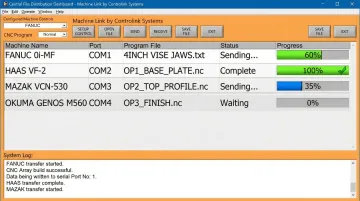
A shop uploads the latest engineering-approved G-code program to a central DNC server. The software then distributes that file to all connected CNC machines concurrently, with confirmation of successful receipt—rather than an operator physically walking files or waiting for one machine at a time to receive its program.
This approach eliminates the bottleneck of sequential transfers and ensures all machines receive the same approved file simultaneously, reducing version drift and the risk of scrap caused by outdated programs.
Purpose-Built for Manufacturing
Controlink Systems' DNC software was developed specifically for this workflow—by engineers who understand machining from the inside. It supports the communication protocols shops actually use and is designed so operators can get up to speed without formal training:
- Serial and Ethernet connections for legacy and modern CNC controllers
- Concurrent file distribution to multiple machines with receipt confirmation
- Centralized file management that keeps every machine on the latest approved program
The results can be significant. A case study at Allied Signal Aerospace found that installing a networked DNC system cut downtime substantially and lifted productivity by 15%.
How to Choose the Right Multi-Threaded File Transfer Tool
Before committing to a tool, shop managers and IT leads should work through a few core questions:
- What protocol do my machines use? (serial, Ethernet, Profinet, EtherCAT)
- Am I primarily transferring many small files or fewer large files?
- Do I need version control and audit trails, or just raw transfer speed?
General-Purpose Tools vs. Purpose-Built DNC Solutions
General-purpose tools like Robocopy (/MT switch, up to 128 threads) or parallel FTP clients (lftp, aria2c, Internet Download Manager) deliver raw speed and flexibility for bulk file migrations — making them well-suited for IT file management tasks.
Purpose-built DNC software goes further than general tools can reach. For CNC program distribution in a manufacturing environment, it's the recommended approach because it:
- Handles serial, Ethernet, and industrial protocols natively
- Confirms successful receipt on each machine
- Enforces version control to prevent outdated programs from running
- Provides audit trails for compliance and troubleshooting
Thread Count Sweet Spot
Once you've chosen your tool type, tuning thread count is the next variable to dial in. More threads are not always better — excessive concurrency can overwhelm network hardware, create I/O contention, or saturate serial connections. Robocopy defaults to 8 threads, and Microsoft recommends staying at or below 32 for standard shop-floor NAS environments.
Recommended approach:
- Start at a moderate thread count (8–32 for general Ethernet transfers)
- Benchmark actual throughput before scaling up
- Monitor for packet loss, disk I/O contention, or network congestion
- Adjust based on real-world performance, not assumptions
Frequently Asked Questions
How many threads should I use for file transfer?
The right number depends on your network bandwidth, disk I/O capacity, and file count. For Ethernet-based transfers, 8–32 threads is a practical starting range (Robocopy defaults to 8). Always benchmark actual throughput. Too many threads can cause network congestion and disk I/O contention rather than improving speed.
Can multiple threads read the same file at the same time during file transfer?
Yes. In segmented transfers, multiple threads read different byte ranges of the same source file at the same time using random-access reads. The source file is not locked or modified during reads, so concurrent access is safe on Windows.
What is the difference between parallel and segmented file transfer?
Parallel transfer sends multiple different files simultaneously (one thread per file), while segmented transfer splits one single file into chunks and downloads all chunks at the same time. Parallel is best for many files; segmented is best for one very large file.
Can multi-threaded file transfer be used to send CNC programs to multiple machines at once?
Yes, purpose-built DNC software uses multi-threading to distribute CNC program files to multiple machines simultaneously over the shop network. This ensures all machines receive the latest approved file at the same time rather than sequentially, eliminating version drift and reducing idle time.
Does multi-threaded file transfer work over RS-232 serial connections to CNC machines?
RS-232 serial connections are point-to-point and inherently single-channel, so true multi-threading within a single serial connection is not possible. However, DNC software can manage multiple serial connections to different machines in parallel, achieving concurrent transfers across the fleet.
What tools support multi-threaded file transfer on Windows?
For general use, Robocopy (/MT switch, up to 128 threads), aria2c, Free Download Manager, and lftp via Cygwin are solid options. For CNC shop environments, purpose-built DNC software is the better choice — it handles the right protocols and includes version control built in.