Introduction
Manufacturing facilities face a persistent problem: machines, software systems, and personnel generate massive amounts of data that stay trapped in disconnected silos. The result is costly downtime, preventable scrap, and productivity gains that never materialize.
MachineMetrics data reveals that average CNC utilization sits at just 24–26%, while program version mismatches alone account for 22% of scrap in CNC turning operations. Factory automation integration connects these isolated systems into a unified operation where data moves freely between hardware, software, and people.
This post covers what factory automation integration actually means, its measurable benefits, the three critical layers every manufacturer must address, common implementation pitfalls, and best practices you can act on immediately to recover hidden capacity sitting idle on your shop floor.
Key Takeaways
- Factory automation integration connects machines, software, and people into one cohesive system to eliminate data silos and unify production flow
- Manufacturers report 10-20% production output improvements and 10-15% unlocked capacity without adding equipment
- Hardware (PLCs, CNCs, sensors), software (MES, ERP, DNC), and network protocols (Modbus, Profinet, EtherCAT) all play a role in a fully integrated system
- Success requires a phased approach starting with high-impact connections, standardized protocols, and strict version control for machine programs
What Is Factory Automation Integration?
Factory automation integration is the process of connecting hardware—PLCs, CNC machines, sensors, actuators—with software platforms like MES, ERP, and DNC systems through a unified network infrastructure. The goal: eliminate the data silos that cause inefficiency by enabling real-time information flow across your entire production environment.
Standalone vs. Integrated Automation
Standalone automation means a single machine performs a task independently—a CNC mill runs a program stored locally on its controller. Integrated automation means multiple systems communicate and act on shared real-time data. The difference in outcomes is significant.
Consider a CNC machine shop without integration: a machinist might run an outdated program file pulled from a USB drive or local storage, resulting in scrapped parts. With integration, the machine automatically pulls the latest engineering-approved file from a centralized DNC system. This eliminates manual transfers and the version control errors that lead to costly rework.
The Spectrum of Integration Complexity
Integration exists on a spectrum:
- Point-to-point connections: A single CNC machine communicates with one PC via serial cable for basic program transfer
- Cell-level integration: Multiple machines and PLCs within a work cell share data through a local network
- Facility-wide integration: All shop-floor equipment, motion controllers, quality systems, and SQL databases communicate across a unified industrial network
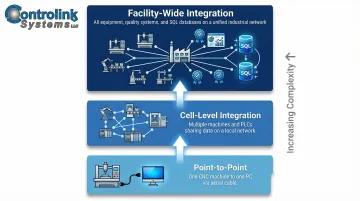
The ISA-95 (IEC 62264) standard establishes the international framework for this integration, defining how enterprise planning systems (Level 4) connect with manufacturing control systems (Level 3) to enable standardized, reliable communication.
Communication Protocols: The Languages of Integration
Integration depends on communication protocols—the "languages" that allow different hardware and software systems to exchange data reliably. Common protocols include:
- Modbus: Simple master/slave architecture for PLC-level telemetry and discrete I/O
- Profinet: Ethernet-based protocol offering high-speed controller-to-device communication
- EtherCAT: Low-latency protocol critical for multi-axis motion control requiring microsecond synchronization
- CAN bus: Device-level protocol commonly used for drive control and sensor networks
- Serial (RS-232): Legacy protocol still prevalent for DNC program transfer with older CNC equipment
Without standardized protocols, manufacturers face the "Islands of Automation" problem identified in NISTIR 8107—disconnected systems that cannot share process data with higher-level MES and ERP software.
Key Benefits of Factory Automation Integration
Increased Productivity and Machine Utilization
Integrated systems eliminate manual data entry, reduce machine idle time waiting for instructions, and keep equipment running at higher utilization rates. Deloitte's 2025 survey reveals that manufacturers implementing smart manufacturing integration report 10% to 20% improvement in production output and unlock 10% to 15% in hidden capacity—without purchasing new equipment.
MachineMetrics data shows average CNC utilization sits at just 23.9% to 26%, meaning machines sit idle more than three-quarters of the time. Automated machine monitoring via MTConnect or OPC UA provides the accurate utilization baseline manufacturers need before investing in additional capital equipment.
Significant Reduction in Scrap and Rework
Integration ensures CNC machines and other equipment always operate from the latest, engineering-approved programs and parameters. This prevents the common and costly mistake of machinists running outdated files.
The numbers make the cost clear:
- Scrap and rework consume 0.6% to 2.2% of revenue, depending on performance
- Top Shops achieve a 0.9% scrap rate versus the 2.4% industry average
- Program version mismatches account for 22% of scrap in Tier-1 automotive and aerospace CNC turning lines
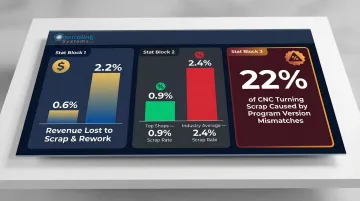
Centralized DNC systems address this directly. When a medical equipment manufacturer implemented centralized DNC software, it eliminated the possibility of downloading wrong files, ensured only one program was held on the controller at a time, and reduced setup time from two hours to 30 seconds.
Real-Time Visibility and Data-Driven Decisions
Integrated systems feed process data—cycle times, tool wear, reject rates, machine status—into a central platform. This allows managers to spot issues and make decisions based on live information rather than end-of-shift reports.
The ISO 22400 standard defines Key Performance Indicators (KPIs) for manufacturing operations management, including Overall Equipment Effectiveness (OEE). Replacing manual tracking with automated MTConnect or OPC UA data feeds gives manufacturers:
- Accurate OEE metrics grounded in real machine data
- Clear visibility into production bottlenecks as they develop
- Complete machine histories for maintenance and compliance
- A systematic basis for improving production efficiency
Reduced Downtime Through Proactive Monitoring
Continuous process monitoring—enabled by integration—allows teams to detect abnormal conditions before they become failures. Vibration anomalies, temperature spikes, and pressure deviations can all signal impending equipment problems.
Unplanned downtime costs industrial manufacturers an estimated $50 billion annually, with the average large plant losing $253 million per year due to roughly 25 incidents per month. Predictive maintenance implementations reduce unplanned downtime by up to 50%, with 85% improvement in downtime forecasting accuracy and 40% reduction in maintenance costs.
BC Machining achieved $72,000 in annual savings per machine by using adaptive tooling technology to monitor Star CNC machines, implementing automatic feed holds when part failure was imminent, virtually eradicating scrap from tool wear.
Scalability and Adaptability
Properly integrated systems are built to grow. Adding a new machine, product line, or data source doesn't require scrapping existing infrastructure. Instead, new components connect into the existing communication framework using standardized protocols and interfaces.
A scalable integration architecture protects your technology investment while giving you the flexibility to respond as product mixes shift and customer demands change.
The Three Layers of Integration Every Manufacturer Should Know
Hardware Integration
Hardware integration involves physically connecting machines, sensors, PLCs, actuators, drives, and motion controllers into a unified control framework. The challenge is ensuring new and legacy equipment can communicate—often requiring interface modules or middleware when older machines lack native communication ports.
With the average age of CNC machines at 8.7 years, many lack modern network interfaces. Retrofitting strategies include:
- MTConnect adapters extract data from legacy controls (Fanuc FOCAS or Siemens OPC servers) without replacing the underlying hardware
- Serial-to-Ethernet gateways convert RS-232 serial communication to modern TCP/IP networks for standard connectivity
- Hall Effect current sensors measure machine power draw externally to determine machine state—no legacy control interface required
This "wrap and extend" strategy integrates legacy machines without costly rip-and-replace upgrades.
Software Integration
Software integration aligns the systems that manage and interpret manufacturing data: DNC/CNC communication software, Manufacturing Execution Systems (MES), ERP platforms, quality management tools, and process monitoring dashboards.
When these layers share data automatically, operators spend more time machining parts and less time chasing information across disconnected platforms. A unified software environment:
- Ensures CNC programs flow from engineering to machines without manual USB transfers
- Links production schedules from ERP directly to shop-floor work orders
- Feeds quality inspection results back to process control systems for real-time adjustments
- Provides managers with consolidated dashboards showing production status, OEE, and exception alerts
Controlink Systems builds this kind of environment by linking CNC programs, SQL databases, and shop-floor monitoring tools into a single interface—reducing training overhead while keeping production data accessible to the people who need it.
Network and Communication Integration
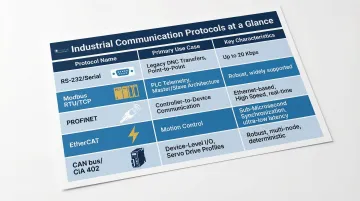
How fast and reliably data moves between hardware and software components depends entirely on the network layer. Protocol selection follows the specific speed, determinism, and payload requirements of each application:
| Protocol | Primary Use Case | Key Characteristics |
|---|---|---|
| RS-232 / Serial | Legacy DNC program transfer & machine offsets | Point-to-point, up to 20 Kbps, highly prevalent in older fleets |
| Modbus (RTU/TCP) | Simple PLC-level telemetry & discrete I/O | Master/slave architecture for exchanging process data |
| PROFINET | Controller-to-device communication & PLC integration | Ethernet-based, high speed, integrated safety (PROFIsafe) |
| EtherCAT | High-performance motion control & multi-axis sync | Low-latency, deterministic (<1µs synchronization) |
| CAN bus / CiA 402 | Device-level I/O and standardized drive profiles | Standardizes functional behavior of servo drives and motors |
Securing the Shop Floor
More connected networks mean a larger attack surface. Manufacturing accounted for 70% of all industrial ransomware incidents in Q4 2024, with 82% of cyber-physical system attacks exploiting remote access protocols—making security a non-negotiable part of any integration plan.
NIST SP 800-82 recommends implementing DMZ architecture so no traffic goes directly between corporate and control networks. ISA/IEC 62443 segments functional levels into "zones" (collections of assets with common security requirements) and "conduits" (logical groupings of communication channels) to enforce least-privilege access across layers.
Key security measures include:
- Network segmentation aligned with the Purdue model
- Multi-factor authentication (MFA) for all remote access
- Blocking insecure SCADA protocols (like unencrypted Modbus/TCP) from crossing into corporate networks
- Maintaining offline backups of critical program files and configurations
Common Challenges and How to Overcome Them
Legacy Equipment Compatibility
Many factories have machines that predate modern communication standards. The good news: legacy equipment is not a barrier to integration.
Solutions include:
- Custom middleware: Software layers that translate between legacy proprietary protocols and modern standards
- Protocol converters: Hardware devices that bridge incompatible communication formats
- DNC serial interfaces: Connect older RS-232 CNC controllers to Ethernet networks without replacing the controller
These approaches allow manufacturers to integrate existing equipment into modern networks without requiring full replacement—protecting capital investments while gaining integration benefits.
Cybersecurity and Data Integrity Risks
As more devices connect to networks, the attack surface grows. Analysis of over 200 incidents revealed that hacktivists frequently exploit insecure-by-design protocols (such as VNC) and target HMIs and SCADA systems guarded by weak or default credentials.
Mitigation strategies:
- Segment IT and OT networks with tightly controlled access points
- Enforce role-based permissions and multi-factor authentication across all connected systems
- Lock down engineering-approved files so only verified programs reach the machines
- Audit critical ports and access logs regularly to catch anomalies early
Workforce Adoption and Change Management
Even well-designed integrations fail if operators resist new workflows. The U.S. faces a projected 2.4 million unfilled manufacturing jobs by 2028, forcing shops to run machines unattended or with less experienced operators.
A McKinsey survey identified organizational resistance to change (41%) as one of the largest barriers to scaling advanced technologies. That's not a technology problem—it's a people problem.
Nearly 70% of MES implementation challenges trace back to process and cultural change rather than the technology itself.
Practical recommendations for easing adoption:
- Deploy intuitive HMI interfaces that cut initial training time from 40+ hours to a manageable range
- Roll out in phases — start with one work cell, validate results, then scale
- Budget 20-40 hours of hands-on training upfront, with reinforcement sessions through the first 6-9 months
Shops that pair formal change management with hands-on training see 35% higher user adoption rates. The technology is only as effective as the people running it.
Best Practices for Implementing Factory Automation Integration
Start with a Clear Integration Roadmap and Phased Approach
Trying to integrate everything at once is a common failure mode. Start with the highest-impact connection point, validate results, then expand.
Recommended sequence:
- Phase 1: Link CNC machines to a DNC system to ensure correct program delivery—this addresses the 22% of scrap caused by version mismatches
- Phase 2: Add real-time machine monitoring to establish accurate utilization baselines and OEE tracking
- Phase 3: Connect quality inspection data to process control systems for closed-loop adjustments
- Phase 4: Integrate shop-floor systems with enterprise ERP for full vertical integration
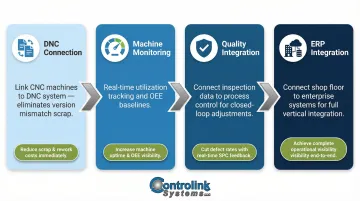
This stepwise approach reduces risk, protects production continuity, and builds operator confidence. Each phase delivers measurable ROI before moving to the next level of complexity.
Standardize on Communication Protocols Early
Choosing a consistent set of protocols across the facility—rather than allowing each machine vendor to dictate its own—dramatically simplifies integration, reduces maintenance complexity, and makes future expansions far easier.
Protocol standardization guidelines:
- For new equipment purchases: Specify Ethernet-based protocols (Profinet, EtherCAT, or OPC UA) in procurement requirements
- For data collection: Adopt MTConnect as the standard semantic vocabulary for manufacturing equipment
- For secure transport: Use OPC UA with built-in session encryption, message signing, and X509 certificate authentication
- For legacy equipment: Deploy standardized gateway hardware (serial-to-Ethernet converters) rather than custom solutions for each machine
MTConnect (ANSI/MTC1.4-2018) is an open, royalty-free standard that uses XML and HTTP to format and transport machine data—eliminating custom data wrangling and proprietary formats across the shop floor.
Prioritize Data Integrity and Version Control for Machine Programs
One of the highest-value quick wins in shop-floor automation is ensuring CNC machines always pull programs from a single, centrally managed and version-controlled repository.
Implementation essentials:
- Maintain all active CNC programs in a single DNC system or PDM platform — no scattered local copies
- Track every program change with timestamps, author IDs, and engineering approval workflows
- Configure machines to pull programs directly from the central system — eliminate USB drives entirely
- Access controls: Restrict who can modify programs and require engineering approval before changes reach the shop floor
When machinists can only access centrally approved files, the version mismatch problem disappears — and scrap rates follow.
Test Integrations Thoroughly Before Full Deployment and Document Everything
Validate data flow at each integration point before going live. Maintain clear documentation of all connections, protocols, and system dependencies.
Testing checklist:
- Verify data accuracy between source and destination systems
- Confirm protocol handshakes and error handling
- Test failure scenarios (network interruptions, invalid data)
- Validate security controls and access restrictions
Documentation requirements:
- Network topology diagrams showing all connected devices
- Protocol specifications and configuration parameters for each connection
- System dependencies and integration points
- Troubleshooting procedures and escalation contacts
Thorough documentation protects operations during equipment changes, software updates, or staff turnover — and accelerates problem resolution when issues surface. Together, these four practices form the backbone of a factory automation integration that holds up under real shop conditions.
Frequently Asked Questions
What is system integration in manufacturing?
System integration in manufacturing is the process of connecting machines, software platforms, controllers, and data systems so they communicate and share information automatically. It replaces manual handoffs and data silos with a unified, real-time production environment where information flows automatically from shop floor to enterprise systems.
What are the benefits of integrating automation in operations?
Primary benefits include higher machine utilization (10-20% output improvement), reduced scrap from version control (addressing 22% of turning scrap), lower downtime (up to 50% reduction through predictive maintenance), real-time production visibility, and the ability to make faster, more accurate operational decisions based on live data rather than end-of-shift reports.
What are the four types of system integration?
The four common types are point-to-point integration (direct communication between two systems), vertical integration (connecting shop-floor to enterprise systems following ISA-95 hierarchy), horizontal integration (connecting systems across production stages or value chain), and hub-and-spoke integration (centralized broker routing data between all systems, reducing direct interface complexity).
What are the 4 types of automation systems?
The four types are fixed (hard-wired sequence, high-volume production), programmable (reprogrammable via instructions, batch production), flexible (rapid changeover for high-mix low-volume work), and integrated (computer networks linking factory operations with business functions end to end).
What four capabilities must work together for automation to function?
Automation relies on four pillars: sensing (collecting data from equipment), connectivity (transmitting it between systems), analytics (converting data into decisions), and actuation (executing those decisions through equipment commands). Integration is what binds them into a coordinated system rather than four isolated capabilities.
When setting up new automated systems and integrations, what are some of the best practices to make the transition easier and protect your data?
Key best practices include:
- Start with a phased rollout targeting high-impact areas like DNC program delivery
- Standardize protocols (MTConnect, OPC UA) early to simplify future expansion
- Enforce version control for machine programs through centralized repositories
- Document all system connections, protocols, and dependencies
- Apply network segmentation and access controls to protect engineering data