Introduction
Picture this: A machinist walks across the shop floor to a CNC machine, manually loads what they believe is the correct part program, and starts the job. Fifteen minutes later, they discover it's an outdated version — resulting in a scrapped workpiece, wasted machine time, and frustration. This exact scenario, repeated across thousands of machine shops daily, is what batch file transfer is designed to prevent.
This article covers two related but frequently confused concepts: batch file transfer (the automated movement of multiple files between systems) and batch files (Windows .bat scripts that execute commands). They share the word "batch," but serve very different purposes in different industries.
Here you'll find a clear breakdown of what batch file transfer is, how it works, and how it relates to .bat files. More importantly, you'll see why it matters in manufacturing and CNC/DNC environments — where program version control directly separates profitable runs from scrap.
Key Takeaways
- Batch file transfer automates the scheduled, consecutive transmission of multiple files between systems
- Windows batch files (.bat) are OS command scripts — a separate concept that often causes confusion
- Protocols used include FTP, SFTP, SCP, and Managed File Transfer (MFT) tools
- In manufacturing, batch transfer is how DNC systems distribute G-code programs to CNC machines on the floor
- Getting this wrong means machinists may run outdated programs — understanding the difference prevents costly scrap
What Is Batch File Transfer? The Core Definition
Batch file transfer refers to the consecutive, automated transmission of two or more files from one system to another, without requiring manual user input for each file. PCMag defines it simply as the automated transfer of multiple files, and this definition forms the foundation of how modern manufacturing, enterprise IT, and data exchange systems operate.
The "batch" concept means processing a collection of files as a group rather than one at a time. This contrasts sharply with real-time or streaming transfers, where data moves continuously as it's generated. Batch processing collects files over a period, then transmits them all at once — think of it like collecting mail throughout the day and delivering it all in one evening run rather than making individual trips for each letter.
Typical trigger mechanisms include:
- Scheduled time windows, such as overnight runs when network traffic is low
- Event-based triggers when a new file appears in a watched folder or a threshold is reached
- Manual queue submission by an operator or system administrator
These triggers reflect a broader reality: many legacy applications, large manufacturing systems, and data pipelines don't need real-time transfers. Grouped file transmission is often the more reliable choice. It fits particularly well when:
- Network bandwidth is constrained
- Transfers must happen during specific maintenance windows
- Audit trails and retry logic are non-negotiable
Common use cases include:
- Enterprise IT data synchronization and backups
- State and government data exchanges
- EDI (Electronic Data Interchange), which generated $8.38 trillion in B2B digital commerce in 2021
- CNC/DNC communications in manufacturing, where G-code programs must reach the right machine at the right time
Batch File Transfer vs. Windows Batch (.bat) Files: Clearing the Confusion
The term "batch file" has two very different meanings in computing that are frequently confused in search results and everyday conversation: (1) a Windows script file with a .bat extension and (2) a method of transferring files in groups. This article addresses both to eliminate the confusion.
Windows Batch Files (.bat)
A Windows batch file is a plain-text script that stores a sequence of operating system commands (such as copy, delete, ping, or echo) to be executed serially by cmd.exe on Windows. The key point: a .bat file is about executing commands on a local machine, not primarily about file transfer over a network.
Where the Overlap Occurs
A Windows .bat script can initiate a file transfer — using FTP commands or xcopy, for example — but the script itself is not the transfer. It is the instruction set that triggers one.
IT teams often write .bat scripts to automate FTP transfers, which is why people conflate the script with the transfer methodology. They are related, but not the same thing.
Quick-Reference Comparison
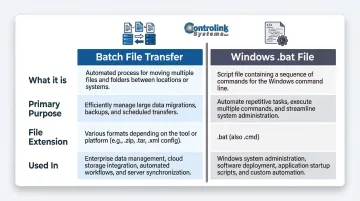
| Feature | Batch File Transfer | Windows .bat File |
|---|---|---|
| What it is | A data movement methodology | A Windows automation script |
| Primary purpose | Move multiple files between systems automatically | Execute a series of OS commands locally |
| File extension | N/A (it's a process, not a file type) | .bat or .cmd |
| Used in | Enterprise IT, EDI, manufacturing DNC systems | Windows system administration, task automation |
How Batch File Transfer Works: Common Protocols and Methods
Protocols Used in Batch File Transfer
The foundation of any batch file transfer system is the protocol used to move data between systems. In manufacturing environments, the wrong protocol choice can expose CNC programs, tooling data, or quality records to interception — or simply leave you with no audit trail when something goes wrong.
| Protocol | Encryption | Best For | Key Limitation |
|---|---|---|---|
| FTP (RFC 959, 1985) | None — cleartext | Legacy systems only | Violates NIST SP 800-171; credentials exposed |
| SFTP (SSH extension) | Full (control + data) | Most modern batch transfer | Requires SSH infrastructure |
| SCP | Full (SSH) | Simple host-to-host copying | Less feature-rich than SFTP |
| MFT (Gartner definition) | Protocol-dependent | Enterprise and compliance-driven environments | Higher cost and setup complexity |
MFT platforms go beyond raw transfer protocols. They add scheduling, error handling, failure alerts, audit logs, and retry logic — the management layer that bare FTP or SFTP lack.
Key Requirements for a Reliable Batch Transfer System
Production-grade batch file transfer systems must meet specific requirements to ensure reliability, security, and compliance. The Oklahoma OMES Batch File Transfer Standard provides a clear framework:
- Encryption in transit — Protects intellectual property and sensitive data from interception
- Retry-on-failure capability — Ensures transfers complete even if network issues occur
- Failure alert notifications — Immediately notifies administrators when transfers fail
- Centralized logging — Creates tamper-evident audit trails for compliance and troubleshooting
- Documented transfer processes — Ensures consistency and enables rapid incident response
On a shop floor, a missed retry or silent failure isn't just an IT inconvenience — it means a machinist running an outdated NC program, scrapped parts, and a compliance gap with no log to explain what happened.
Batch File Transfer in CNC and DNC Manufacturing Environments
In machining and manufacturing, the "files" being transferred in batch are typically CNC part programs (G-code files) that need to be sent from a central computer or server to multiple CNC machine tools on the shop floor. This process is managed by DNC (Distributed Numerical Control) software, which coordinates program distribution across every connected machine.
The Core Problem Batch File Transfer Solves
Without a reliable batch transfer system, machinists must physically walk programs to machines on USB drives or manually re-enter data, creating risk of version errors, scrap parts, and wasted machine time. The financial impact is staggering: unplanned downtime costs manufacturers an average of $260,000 per hour, with automotive sector costs reaching $2.3 million per hour.
How DNC Software Uses Batch File Transfer Principles
DNC systems enable programs to be queued and pushed to machines automatically, ensuring the correct, engineering-approved version reaches the right machine at the right time — without the machinist leaving the cell. That "sneakernet" approach — walking USB drives across the shop floor — also introduces severe cybersecurity risks, with 82% of USB threats capable of disrupting operations.
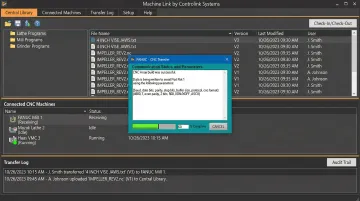
Controlink Systems LLC's DNC software is built around this workflow. For shops managing multiple machines, it provides:
- Reliable G-code transfer from a central program library to any connected machine
- Version control that ensures machinists always run the latest engineering-approved file
- A fully auditable log of every transfer, flagging failures before they cause downtime
Practical Example Scenario
A shop running 20 CNC machines needs to push updated programs to 5 machines after an engineering change order. With a batch file transfer-enabled DNC system, this happens automatically from the server to all target machines — no thumb drives, no walking, no re-entry errors. The system logs every transfer, alerts the administrator if any fail, and ensures every machine receives the identical, current, engineering-approved file.
Key Benefits of Batch File Transfer in Manufacturing
Efficiency and Time Savings
Batch transfers eliminate the need to send files one at a time or manually transport them, freeing machinists and programmers to focus on production rather than file management. Case studies show that integrating DNC systems with automated program distribution reduced setup time from 13.38 hours to 8.38 hours for typical 50-tool jobs — a 37% reduction in non-value-added time.
Version Control and Quality Assurance
Centralized batch distribution ensures every machine receives the same, current, engineering-approved file, directly reducing scrap rates caused by machinists running outdated programs. Insufficient program headers and poor documentation lead to operators running incorrect program versions, causing tool breakage, scrapped workpieces, and machine crashes.
Controlink's DNC solutions address this by acting as the definitive file source for G-code, ensuring version consistency across the entire shop floor.
Automated Retry Logic and Audit Trails
Properly configured batch file transfer systems include retry logic, failure alerts, and audit trails so failed transfers are caught and corrected before a machine tries to run a missing or corrupted program. That kind of reliability is impossible with manual USB-based transfers, where no system confirms delivery to the intended machine.
Frequently Asked Questions
Frequently Asked Questions
What is the meaning of batch transfer?
Batch transfer refers to the automated, consecutive transmission of two or more files from one system to another as a group, typically on a schedule or triggered by an event, rather than one file at a time in real time.
What is a batch file used for?
A batch file (.bat) is a Windows script that stores a series of OS commands (like copying files, launching programs, or running diagnostics) to be executed automatically in sequence — commonly used for IT automation and system maintenance.
What is a .bat file with an example?
A .bat file is a plain-text script saved with a .bat extension that cmd.exe can run. For example, a three-line script — @echo off, echo Hello World, pause — displays "Hello World" and waits for user input before closing.
Are .BAT files still relevant today?
Yes, .bat files remain relevant for simple Windows automation tasks, though PowerShell and Python are preferred for complex scripting. In manufacturing and DNC environments, batch-style automation is still widely used for program distribution.
How does FTP relate to batch file transfer?
FTP (File Transfer Protocol) is a standard protocol for sending files between computers over a network, and it's commonly used to automate batch transfers in DNC and shop-floor environments. Main types include standard FTP (unencrypted), SFTP (encrypted via SSH), FTPS (FTP over SSL), and SCP (Secure Copy).
Why is it called a batch file?
The term "batch" comes from the computing concept of processing a collection of jobs or commands together rather than one at a time interactively. A batch file is, simply, a file containing a "batch" of commands that run in sequence.