Introduction: What Are DNC Solutions and Why Do They Matter?
Picture this: A machinist walks across a busy shop floor clutching a USB drive, heading to the CNC machine to manually load a G-code program. Five minutes later, they're back at the engineering office because the file won't load. Another ten minutes wasted troubleshooting. Meanwhile, the machine sits idle.
This scenario plays out thousands of times daily in machine shops worldwide, costing time, introducing errors, and draining productivity. DNC (Direct/Distributed Numerical Control) solves it by automating and centralizing the transfer of NC programs from engineering to CNC machines on the shop floor — replacing manual methods with a reliable, error-free digital pipeline.
This article explains what DNC is, how it works, what features matter most, and why it's foundational for modern manufacturing.
TLDR: Key Takeaways
- DNC automates NC/G-code file transfer from a central server to shop-floor CNC machines, eliminating manual methods
- Enforces revision control so operators always receive the latest engineering-approved program version
- Essential features include remote request capability, legacy RS-232 support, and ERP/MES integration readiness
- Bridges shop-floor machines to broader manufacturing systems, enabling real-time data flow and Industry 4.0 readiness
- Purpose-built DNC software — not generic IT tools — handles the mixed controllers and legacy machines common in real shop environments
How DNC Solutions Work: The Basics Explained
DNC software maintains a central repository of approved NC programs (G-code files) and manages their controlled delivery to CNC machines. It bridges CAM software — where files are created — and the CNC machines that execute them, making sure the correct, approved program reaches each machine without manual file-shuffling.
Revision Control: The Quality Gatekeeper
DNC software acts as a gatekeeper, ensuring machinists always receive the latest engineering-approved file version. Here's why this matters: running an outdated file means machining the wrong part, which equals scrap. A properly configured DNC system blocks access to old revisions entirely, eliminating this costly risk before it reaches the floor.
Remote Request Process
Instead of walking to an office computer, CNC operators call for specific NC files directly from the machine control or a nearby terminal. A simple request program in the machine control sends the file name to the DNC server, which delivers it instantly. This eliminates the "walking" problem and keeps machines running.
Direct vs. Distributed: Understanding the Models
The two architectural models differ most in what happens when something goes wrong:
| Model | How It Works | Key Risk |
|---|---|---|
| Direct Numerical Control (legacy) | One central computer feeds data block-by-block to all machines in real time | Server crash stops every machine on the floor |
| Distributed Numerical Control (modern) | Programs are pushed to machines that store and run them locally | Network outages don't halt production |
Most modern DNC systems use the distributed model for exactly this reason — shop floors can't afford a single point of failure.
The Manufacturing Workflow Connection
Every file follows a defined path before a machine ever cuts metal:
- CAD/CAM generates the NC program
- Engineering reviews and approves it
- DNC server stores the approved version with version history
- Floor operators pull the file on demand from the machine control
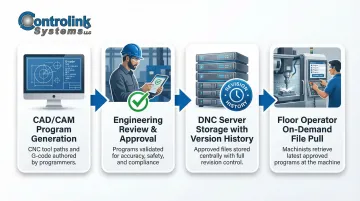
This chain means every part is traceable back to a specific approved program revision — a requirement in aerospace, medical, and automotive environments where documentation isn't optional.
The Real Cost of Not Using DNC: Problems It Solves
The "Sneaker-Ware" Time Drain
Operators physically transporting NC programs via USB sticks, floppy disks, or PCMCIA cards waste enormous amounts of time. At Messier-Dowty, eliminating manual program uploads saved three hours per week per machine—nearly 2,000 hours annually across 13 machines, representing over $200,000 in savings. Multiply that across a 20- or 30-machine shop, and lost labor hours compound into a six-figure productivity gap every year.
Scrap Risk from Version Control Failures
Without DNC, machinists may accidentally run outdated programs. A single incorrect file revision can produce an entire batch of nonconforming parts. Clearwater Engineering reduced scrap rates by 45% simply by implementing centralized tool and program management, proving this is one of the most costly and preventable problems DNC eliminates.
The Accountability Gap
Without a centralized system, shops lose all visibility into who ran which program, when, and on which machine. In regulated industries—aerospace (AS9100D) and medical devices (FDA 21 CFR Part 11)—that missing audit trail isn't just an operational problem. It's a compliance failure that can trigger customer audits, corrective actions, or lost contracts.
Machine Downtime During Setup
Manual transfers force machines to sit idle while operators search for, transport, and load programs. The productivity impact shows up fast:
- Operators average 10–20 minutes per setup searching for and loading the correct file
- Idle machine time during program transfers directly reduces OEE scores
- Missed production targets accumulate across every shift, not just peak hours
For high-volume shops running multiple setups per shift, that idle time adds up to hours of lost capacity every day.
Key Features to Look for in DNC Software
Revision Control and Program Library Management
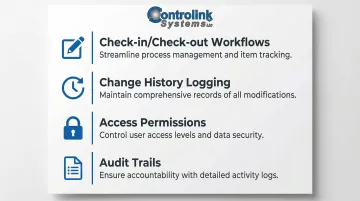
The DNC software must serve as the authoritative single source of truth for all NC programs. Only engineering-approved versions should be accessible to operators. Look for:
- Check-in/check-out workflows that track who modified what and when
- Change history logging that allows reverting to proven earlier versions
- Access permissions that restrict editing rights to authorized personnel
- Audit trails that document every file access and transfer
Remote Request and Shop-Floor Terminal Support
Operators should call programs directly from the CNC control or a nearby terminal, tablet, or barcode scanner. This feature alone eliminates most of the "walking" problem and reduces setup time dramatically — no dispatching files manually, no version confusion at the machine.
Legacy Machine Compatibility
Many shops operate a mix of modern and older CNC equipment. Look for DNC software that supports:
- Ethernet connectivity for modern machines
- RS-232 serial connections for legacy equipment (often limited to 15 meters and slow baud rates)
- Simultaneous protocol support so both machine types work from one server
Controlink Systems LLC has handled exactly this kind of mixed-floor environment since 1998, with deployments at manufacturers like Timken, 3M, and Oak Ridge National Laboratory.
G-Code Viewing, Editing, and Backplotting
DNC software should allow authorized users to view and verify programs before they reach the machine floor. Backplotting means visual simulation of the tool path—a quality safeguard that catches syntax errors, collision risks, and gouges before they cause machine crashes or scrap.
Scalability and Integration-Readiness
As your shop grows, the DNC system should keep pace. Look for:
- Open API support for custom integrations
- Compatibility with ERP, MRP, and MES systems to close the loop between production planning and execution
- Standards support like MTConnect and OPC UA for Industry 4.0 readiness
How DNC Software Connects to CNC Machines
Two Primary Connection Types
Ethernet (for modern machines):
- Unlimited distance via network infrastructure
- High speed (10-100+ Mbps)
- Native TCP/IP, SMB/NFS protocols
RS-232 Serial (for legacy machines):
- Limited to 15 meters without boosters
- Slow baud rates (4,800-38,400 baud)
- Requires direct serial cable or serial-to-Ethernet converter
Many shops require DNC software that handles both simultaneously. Industrial serial-to-Ethernet converters eliminate the 15-meter distance limit and allow centralized management without replacing CNC controllers.
Network Architecture Considerations
The DNC server typically sits on a separate CNC network. Shops commonly isolate it from the corporate IT network via VPN, keeping production systems insulated from corporate traffic while still allowing controlled data exchange.
Wireless Connectivity
Where fixed cabling is impractical, some shops add wireless connectivity between the DNC server and machine tools. This simplifies layout changes and reduces installation costs — but industrial environments present real challenges. Metal structures and electrical noise can disrupt signals, so reliability needs careful evaluation before committing to a wireless setup.
DNC and Shop-Floor Integration: Connecting to ERP, MES, and Industry 4.0
Closing the Loop with MES Integration
Advanced DNC systems integrate with ERP/MRP systems via a Manufacturing Execution System (MES). Operators see their next scheduled job on a tablet at the work center and pull the correct NC file automatically. This closes the loop between production planning and actual machining, eliminating paper work orders and manual coordination.
Live Feedback Loop
When a program is modified during production, operators upload it back to the DNC server for engineering review. This creates a live feedback loop between the shop floor and engineering — supporting continuous improvement and preserving process knowledge that would otherwise walk out the door.
Industry 4.0 Foundation
That feedback capability is also what makes broader Industry 4.0 investment worthwhile. According to a 2025 Deloitte survey, 80% of manufacturers are dedicating 20% or more of their improvement budgets to smart manufacturing. Without a reliable DNC foundation, none of the following can function effectively:
- Real-time machine monitoring and OEE tracking
- Predictive maintenance triggered by actual cycle data
- Digital twins fed by live program execution
- AI-driven scheduling tied to shop-floor status
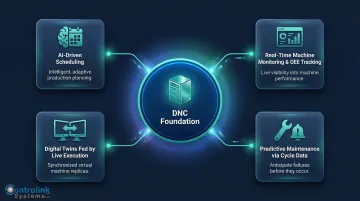
DNC is what connects these capabilities to your machines — without it, they're pulling data from the wrong place or not at all.
Key integration standards:
- ISA-95 governs information flow between MES and ERP systems, defining what data moves where across production tiers
- MTConnect (ANSI-accredited) standardizes how process execution data is collected from machines on the floor
- QIF (Quality Information Framework, ISO) handles exchange of metrology and quality data across inspection systems
How to Choose the Right DNC Solution for Your Shop
Evaluation Checklist
Before purchasing DNC software, run through these key questions:
Machine compatibility:
- Does it support your current machine mix (including legacy equipment)?
- Can it handle both Ethernet and RS-232 connections simultaneously?
Core functionality:
- Does it offer revision control with audit trails?
- Does it support remote request from machine controls?
- Can operators access it via terminals, tablets, or barcode scanners?
Integration readiness:
- Can it integrate with your existing ERP or MES?
- Does it support Open API or standard protocols (MTConnect, OPC UA)?
Usability:
- Is the interface practical for shop-floor operators without extensive training?
- Does it reduce setup time and eliminate manual file handling?
A Purpose-Built Option for Manufacturing Shops
If you're running through that checklist and want a vendor that checks every box, Controlink Systems LLC is worth a close look. Their DNC software was built by people who know machining — designed to be fast, easy, and reliable from day one.
With over 25 years of experience supporting shops across automotive, aerospace, and beyond, Controlink keeps training time short through straightforward HMI design. The software interfaces with a wide range of communication protocols, including RS-232, Ethernet, and Modbus.
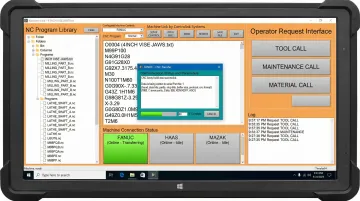
The software has been deployed at major manufacturers including Timken, 3M, and Oak Ridge National Laboratory, demonstrating its scalability and reliability in demanding production environments.
Frequently Asked Questions
What is the difference between CNC and DNC?
CNC (Computer Numerical Control) refers to the machine tool itself—the equipment that executes machining programs. DNC (Direct/Distributed Numerical Control) is the software system that manages and delivers those NC programs from a central server to the CNC machines on the shop floor.
What does DNC stand for in manufacturing?
DNC stands for Direct Numerical Control or Distributed Numerical Control. In modern manufacturing, it almost always refers to the distributed model: a centralized software system that stores, manages, and distributes NC/G-code programs to multiple CNC machines across a facility.
What is DNC in electronics?
In electronics or general computing contexts, DNC can refer to "Do Not Connect" (a pin designation on circuit boards). However, in manufacturing and machining, DNC exclusively refers to Direct/Distributed Numerical Control systems used to manage CNC program transfer.
How does DNC software reduce scrap in a machine shop?
DNC software reduces scrap by enforcing revision control—ensuring operators can only access the latest engineering-approved NC program version. This eliminates the risk of running an outdated or incorrect G-code file that would produce nonconforming parts.
Can DNC software connect to older CNC machines?
Yes. Quality DNC software supports both modern Ethernet-connected machines and older CNC equipment using RS-232 serial connections, making it viable for shops running a mixed fleet of legacy and newer machine tools.
What is the difference between DNC software and an ERP system?
An ERP (Enterprise Resource Planning) system manages business-level operations like scheduling, inventory, and orders. DNC software manages the technical data (NC programs) on the shop floor. The two can be linked via an MES, where production plans automatically trigger the correct program delivery to each machine.