
Introduction
Many manufacturers have invested heavily in automation equipment yet still face unexplained downtime, excessive scrap, and inconsistent throughput. The problem rarely lies with the hardware — it comes down to how the setup is configured, connected, and managed.
When CNC machines can't communicate with each other, workers waste time manually transferring data, re-entering programs, or walking the shop floor to retrieve information. Worse, machinists often run outdated engineering files without realizing it — and that goes straight to scrap.
This guide walks through proven strategies to unlock the efficiency already built into your automation setup: identifying where time and quality are actually lost, prioritizing the right improvements, leveraging CNC/DNC communication tools, implementing real-time monitoring, and integrating systems so they work as one coordinated unit.
Key Takeaways
- Disconnected systems cause most efficiency losses—not broken machines, but manual handoffs and missing data flows
- Audit before automating—identify the 20% of processes causing 80% of downtime, scrap, or throughput loss
- Centralized DNC software eliminates manual program transfers—machinists always run the latest approved file, cutting setup time
- Real-time monitoring catches deviations before they become defects, enabling predictive maintenance that reduces downtime by 30–50%
- System integration removes manual data re-entry so PLCs, CNCs, and databases exchange information without human handoffs
Why Most Industrial Automation Setups Fall Short of Their Efficiency Potential
Disconnected Systems Are the Real Bottleneck
Disconnected systems are the most common source of lost efficiency in machining environments. When equipment can't communicate, workers manually transfer data, re-enter programs, or walk the shop floor to retrieve information. Up to 70% of manufacturers still collect data manually, creating delays and inconsistencies that compound downstream.
Data entry error rates typically range from 1–4% per field — making mistakes mathematically inevitable at scale.
These manual handoffs create invisible friction. A machinist who must leave the machine to retrieve a program loses productive time. A supervisor who walks the floor to collect production counts introduces lag into decision-making. Every manual step is an opportunity for error and a drain on throughput.
Reactive Maintenance Multiplies Downtime Costs
Reactive maintenance costs 3 to 5 times more than preventive approaches, yet up to 52% of maintenance budgets are still spent on run-to-failure strategies. The financial exposure adds up fast:
- Unplanned downtime averages $25,000 per hour for U.S. manufacturers — exceeding $500,000/hr at larger facilities
- Emergency labor rates run 1.5–2× standard rates
- Expedited parts shipping carries a 4× to 10× premium over standard pricing
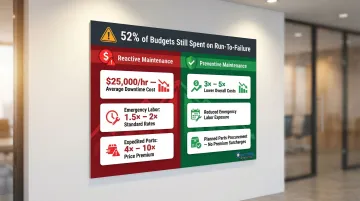
Shops that monitor equipment health in real time can address wear before it causes an unplanned stoppage, avoiding both the emergency repair premium and the secondary damage that often occurs when a component fails catastrophically.
Outdated CNC Programs Drive Scrap and Rework
Running non-current engineering files is a significant and often overlooked source of inefficiency. Program version mismatches — where offline edits aren't synced to the shop floor — account for 22% of scrap in CNC turning lines. Bad tool setups (incorrect Z-heights, wrong diameters, transposed offset numbers) can drain $50,000 to $250,000 per year from CNC shops.
When a machinist loads a program from a USB drive or retrieves an older file from a local folder, there's no guarantee it's the latest engineering-approved version. The result: parts machined to outdated specs, discovered only after inspection or—worse—after they've reached the customer.
Partial Automation Creates New Bottlenecks
Many shops automate isolated steps without linking the full chain. A fast CNC cell feeds into a manual inspection station. An automated material handling system waits for a manual data entry step. One slow or manual handoff undermines the speed gains everywhere else, creating a new constraint that limits overall throughput.
Identify the Highest-Impact Areas Before Expanding Automation
Apply the 80/20 Principle to Find the Real Constraints
In most industrial environments, roughly 20% of processes, machines, or handoffs are responsible for 80% of downtime, scrap, or throughput loss. The goal before adding more automation is to find that 20%. Root cause analyses show a few recurring issues dominate most facilities. In one study, just three failure modes—spindle overheating (35%), servo motor burnout (22%), and improper tool loading (14%)—accounted for over 70% of all downtime incidents.
Conduct a Simple Process Audit
Track where jobs wait, not just where they run:
- Measure changeover times—how long does it take to switch from one part to another?
- Count manual steps—where does a worker physically carry a file, enter a number twice, or verify a setting that a system could confirm automatically?
- Document handoffs—where does information move from one system to another manually?
- Identify error-prone tasks—where do mistakes happen repeatedly?
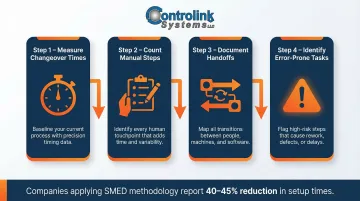
This audit reveals the friction points that automated systems could eliminate. For example, applying SMED (Single-Minute Exchange of Die) techniques has proven to cut CNC setup times by 40% to 45%, unlocking the equivalent capacity of an additional machine without new capital equipment.
Prioritize High-Volume, Repetitive, Error-Prone Tasks
Automation delivers the highest ROI when applied to tasks that are:
- Performed dozens or hundreds of times per day (repetitive by nature)
- Affecting a large percentage of total production output
- Prone to quality escapes when done manually
Low-volume, highly customized, or rapidly changing tasks are often better left to skilled operators who can adapt quickly. Spending capital on a step that isn't the actual constraint leaves the real bottleneck untouched.
Involve Both Engineering and Operators
IT and engineering teams understand the technical possibilities, but machine operators know exactly where the daily friction points are. Combine both perspectives in your audit — operators bring knowledge that no system report captures:
- Which handoffs consistently slow throughput
- Which steps require informal workarounds
- Where quality problems actually originate on the floor
Streamline CNC/DNC Communications and Program Management
What DNC Software Does
Distributed Numerical Control (DNC) software manages the transfer of CNC part programs between a central server or engineering system and individual machine tools on the shop floor. It eliminates manual USB transfers, floppy disks, and re-keying of programs — the DNC system delivers programs directly to the machine control over the network.
Efficiency Gains from Centralized DNC
Setup time reduction: Machinists no longer leave their machines to retrieve programs. In one documented case, combining DNC with an offline tool presetter reduced the setup time for a 50-tool job from 13.38 hours to 8.38 hours, with the investment achieving full payback in less than one year.
Cycle time improvement: Eliminating manual program retrieval and verification steps reduces the time between jobs. One aerospace shop reduced the completion time for a specific part from 44 hours to 18 hours.
Audit trail and version control: DNC software logs which file version ran on which machine at what time. This documented trail prevents the 22% scrap contribution caused by program version mismatches, ensuring only the current approved version is available at the control.
Always Deliver the Latest Engineering-Approved File
When programs are managed centrally, machinists can't accidentally run an outdated file stored on a local drive or USB stick. The DNC system delivers the latest engineering-approved version directly to the machine, eliminating the risk of machining parts to obsolete specs.
Two-Way Communication for Logging and Analysis
A well-implemented DNC system supports two-way communication — sending programs to machines and pulling updated files, offsets, or run data back to a central system. Shops can use this return flow to:
- Log actual machine activity against scheduled jobs
- Compare programmed vs. actual cycle times to identify inefficiencies
- Capture operator edits for review and potential incorporation into the master program
Controlink Systems: Shop-Floor-Focused DNC Software
Controlink Systems LLC has been developing shop-floor-focused DNC software solutions since 1998, built specifically for CNC machining environments. Their HMI interfaces are designed to minimize training time, so shops can move from manual program management to a reliable networked system without disrupting production.
Use Real-Time Process Monitoring to Drive Smarter Decisions
Real-Time vs. After-the-Fact Data Collection
Real-time monitoring means collecting data from machines, sensors, or controllers as production runs—not reviewing reports hours or days later. This visibility enables operators and managers to catch deviations before they become defects or downtime events. Real-time CNC machine monitoring reduces unplanned downtime by 15–27% on average.
Manual, after-the-fact data collection introduces inconsistencies and delays alerts, forcing leaders to react to costly errors after they've already occurred. By the time a supervisor reviews a shift report, dozens or hundreds of parts may have been affected.
Catch Out-of-Tolerance Conditions Before They Escalate
High-speed process monitoring systems flag out-of-tolerance conditions, trigger alerts, and log data for trend analysis. For example:
- Tool wear monitoring: Acoustic emission and spindle-load current monitoring detect when a cutting tool reaches its wear threshold, preventing the transition into rapid wear that produces scrap or damages the workpiece
- Temperature monitoring: Elevated temperatures indicate excessive friction or improper coolant flow, allowing intervention before tool failure
- Vibration analysis: Abnormal vibration patterns signal bearing wear, imbalance, or loose fixturing

Without real-time monitoring, tool wear escalates rapidly into catastrophic failure. In ISO 3685 tool-life testing, an uncoated carbide tool reached its end-of-life criterion after just three passes at a cutting speed of 200 m/min.
Predictive Maintenance Reduces Downtime and Costs
The data gathered through process monitoring drives predictive maintenance strategies, addressing equipment wear before it causes unplanned downtime:
- Unplanned downtime reduced by 30–50%
- Maintenance costs reduced by 18–25%
- Equipment lifespan extended by 20–40%
- Unexpected breakdowns decreased by 70–75%
Predictive maintenance transforms maintenance from a reactive cost center into a strategic advantage, with proactive repairs costing 4 to 5 times less than emergency repairs on the same asset.
Foundation for Continuous Improvement
Those cost savings only tell part of the story. When shops can see exactly where cycle times spike, where quality escapes occur, or which machines underperform, they can make targeted changes rather than guessing.
Process monitoring data creates a feedback loop for continuous improvement — pinpointing the root causes of variability, validating whether changes actually worked, and setting measurable baselines for the next round of optimization.
Integrate Your Systems So They Work as One
What System Integration Means on the Shop Floor
System integration connects PLCs, machine tools, SQL databases, HMIs, and other controllers so data flows automatically rather than being manually transcribed between systems.
When a machine's output data feeds directly into a database, it updates dashboards and triggers downstream processes in real time. Supervisors get accurate information without walking the floor to collect it—and errors from manual re-entry disappear.
The Problem of Data Silos
Manufacturing environments are built on mixed equipment from different eras and vendors. 81% of IT leaders report that data silos from legacy, mixed-vintage equipment hinder digital transformation. When systems are siloed, manufacturers lack real-time visibility, causing delayed delivery times and an inability to take quick action on disruptions.
Many unconnected CNC machines on plant floors are older legacy equipment that require multiple communication interfaces to enable connectivity. Integration eliminates these silos—and the right protocol support is what makes that connection possible across mixed equipment.
Supporting Multiple Communication Protocols
Supporting a range of communication protocols is critical for integration in environments with mixed equipment:
| Protocol | Application |
|---|---|
| Modbus | Widely used serial protocol for connecting legacy machines and SCADA systems |
| EtherCAT | Extreme performance for highly synchronized motion control and CNC applications (updates 1,000 I/Os in 30 µs) |
| Profinet | Leading Industrial Ethernet standard with parallel TCP/IP communication and integrated safety data |
| OPC UA | Flexible machine-to-machine communication protocol for exposing customized information across the enterprise |
| Serial (RS-232) | Common on older CNC controls and legacy equipment |
Working with a partner experienced in multi-protocol environments avoids costly compatibility problems. Controlink Systems routinely interfaces with SQL databases, PLC hardware, and single/multi-axis motion controllers, supporting protocols including CAN, Modbus, Serial, Profinet, and EtherCAT.
Practical Benefits of Integration
- When a CNC completes a part, the system logs cycle time, updates inventory, and triggers the next job—no manual entry required
- Supervisors see current machine status, utilization, and quality metrics on a single screen, updated continuously
- Eliminating manual transcription removes the 1-4% error rate inherent in human data entry
- When a machine stops or a process drifts out of tolerance, the right person gets an alert immediately—not hours later
Measure What Matters and Iterate Continuously
Core KPIs That Reflect Automation Efficiency
You can't improve what you don't measure. Track at least a few of these KPIs consistently:
- Overall Equipment Effectiveness (OEE): Availability × Performance × Quality (ISO 22400). The "85% world-class" benchmark applies to continuous automotive lines — realistic targets for high-mix CNC shops run 40–58% depending on machine type.
- Mean Time Between Failures (MTBF): Total run time divided by number of failures. Industry benchmark for CNC machines: 1,200–2,500 hours.
- Scrap and Rework Rate: Acceptable threshold is under 5%; world-class shops hold scrap-to-sales ratios below 1.5%.
- Setup and Changeover Time: Time to switch between parts. SMED techniques reduce this by 40–57% in metalworking environments.
- Machine Utilization: Run Hours ÷ Available Hours. Most manufacturers land between 23.9%–28% — well below the 75%–85% target for precision CNC machining.
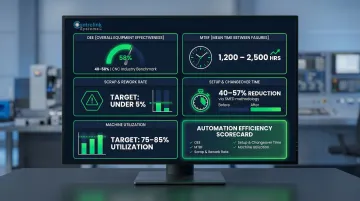
The Performance Gap: Tracking vs. Not Tracking
Manufacturers that systematically track KPIs significantly outperform their peers. The top 20% achieve 88% OEE and 95% On-Time Delivery — and are far more likely to standardize those metrics across locations.
The numbers get sharper at the top: the top 11% of manufacturers averaged OEE of 80 or higher and saw 14% annual financial improvements, compared to just 8.6% for shops with lower tracking maturity.
Treat Automation as an Evolving System
Automation efficiency is an ongoing process — not a one-time project. As parts, volumes, and equipment change, the setup needs to change with them. Continuous improvement requires:
- Regular audits to identify new bottlenecks as production mix changes
- Data review to validate that improvements are delivering expected results
- Operator feedback to catch issues that metrics alone might miss
- Incremental changes rather than wholesale replacements, allowing adjustments with minimal disruption
Frequently Asked Questions
How can industrial automation increase efficiency?
Industrial automation increases efficiency by replacing manual, repetitive, and error-prone tasks with consistent, faster machine-driven processes. This reduces downtime, cuts scrap, and frees skilled workers to focus on higher-value work such as problem-solving, quality improvement, and process optimization.
How does the 80/20 rule apply to industrial automation?
In most shops, roughly 20% of processes cause 80% of inefficiency—whether downtime, scrap, or throughput loss. Applying the 80/20 rule means auditing operations to identify that small set of high-impact bottlenecks first. That focus ensures capital goes to the constraints that matter most.
What are the key principles (pillars) of industrial automation?
Four core pillars underpin effective industrial automation:
- Sensing and data collection — real-time information gathered from machines and processes
- Control systems — PLCs, HMIs, and software that execute logic and commands
- Communication networks — reliable connections linking machines and systems
- Feedback loops — continuous monitoring that enables real-time adjustment and improvement
What is the first step to improving efficiency in an existing automation setup?
Start with an audit of where time, quality, and throughput are being lost—especially at manual handoffs and communication gaps between systems. Track where jobs wait, measure changeover times, and document manual steps before investing in new equipment or software.
How does CNC/DNC software improve shop floor efficiency?
DNC software addresses several common sources of shop floor waste:
- Eliminates manual program transfers and the walks across the shop they require
- Ensures machinists always run the latest engineering-approved file, reducing version-mismatch scrap
- Cuts setup time and creates an auditable record of which programs ran on which machines
The result: less unplanned downtime and more time actually running parts.