Introduction
Manufacturing and business operations are filled with predictable, rule-based tasks—data entry, report generation, CNC program transfers, quality checks—that silently consume operator time and invite human error. Research shows that over 40% of workers spend at least a quarter of their workweek on manual, repetitive tasks, while manual data entry carries an inherent error rate of 1% to 4% per field. At scale, those error rates compound fast enough to make mistakes statistically inevitable.
The problem isn't deciding whether to automate — it's knowing where to start. Results vary dramatically depending on which processes you target, what tools you choose, and how you approach implementation. Automating a broken process simply scales the inefficiency faster. Choosing feature-rich software that can't interface with your legacy equipment leads to expensive rework — not savings.
This guide covers a practical, process-first framework for automating repetitive business tasks — what to prepare, what separates successful implementations from costly ones, and the common mistakes that derail both.
Key Takeaways
- Automation works best on high-volume, rule-based tasks with predictable inputs and measurable outcomes
- Map and score your processes before selecting any tool—prioritize the 20% of tasks causing 80% of wasted time
- General RPA tools suit office workflows—manufacturing environments require purpose-built shop-floor automation built for industrial protocols like Modbus, EtherCAT, and serial communication
- Projects with excellent change management are 7x more likely to meet objectives—operator buy-in is critical
- Continuous monitoring after deployment locks in efficiency gains and catches performance drift before it erodes results
How to Automate Repetitive Business Processes: Step-by-Step
Step 1: Identify and Document Repetitive Processes
Start by listing all manual, recurring tasks across departments: data entry, approvals, scheduling, reporting, file transfers, quality logging. Document each process's inputs, outputs, rules, and frequency. Flag tasks where employees spend significant time on execution rather than judgment; these are primary automation candidates.
Assess current error rates and time-cost per task to create a baseline for measuring automation ROI later. For example, if manual data entry takes 15 minutes per transaction with a 3% error rate, you now have concrete numbers to compare against post-automation performance.
Step 2: Evaluate and Prioritize by Impact and Complexity
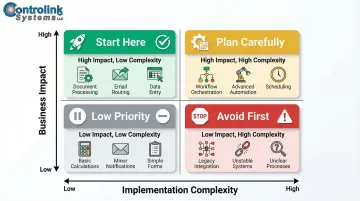
Score each candidate process on two axes: business impact (time saved, error reduction, cost) and implementation complexity (number of exceptions, system integrations required, data variability). Apply the 80/20 principle and prioritize the 20% of processes that account for 80% of wasted time or errors.
Prioritization criteria:
- High-volume, high-frequency tasks
- Processes with measurable cost impact
- Tasks with documented quality issues
- Activities that block downstream work
Avoid starting with complex, exception-heavy processes. Choose a high-frequency, low-exception task for your first automation to build confidence and demonstrate ROI quickly. Targeted automation deployments frequently show payback periods under six months and ROIs exceeding 200%.
Step 3: Select the Right Automation Technology
Match tool type to process type. RPA tools work well for structured, screen-based office tasks; workflow automation platforms suit multi-step approval chains. Manufacturing environments with CNC machines, PLCs, or test equipment require purpose-built shop-floor automation software that can interface with industrial protocols such as Modbus, Profinet, EtherCAT, Serial.
Controlink Systems LLC's shop-floor and DNC automation software addresses this directly, with native support for these industrial protocols and direct connectivity to machine controllers without middleware layers.
Technology selection checklist:
- Confirm integration with your existing systems (ERP, MES, SQL databases, machine controllers)
- Verify support for your industrial communication protocols
- Evaluate vendor support quality and response times
- Review licensing model: per-user pricing can become unviable at scale
- Check scalability as you add machines or users
Organizations with outdated technology infrastructures face 40–60% higher integration costs due to custom API development and middleware requirements. Choose platforms with robust native connectivity to avoid this penalty.
Step 4: Build, Test, and Deploy With Stakeholder Alignment
Involve the operators who perform the task daily. They will identify edge cases that documentation misses, and their buy-in is critical to adoption.
Run the automated process in parallel with the manual process during a pilot phase. Compare outputs for accuracy before fully cutting over.
Define what successful deployment looks like using the baseline metrics from Step 1. Establish a go/no-go threshold before full rollout. For instance, require that "automation must match manual accuracy within 2% and reduce processing time by at least 50%.
Pilot phase best practices:
- Run parallel operations for 2-4 weeks minimum
- Document every exception and failure
- Gather operator feedback daily
- Measure performance against baseline metrics
- Adjust automation rules based on real-world behavior
Step 5: Monitor, Measure, and Continuously Optimize
Set up performance dashboards or logging to track automation throughput, error rates, and exception frequency post-deployment. Review performance on a scheduled cadence (monthly or quarterly). Processes evolve, and automated workflows require updates when inputs, rules, or downstream systems change.
Treat automation as an ongoing program. Document improvements, share results with stakeholders, and keep a prioritized list of the next processes to tackle.
Metrics to track post-deployment:
- Throughput volume vs. pre-automation baseline
- Error and exception rates over time
- Processing time per transaction
- Operator hours reallocated to higher-value work
Shops that review and refine their automations quarterly consistently outperform those that deploy once and move on.
Which Business Processes Are Best Suited for Automation?
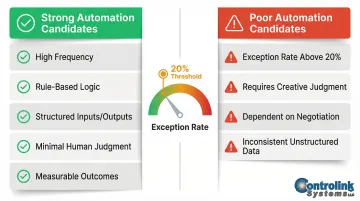
Not every process is a good automation candidate. The best candidates share a common profile: high frequency, rule-based logic, structured inputs and outputs, minimal need for human judgment, and measurable outcomes.
Strong automation candidates across business functions:
- Data entry and reporting
- Invoice processing and approvals
- Employee onboarding document workflows
- Production scheduling notifications
- CNC program distribution to machines
- End-of-line test data logging
- Customer follow-up communications
- Statistical Process Control (SPC) data collection
When automation becomes inefficient or risky:
- Processes with high exception rates (>20% of cases require human intervention)
- Tasks requiring creative or contextual judgment
- Workflows dependent on frequent human negotiation
- Situations where data inputs are too inconsistent or unstructured for reliable rule-based processing
Exception rate is the deciding factor between these two categories. It measures how often a process deviates from its predictable path — and when that rate climbs above 20%, automation tends to create more work than it eliminates. A rate below 20% signals a mature, standardized process that's ready to automate.
What You Need Before Automating Your Business Processes
Most automation projects don't fail during deployment — they fail weeks earlier, when teams skip the readiness work. Two areas need attention before any tool gets configured: your technical infrastructure and your process documentation.
System and Integration Requirements
Confirm that your existing software systems, machines, or equipment expose accessible data connections—APIs, database access, file outputs, or communication ports. Automation tools can only work with data they can reliably reach.
In manufacturing environments specifically, the gap between Information Technology (IT) and Operational Technology (OT) is often the biggest obstacle. OT systems run on industrial protocols like Modbus, PROFINET, and OPC UA, while modern IT relies on HTTP/REST and JSON. Bridging that divide — what engineers call the "Last Mile" integration gap — requires deliberate planning before any automation layer gets built on top.
Pre-deployment technical checklist:
- Document all systems that need to connect
- Verify API availability or database access permissions
- Identify industrial protocols in use (for manufacturing)
- Confirm network connectivity between systems
- Test data format compatibility
Technical connectivity alone isn't enough — the process itself needs to be ready too.
Process Documentation and Stakeholder Readiness
Ensure the process to be automated is fully documented with clear rules, exception handling defined, and relevant team members briefed on what will change. Surprises discovered after go-live are significantly more expensive to fix than gaps caught during planning.
Build out process maps that cover:
- Every step and decision point in the workflow
- Who performs each step today and what authority they hold
- What data inputs each step requires
- What outputs the step produces and where they go
- Known exceptions and how they're currently handled
That documentation becomes the direct blueprint for your automation configuration.
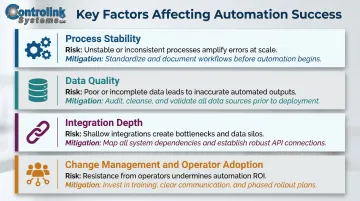
Key Factors That Affect Automation Success
Two teams with identical automation tools can get drastically different results based on how they handle process design, data quality, system integration, and team adoption.
Process Stability
Automating an unstable or frequently changing process locks in inefficiencies rather than eliminating them. The process should be mature and standardized before any automation is layered on top.
When you skip this step, the result is frequent failures, heavy exception-handling overhead, and operators who stop trusting the system. Fix the process first, then automate it.
Data Quality and Consistency
Automation operates on rules applied to data. If input data is inconsistent, incomplete, or formatted irregularly, the automation will either fail silently or produce inaccurate outputs — often without any obvious warning.
The cost compounds fast. Poor data quality costs organizations at least $12.9 million annually on average, and in automated workflows, those inaccuracies don't stay contained — they propagate across every downstream system they touch, causing defective outputs and wasted machine cycles.
Integration Depth
Automation that touches only one system while requiring manual handoffs everywhere else doesn't eliminate bottlenecks — it moves them. Deep integration across connected systems is what multiplies the impact.
Consider a common shop-floor example: automating CNC program distribution without connecting to your ERP means operators still manually update production records after every job. You've saved one step and created a new gap. Connecting machine controllers, MES, and ERP in sequence is where the real efficiency gains appear.
Change Management and Operator Adoption
Automation changes how people work, and that's where most implementations quietly fall apart. Without adequate training, communication, and visible leadership support, teams work around automated systems or revert to what they know.
Research shows 70% of transformations fail — and 70% of those failures trace back to culture, not technology. In manufacturing, this typically shows up as operator resistance: workers who distrust "black box" recommendations or worry automation threatens their role. Address those concerns directly and early, or the technical implementation won't matter.
Common Mistakes When Automating Business Processes (and How to Avoid Them)
Most automation failures aren't caused by the technology — they're caused by how it's implemented. These three mistakes account for the majority of costly rollbacks.
Automating a Broken Process
Automation amplifies whatever already exists in a workflow. If the underlying process is flawed, you'll produce wrong outputs faster and at scale. As Bill Gates observed, "automation applied to an inefficient operation will magnify the inefficiency." Fix the process first, then automate it.
Choosing Tools by Features Instead of Fit
The most feature-rich platform isn't the right choice if it doesn't integrate with your actual systems — especially industrial equipment, legacy controllers, or shop-floor hardware. Evaluate tools against your specific environment and communication requirements before committing.
Skipping the Pilot Phase and Monitoring Setup
Deploying automation without a parallel-run validation period and ongoing performance logging leaves you without a safety net. Errors that would have been caught early compound undetected until they become costly problems. Always run a pilot deployment and establish monitoring before full rollout.
Frequently Asked Questions
What enables businesses to automate repetitive tasks and improve operational efficiency?
The right technology (RPA, workflow automation, or specialized industrial software), well-documented processes, and system integration capabilities all play a role. The foundational requirement is identifying rule-based, high-frequency tasks with predictable inputs.
How can automation improve efficiency?
Automation improves efficiency by eliminating manual handling time, reducing human error, and enabling around-the-clock process execution without fatigue. It frees employees to focus on judgment-intensive and value-added work rather than repetitive data entry or file transfers.
What is repetitive process automation?
Repetitive process automation is the use of software or hardware tools to execute recurring, rule-based tasks—such as data entry, file transfers, report generation, or machine program distribution—automatically and without manual intervention.
What is the 80/20 rule for automation?
The 80/20 rule in automation means identifying the 20% of repetitive tasks that account for 80% of wasted time or errors, then prioritizing those first. Targeting that high-impact subset maximizes early ROI before you expand the automation program.
What are the 5 D's of automation?
The 5 D's of automation are Dull, Dirty, Dangerous, Dear (costly), and Delicate. This framework serves as a practical filter for identifying strong automation candidates — tasks that are poor uses of skilled human attention or carry high risk of error or injury.