Introduction
Most manufacturers operate in two disconnected worlds. Planners work from ERP dashboards, managing work orders, inventory, and delivery commitments. Meanwhile, machinists on the shop floor rely on paper travelers, verbal instructions, or CNC programs pulled from USB drives or shared network folders.
That gap creates real costs: production data arrives hours late, scrap accumulates from outdated program revisions, and managers have no real-time visibility into what's actually running at the machines.
More than 90% of manufacturers report their systems remain partially connected, siloed, or heavily dependent on spreadsheets — and 63% admit their ERP schedule doesn't update when production changes occur. This isn't a failure of either system — ERP and shop floor automation were built for fundamentally different purposes. The opportunity lies in connecting them so information flows automatically in both directions.
This guide breaks down what that connection looks like in practice — the components involved, how the data flows, and what to plan for before you start.
Key Takeaways
- ERP manages planning and business data but can't see machine-level activity without integration
- Shop floor automation generates real-time production data that ERP needs for accurate decisions
- Bridging eliminates manual entry, reduces scrap, and provides live production visibility
- Middleware, industrial protocols (Modbus, EtherCAT, Profinet), and DNC software are the primary tools for connecting both systems
- Map your data flows, audit existing hardware, and train operators before go-live to avoid costly integration gaps
Why ERP Alone Can't Run Your Shop Floor
ERP systems excel at managing business-level information—work orders, schedules, inventory, costing, and customer commitments. But they have no native mechanism to communicate directly with CNC controllers, PLCs, or other shop floor devices. Production data—cycle times, part counts, machine status, quality results—stays isolated on the floor unless a deliberate integration layer exists.
Operating in Silos: The Daily Reality
Here's what disconnected systems look like in practice:
- A scheduler updates a work order in ERP, but the machinist doesn't see it until someone walks the floor or prints a new traveler
- A part gets scrapped because an operator loaded an older CNC program from a USB drive instead of the latest engineering-approved revision
- Production actuals are entered manually hours after the shift ends—introducing delays and errors into inventory and costing data
- Managers discover bottlenecks or quality issues only when it's too late to respond effectively
Seventy percent of manufacturers still collect data manually, creating an "Information Gap" with 24 to 48-hour data latency. Critical production issues occur on the floor while management remains unaware because the data sits trapped on clipboards.
The Compounding Cost of Manual Entry
Manual data entry carries a biological error floor of approximately 1% under ideal conditions—one mistake per 100 data points. In multi-step manufacturing processes with 20+ fields per record, this compounds to 33-40% of records containing at least one error. These cascading errors corrupt inventory accuracy, financial reporting, and delivery forecasts.
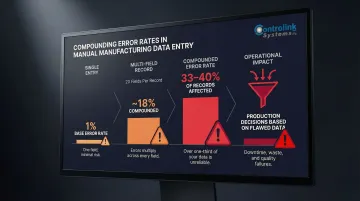
ERP and shop floor automation were built for different purposes — that's not a flaw, it's just history. The opportunity is in connecting them: work orders flow down to the floor automatically, and production data flows back up to ERP in real time.
The Real Benefits of Bridging ERP and Shop Floor Automation
Elimination of Duplicate and Manual Data Entry
When shop floor systems feed data directly into ERP, operators stop transcribing part counts, labor hours, and machine status by hand. This removes a primary source of human error and frees operators to focus on machining rather than paperwork.
Operators and supervisors spend more than 9 hours per week manually transferring data into digital systems. By automating these manual interventions, shops recover 30-60 minutes per operator per shift—time that can be redirected to productive work.
Real-Time Production Visibility
Managers and supervisors can see live job status, machine utilization, and output rates from ERP dashboards rather than waiting for end-of-shift reports. This enables faster responses to bottlenecks, unplanned downtime, or quality escapes before they compound.
Case studies show that implementing real-time OEE monitoring yields a 10% increase in equipment availability and an 8-point increase in overall OEE. When operators see live performance data, they address micro-stops immediately instead of discovering problems hours later.
Scrap and Rework Reduction Through Controlled Program Delivery
When ERP-approved CNC programs are delivered directly to the machine via DNC (Distributed Numerical Control) software, rather than manually loaded from USB drives or shared folders, machinists always run the latest engineering-approved file. This directly reduces scrap caused by revision-level errors, a cost driver that often goes unmeasured in precision machining.
Unmonitored tool wear and incorrect setups contribute to 25-30% of CNC machining defects, and that figure climbs when operators load the wrong G-code revision. Controlled program delivery through DNC integration removes that variable entirely.
Tighter Inventory and Material Planning
When actual production consumption data flows back into ERP automatically, inventory records stay accurate in real time. This improves MRP (Material Requirements Planning) accuracy, reduces emergency material orders, and prevents both stockouts and excess WIP (Work in Process) on the floor.
One manufacturer reduced inventory variance by 86%—dropping from a 15% loss to a maximum 2% variance—after implementing real-time production visibility.
Improved Scheduling and On-Time Delivery
Real-time job progress data allows ERP to update completion forecasts dynamically. Schedulers can resequence jobs proactively when delays occur, rather than discovering missed commitments after the fact. The downstream effect shows up where it matters most: customer-facing delivery performance.
What Gets Connected: Key Components of Shop Floor-ERP Integration
CNC Machines and DNC Software
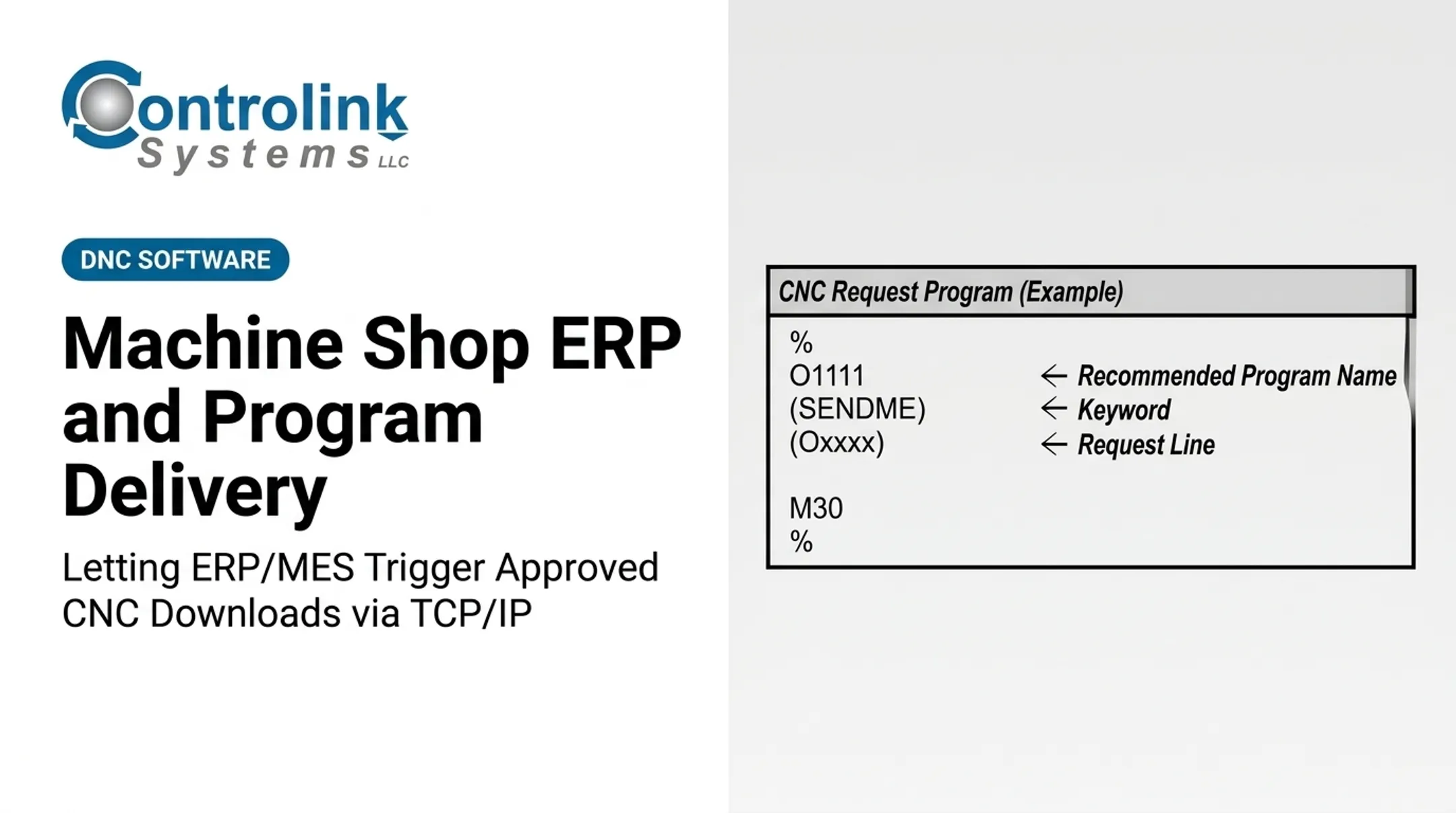
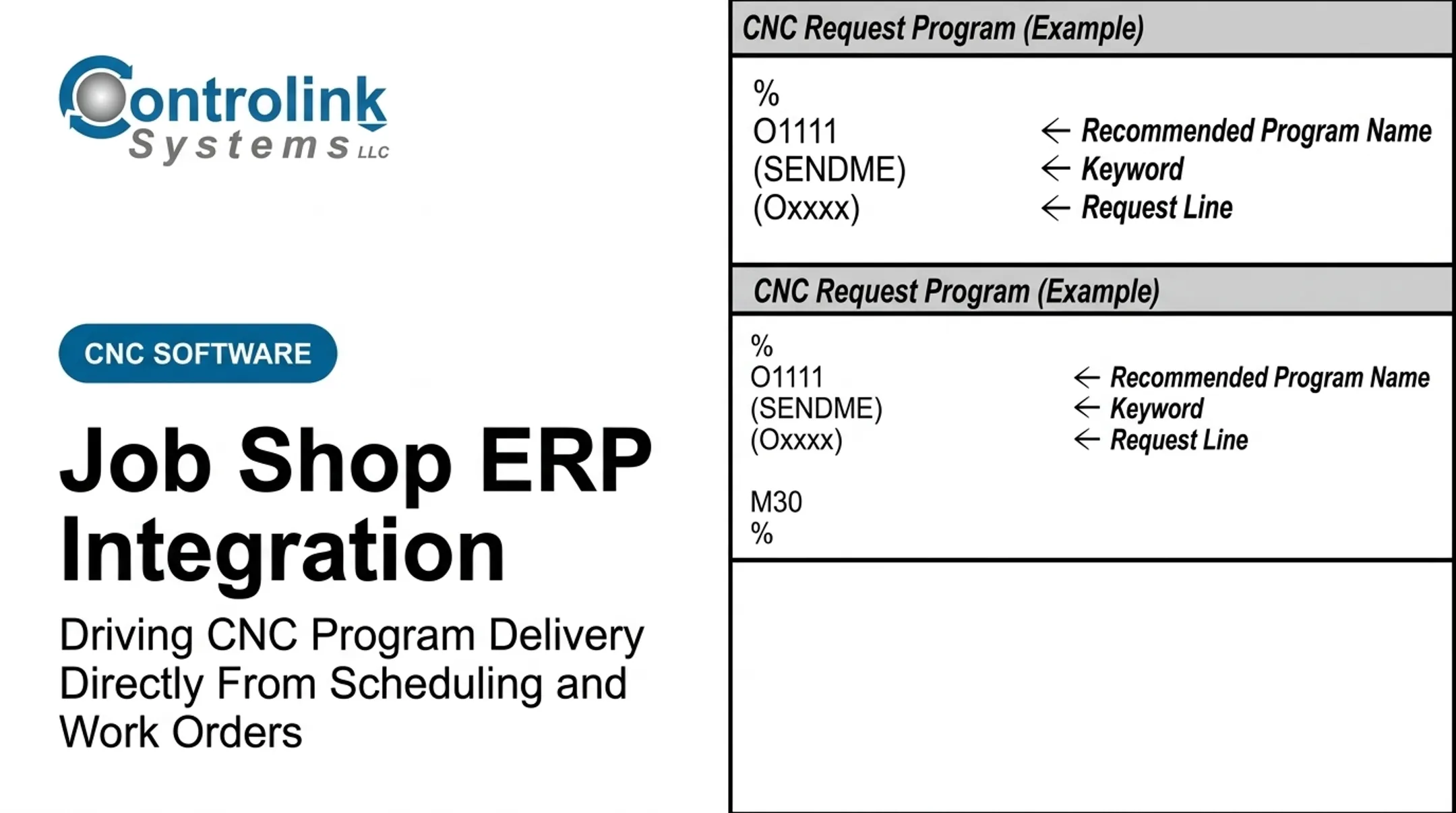
CNC controllers are the workhorses of most machine shops, but they're isolated by default—each machine holds its own programs locally. DNC software acts as the communication layer between ERP and individual CNC controllers, enabling centralized program storage and delivery.
- Stores all CNC programs in a central, version-controlled repository
- Delivers the correct program to the correct machine automatically when a work order is released
- Logs every program transfer for traceability and quality control
- Eliminates the risk of operators loading outdated or incorrect program revisions
Controlink Systems LLC has been developing CNC/DNC communication software since 1998, with solutions built specifically for everyday machine shops. Their software interfaces with SQL databases and PLC hardware, and supports protocols including Modbus, Serial, Profinet, and EtherCAT—giving shops flexibility regardless of their existing equipment.
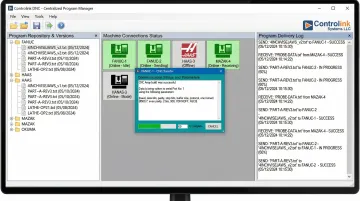
DNC integration is typically the first connection point shops establish. Once programs are flowing reliably, the next layer involves the machines themselves reporting back.
PLCs and Machine-Level Automation
PLCs (Programmable Logic Controllers) control discrete machine functions—part detection, material feeding, clamping, cycle completion signals. They're a primary source of real-time production event data.
ERP integration captures the following directly from PLCs:
- Cycle start and completion signals
- Part count increments
- Fault codes and error conditions
- Machine state changes (idle, running, alarm)
This data populates job tracking records in ERP automatically, eliminating manual operator entry and providing real-time production status. With PLC data feeding ERP, the system now needs something to sit between them—organizing that stream of signals into meaningful production context.
MES as Integration Middleware
An MES (Manufacturing Execution System) sits between ERP (business layer) and the shop floor (machine layer), collecting and organizing and interpreting production data and routing instructions. It answers "how is production actually happening right now?" while ERP answers "what needs to be produced and when?"
Important note: Not every shop needs a full MES. In simpler environments, direct DNC software and database connectors can serve a similar bridging function at lower cost and complexity. While 54% of small- and medium-sized plants still use pen, paper, and spreadsheets, many are adopting modular point solutions (DNC + machine monitoring) that deliver measurable results in weeks rather than months.
HMI Terminals
Shop floor operators interact with the integrated system through HMI (Human-Machine Interface) displays—touchscreens or workstation terminals at each work center. Well-designed HMIs surface only the information an operator needs: current job, program to run, quality checkpoints—without requiring ERP login or navigation.
User-friendly HMI design is critical to operator adoption and directly reduces training costs. In one documented case, implementing a centralized, high-performance HMI system reduced operator intervention time from 1 hour per machine per shift down to just 7 minutes.
SQL Databases and Data Infrastructure
The backbone of ERP-shop floor integration is often a structured SQL database that both systems can read from and write to. This shared data layer allows job data, program revision history, quality records, and production actuals to be stored centrally and accessed by ERP, DNC software, MES, and reporting tools simultaneously.
How ERP-to-Shop-Floor Integration Actually Works
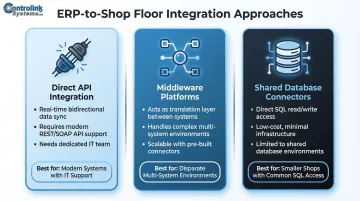
Integration Approaches: Three Common Methods
1. Direct API Integration
Shop floor software exchanges data with ERP via documented interfaces. Works best when both systems have modern APIs and your IT team can maintain the connection long-term.
2. Middleware Platforms
MES or integration brokers translate between systems, handling protocol conversion and data transformation. The added layer pays off when connecting several disparate systems that don't share a common protocol.
3. Shared Database Connectors
Both systems read and write to a common SQL data store. Often the simplest path for smaller shops — provided both ERP and shop floor software can access the same SQL database.
The right approach depends on your ERP capabilities, machine types, and existing infrastructure. For shops with mixed equipment — older legacy machines alongside modern CNCs — this decision matters more than most realize. Controlink Systems LLC interfaces with SQL databases and PLC hardware across a range of protocols including Modbus, Serial, Profinet, and EtherCAT, giving shops flexibility regardless of what's already on the floor.
Communication Protocols That Carry the Data
Moving data between shop floor equipment and software requires a shared language. Mismatched protocols are one of the most common reasons integration projects stall — identifying them early prevents costly rework.
Common protocols in manufacturing:
| Protocol | Characteristics | Typical Use |
|---|---|---|
| Modbus (RTU/TCP) | Simple master/slave architecture; widely supported | Legacy and modern PLCs; reading simple register data |
| PROFINET | Leading Industrial Ethernet standard; real-time communication | Modern CNCs, PLCs, high-speed diagnostics |
| EtherCAT | Processes Ethernet frames "on the fly"; highly deterministic | High-performance motion control, robotics, modern CNCs |
| RS-232 / Serial | Point-to-point, low speed, short cable length | Legacy CNC program transfer and basic monitoring |
While modern protocols like PROFINET and EtherCAT offer superior speed and real-time control, legacy RS-232 serial connections remain ubiquitous on older CNC machines. Shops must often use serial device servers or edge gateways to bridge the gap, converting serial data into network-readable formats.
Data Flow: Bidirectional vs. One-Way
The most valuable integrations are bidirectional:
Downward flow (ERP → Shop Floor):
- Work orders and job schedules
- Approved CNC programs
- Material specifications and routing instructions
- Quality checkpoints and inspection requirements
Upward flow (Shop Floor → ERP):
- Production actuals and part counts
- Cycle times and machine status
- Quality inspection results
- Material consumption and WIP updates
Simpler one-way setups where only basic completion data flows back offer some value but miss opportunities for dynamic scheduling, real-time inventory accuracy, and proactive bottleneck management.
Real-World Example: End-to-End Data Flow
Here's how a complete integration works in practice:
- Work order created in ERP → Triggers DNC system to stage the correct CNC program at the designated machine
- Operator confirms job start via HMI → System logs start time and operator ID
- PLC cycle completion signals → Auto-populate part count in ERP as each piece completes
- Quality inspection results logged at machine → Linked directly to the work order in ERP
- ERP updates WIP inventory and job cost in real time → Managers see live status without waiting for end-of-shift reports
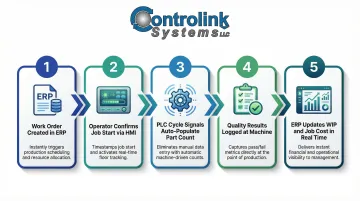
Every manual handoff in that chain — the paper traveler, the end-of-shift data entry, the phone call to check job status — disappears. What's left is a live view of the floor, updated by the machines themselves.
What to Plan For Before You Start
Map Your Data Flows and Integration Points First
Successful integration projects begin with thorough documentation—identifying each production recording point, what data is needed, which system owns it, and how it needs to move.
Do not select software or hardware before this mapping is complete. Integration scope directly determines cost, timeline, and complexity. Document:
- What production events need to be captured (job start, cycle complete, quality checks)
- Where that data originates (PLC signals, operator input, machine controller)
- What system needs to consume it (ERP, MES, reporting tools)
- How frequently data needs to update (real-time vs. batch)
Evaluate Existing Hardware and Network Infrastructure
Many shops discover connectivity gaps during this phase:
- Older CNC controllers that only support RS-232 serial communication
- Missing shop floor network drops or inadequate WiFi coverage
- PLC firmware versions that limit communication options
- Lack of edge devices to convert legacy protocols to modern Ethernet
A hardware and connectivity audit is a required first step. Cost-effective upgrade paths often exist before wholesale equipment replacement is needed—such as serial-to-Ethernet converters, edge gateways, or firmware updates.
Once your infrastructure is mapped and gaps are addressed, the next challenge is human: getting operators to actually use the system as intended.
Plan for Operator Training and Change Management
Operators need to understand:
- How the integrated system changes their daily workflow
- What they're responsible for entering (vs. what is automatic)
- Why the change matters and how it benefits them
- How to troubleshoot basic issues or escalate problems
Interface design is a major factor in adoption. ERP integrations frequently stall on the factory floor because systems feel too slow or rigid for real-time production, pushing operators back to paper logs and workarounds.
HMI screens built specifically for the shop floor—touchscreens, barcode scanners, clear visual cues—reduce training time and make the integrated system faster than the manual process it replaces.
Frequently Asked Questions
What is an example of ERP integration?
A CNC machine shop where ERP automatically sends approved part programs to machines via DNC software, and production completion data flows back to update work orders and inventory in real time—eliminating manual data entry at both ends and ensuring machinists always run the correct program revision.
What are the stages of ERP implementation?
ERP implementation typically spans six phases: discovery and planning (defining scope and goals), design (documenting workflows), development/configuration (setting up the system), testing (validating functionality), deployment/go-live (migrating data and launching), and ongoing support and continuous improvement.
What is the difference between ERP and MES in manufacturing?
ERP handles business-level functions like scheduling, inventory, costing, and customer orders: it answers "what needs to be produced and when." MES manages real-time shop floor execution—machine-level job tracking, quality recording, and operator guidance—answering "how is production actually happening right now."
What communication protocols connect shop floor machines to ERP?
The most common protocols are Modbus (PLCs and legacy equipment), PROFINET and EtherCAT (real-time Industrial Ethernet), and Serial/RS-232 (legacy CNC controllers). The right choice depends on the machine controllers and PLC hardware already installed at your facility.
How does DNC software help bridge CNC machines and ERP systems?
DNC software manages centralized storage and delivery of CNC part programs, ensuring machines always receive the correct, engineering-approved version. It can be integrated with ERP so program delivery is triggered automatically by work order release—eliminating manual program loading, reducing scrap from revision errors, and providing traceability for quality control.