Introduction
Most manufacturing facilities run more disconnected systems than they realize — CNCs, PLCs, SCADA, MES, and data acquisition hardware that rarely talk to each other. Industrial control system (ICS) integration changes that, connecting those systems so machines, controllers, and software share real-time production data. When done right, it directly impacts shop productivity, uptime, and quality — McKinsey reports an 11% increase in Overall Equipment Effectiveness (OEE) and a 25% reduction in unplanned downtime for critical assets.
In practice, outcomes vary dramatically. Protocol compatibility, system architecture, legacy hardware, and execution sequence all determine whether a project delivers measurable value or gets abandoned mid-deployment.
A Rockwell Automation survey found that while 56% of manufacturers are piloting smart manufacturing initiatives, only 20% have scaled them successfully — largely due to siloed systems and inadequate planning.
This guide covers what's required before starting, a step-by-step process, the variables that most affect results, and the mistakes that derail even well-planned projects.
Key Takeaways
- ICS integration connects PLCs, HMIs, SCADA systems, CNC machines, sensors, and business systems for real-time data sharing
- Upfront system auditing, protocol selection, and pre-go-live testing are the three steps that most determine whether integration succeeds or stalls
- Legacy compatibility and cybersecurity are where most ICS integration projects break down
- How well you document your systems upfront directly determines how long the project takes — and how stable it runs afterward
- A well-executed integration reduces downtime, cuts scrap, and gives engineers real-time visibility across the entire shop floor
Before You Begin: Prerequisites and Integration Readiness
Skipping a readiness assessment is the single most common reason ICS integration projects stall or fail mid-execution. Preparation directly determines outcomes—LNS Research identifies organizational misalignment and failure to execute IT-OT convergence as root causes for "Pilot Purgatory" and stalled Factory of the Future initiatives.
System and Hardware Inventory
A full systems audit involves cataloging every device: PLCs, HMIs, CNCs, sensors, and actuators. Record firmware and software versions, document which systems currently communicate with each other, and identify siloed devices.
This step surfaces legacy hardware that may lack modern communication ports or protocol support. Finding that a legacy device lacks the required communication port at Step 3 instead of Step 1 multiplies downtime and rework costs significantly. According to TXOne Networks, 50% of European OT environments still rely on legacy systems, with 20% reporting that more than 75% of their infrastructure is legacy-dependent.
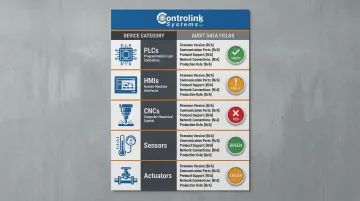
Key inventory items:
- Device type and manufacturer
- Firmware/software version
- Current communication capability
- Physical communication ports available
- Existing network connections
- Role in production process
Skills, Tools, and Compliance Readiness
Integration requires hands-on familiarity with the protocols in play, plus access to configuration software for each device type. An experienced integration partner — such as Controlink Systems, which routinely works across SQL databases, PLC hardware, motion controllers, and protocols including CAN, UDS, Modbus, Serial, Profinet, and EtherCAT — can close skills gaps quickly when internal expertise runs thin.
Before the project starts, address three readiness questions:
- Compliance documentation: For regulated industries like medical devices or aerospace, identify required safety and compliance records upfront.
- Ownership of maintenance: Decide whether ongoing support falls to an internal team, software vendor, or third-party partner.
- Integration standards: The ISA-95 standard defines interfaces between control and enterprise functions to reduce implementation risk, cost, and errors.
How to Integrate Industrial Control Systems: Step-by-Step
Step 1: Audit Existing Systems and Define Clear Integration Goals
A thorough pre-integration audit documents every control device, its communication capability, its data output format, and its current role in the production process. Skipping this step is the most common cause of costly mid-project surprises.
Integration goals must be specific and measurable:
- ✅ "Eliminate manual data entry between CNC machines and the MES"
- ✅ "Enable real-time machine status visibility from a central HMI"
- ❌ "Improve shop floor efficiency" (too vague)
Defining goals at this stage determines the scope: full plant-wide connectivity versus targeted point-to-point system linking. Oxmaint documented a jump from 58% to 82% OEE (+24 points) using AI predictive maintenance and real-time dashboards—but that level of improvement requires clear, measurable objectives from the start.
Step 2: Select Communication Protocols and Design the Integration Architecture
Communication protocols determine how devices "speak" to each other. Common industrial protocols include:
| Protocol | Best Use Case | Key Characteristics |
|---|---|---|
| EtherCAT | High-speed motion control | Cycle times ≤100 μs, jitter ≤1 μs via hardware-based Distributed Clocks |
| Profinet IRT | Demanding motion control + IT traffic | Minimum 250 μs update rate, reducible to 31.25 μs with bandwidth reservation |
| Modbus TCP/IP | Basic I/O, HMI, SCADA | Universal but non-deterministic; unsuitable for synchronized multi-axis CNC |
| CANopen | Embedded machine components | Peer-to-peer for tool changers, simple servos; subject to minor jitter |
| OPC UA | IT/OT convergence layer | Built-in X.509 authentication, message signing, complex information modeling |
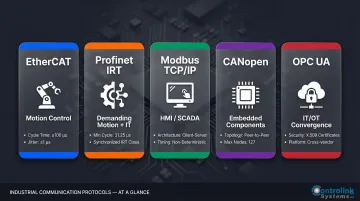
Protocol selection must match the hardware on both ends of the connection. Enterprises using more than three communication protocols experience 30% higher gateway maintenance costs.
Integration architecture diagrams should include:
- Which systems connect to which
- Direction of data flow
- Where data is aggregated or processed
- How IT systems (ERP, MES, SQL databases) interface with OT systems
In CNC/DNC shop environments where protocol diversity is high, expertise in SQL databases, PLC hardware, and motion controllers directly accelerates this design phase.
Step 3: Configure, Program, and Connect the Systems
Walk through physical and software configuration sequentially:
- Install communication hardware where needed (interface cards, network switches)
- Configure network addresses and baud rates for each device
- Program PLCs or middleware to handle data translation between systems
- Connect and test one system pair at a time—never attempt full plant-wide integration at once
A sequential approach isolates problems faster and reduces risk. The cost of skipping it can be severe: one documented plant upgrade saw incompatible I/O maps and safety protocols generate a $1 million change order—entirely avoidable with proper sequencing.
Live connection validation at this stage confirms:
- Data flows in the correct direction
- Data arrives at the expected rate
- Data format matches receiving system expectations
- No packet loss or corruption occurs
Step 4: Test, Validate, and Document the Integration
Three categories of testing are required:
Functional Testing
- Does each integrated system perform its intended task?
- Can operators access data where and when needed?
- Do alarms and alerts trigger correctly?
Stress/Load Testing
- Does the integration hold under real production conditions?
- What happens when multiple systems request data simultaneously?
- Are there bottlenecks under peak load?
Failover Testing
- What happens when one system goes offline?
- Does the network recover gracefully?
- Are operators alerted to failures immediately?
Documentation is non-negotiable. A complete record of system configurations, wiring diagrams, protocol settings, and integration logic allows maintenance teams to troubleshoot issues and makes future system upgrades far less disruptive.
Commissioning sign-off should involve operators and maintenance staff—not just engineers—to confirm the integrated system is usable and HMI interfaces are intuitive enough to reduce training burden.
Key Variables That Determine Integration Success
Even well-executed integrations can underperform if these variables are not actively controlled throughout the project.
Protocol Compatibility
A mismatch between the protocol a device transmits and the protocol a receiving system expects will silently corrupt or drop data. Approximately 45% of industrial enterprises report compatibility issues when connecting modern gateways to equipment more than 15 years old.
Incompatible protocols require data translation layers — middleware or gateways — that add latency and introduce additional failure points. Choosing hardware with native protocol support from the start eliminates this overhead. When gateways are unavoidable, treat them as additional assets to monitor and maintain.
To minimize compatibility risk:
- Audit all devices for native protocol support before design
- Standardize on a single deterministic fieldbus at the machine level
- Use OPC UA at the supervisory level for secure data contextualization
- Budget for protocol gateways only when no native alternative exists
HMI and Interface Design
Integrated systems are only as valuable as the accuracy and timeliness of the data flowing through them. If sensor data arrives with significant delay or timestamp errors, control decisions based on that data will be wrong. In high-speed process monitoring or CNC applications, even milliseconds of latency can affect part quality or machine response.
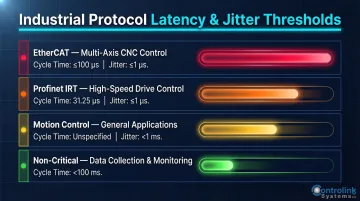
A study on networked motion control systems demonstrated that delay jitter must be kept under 1 millisecond for motion control systems to function optimally. Use the thresholds below as design targets, then validate with protocol-specific diagnostic tools or network analyzers during commissioning.
| Protocol / Use Case | Cycle Time | Max Jitter |
|---|---|---|
| EtherCAT (multi-axis CNC) | ≤100 μs | ≤1 μs |
| Profinet IRT (high-speed drives) | 31.25 μs | ≤1 μs |
| Motion control (general) | — | <1 ms |
| Non-critical data collection | <100 ms | Not specified |
Common Mistakes When Integrating Industrial Control Systems
Most ICS integration failures trace back to the same three mistakes — and all of them are avoidable. Here's what to watch for before they derail your project.
Skipping or Rushing the Systems Audit
Teams that bypass a thorough pre-integration audit encounter unexpected hardware incompatibilities mid-project. The cost of discovering a legacy device lacks the required communication port at Step 3 versus Step 1 is far higher in downtime and rework.
Troubleshooting guidance: If integration is stalling due to an unresponsive device, the first check should always be whether that device's firmware and communication capability have been verified against the integration architecture specs.
Protocol Misconfiguration
Incorrect baud rates, wrong parity settings, or mismatched data formats between devices are among the most common causes of silent integration failure—data appears to flow but arrives garbled or out of sequence.
When this happens, start here:
- Use protocol-specific diagnostic tools or a serial/network analyzer
- Inspect the actual data packets being transmitted
- Compare readings against the device's datasheet specifications
- Correct configuration settings before assuming a hardware fault
- Verify termination resistors on fieldbus networks
- Confirm cable specifications match protocol requirements
Neglecting Post-Integration Cybersecurity
Many shops focus heavily on getting systems connected and functional, then defer security hardening as a "later task." This creates a vulnerable window that persists indefinitely. TXOne Networks found that 85% of organizations do not conduct regular patching in OT, with 47% citing concerns about operational disruptions as a major barrier.
The average cost of a cybersecurity incident affecting OT environments is $4.56 million. In 2025, Jaguar Land Rover suffered a six-week production shutdown from a cyberattack, causing pre-tax losses of £485 million (roughly $610M USD).
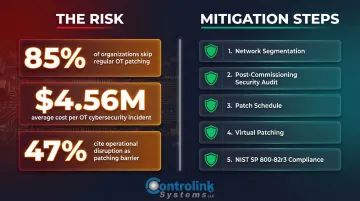
To close that window before it becomes a liability:
- Implement network segmentation between OT and IT zones before going live
- Conduct a security audit after commissioning
- Establish a patch schedule that balances security with uptime requirements
- Use virtual patching or compensating controls when direct patching risks disruption
- Follow NIST SP 800-82r3 guidance for OT security
Frequently Asked Questions
How to integrate two different systems?
Integrating two different systems begins with confirming they share a compatible communication protocol or using a middleware/gateway if they don't. Map the data flow between systems, configure both endpoints with correct addresses and formats, and validate that data transfers accurately and in real time before moving to production.
What communication protocols are used in industrial control system integration?
The most common protocols are Modbus (serial and TCP/IP), Profinet, EtherCAT, CAN, and OPC-UA. Protocol selection should be driven by what the specific hardware natively supports, not by preference; mismatches require costly gateways that add latency and failure points.
How do you integrate legacy industrial control systems with modern equipment?
Legacy integration requires a protocol gateway or middleware layer to translate between older formats and modern protocols. OPC UA wrappers bridge classic COM/DCOM-based OPC servers to OPC UA; when software alone isn't enough, hardware upgrades such as communication cards or replacement controllers may be necessary.
What is the difference between PLC integration and SCADA integration?
PLC integration connects programmable logic controllers to other devices and systems for automated control, while SCADA integration connects monitoring and supervisory software to those PLCs and field devices for centralized visibility and data collection. Both are often part of the same overall ICS integration project.
How long does an industrial control system integration project typically take?
Timelines scale with scope: point-to-point integrations (such as CNC to MES) take 4-12 weeks, single-site MES projects run 6-8 months, and enterprise-wide deployments span 12-24+ months. Control Engineering reports that properly integrated MES systems typically pay for themselves within 6-24 months of going live.
What are the biggest cybersecurity risks in ICS integration?
The top risks are unsegmented IT/OT networks, outdated firmware on field devices, and weak or shared credentials. 63% of industrial gateways contain exploitable firmware weaknesses, making strict network segmentation and firewalling essential — NIST SP 800-82r3 provides the baseline guidance.
Conclusion
Successful ICS integration is the result of disciplined preparation, sequential execution, and careful attention to the variables—protocol compatibility, interface design, cybersecurity, and data quality—that determine whether the integration delivers its intended value.
Most integration failures are avoidable. They trace back to a skipped audit, a misconfigured protocol, or a deferred security step — not to the complexity of the work itself. The facilities that get the most from their systems consistently do three things:
- Document thoroughly at every stage of the integration
- Train operators before go-live, not after problems surface
- Revisit and update their integration architecture as equipment and production needs shift
ICS integration is an ongoing responsibility. The architecture decisions and documentation practices you establish now will determine whether your next upgrade or equipment addition takes a few days to absorb — or sets off a months-long troubleshooting cycle.