
Introduction
Every shift, your shop floor generates enormous amounts of operational data: machine run times, cycle counts, defect rates, labor hours, downtime events, and quality inspection results. Yet 70% of manufacturers still collect this data manually, using paper travelers, clipboard checklists, and end-of-shift operator entries. Most of it goes uncaptured, gets recorded hours too late to act on, or contains transcription errors that undermine its reliability.
This is a costly missed opportunity. Unplanned downtime costs the average manufacturing facility 5-20% of annual productivity, and delayed data means you're reacting to problems rather than preventing them. When you can't see what's happening on the shop floor in real time, you can't make the decisions that reduce scrap, cut downtime, and keep production on schedule.
This post covers what shop floor data collection is, which data types matter most, the pitfalls of manual approaches, and best practices for improving data capture and use.
TLDR:
- Manual data collection creates transcription errors and delays that cost shops thousands in scrap and downtime
- Capture machine performance, quality, labor, and downtime data at the source
- Standardize downtime reason codes and data definitions across the shop floor
- Integrate CNC program management with shop floor data systems to eliminate scrap from outdated files
- Use dashboards to close the feedback loop with operators and sustain continuous improvement
What Is Shop Floor Data Collection?
Shop floor data collection is the systematic process of capturing operational information from machines, workers, and workflows on the production floor—in real time or near real time—to support monitoring, analysis, and decision-making.
It sits at the intersection of production management and process control. Data is collected not just for record-keeping but to feed continuous improvement cycles, quality control, and scheduling decisions.
The ISA-95 (IEC 62264) standard defines this within "Level 3" of the manufacturing functional hierarchy, which manages Manufacturing Execution Systems (MES) and SCADA (Supervisory Control and Data Acquisition) systems to coordinate personnel, equipment, and material in manufacturing.
Reactive vs. Proactive Data Collection
There's a critical distinction between reactive and proactive approaches:
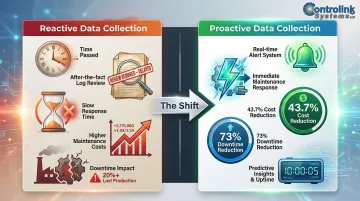
- Reactive data collection: Reviewing logs after problems occur—finding out this morning that a machine faulted three times during second shift
- Proactive data collection: Capturing data continuously to prevent issues before they escalate—getting an alert the moment a machine enters fault state so maintenance can respond immediately
The payoff of going proactive is measurable. A 2026 industrial case study on CNC machining found that implementing a real-time predictive maintenance model reduced total annual maintenance costs by 43.7% and cut equipment downtime by 73% compared to a reactive baseline.
Connecting Upstream and Downstream Systems
Shop floor data collection is a foundational layer for smart manufacturing operations. It connects upstream (to engineering and planning) and downstream (to quality, shipping, and ERP systems). That data flow creates tangible operational benefits:
- Scheduling: Production data reaches planning systems automatically, so schedulers can adjust work orders based on actual capacity—not yesterday's assumptions
- Quality control: Quality data reaches engineering in real time, enabling process corrections before defect rates climb
- ERP accuracy: Automated data capture eliminates manual entry delays, keeping inventory and cost figures current
Types of Data Worth Collecting on the Shop Floor
Not all data is equally valuable. Focus on these core categories:
Machine Performance Data
- Cycle times
- Spindle utilization
- Feed rates
- Machine status (running, idle, faulted)
This is the backbone of any Overall Equipment Effectiveness (OEE) calculation. OEE is calculated as Availability × Performance × Quality, and machine performance data surfaces hidden capacity losses.
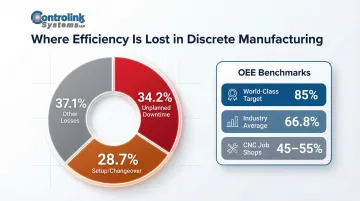
While 85% OEE is widely cited as "world-class," actual discrete manufacturing averages 66.8%, with high-mix CNC job shops often operating at 45-55% due to frequent changeovers.
Quality and Inspection Data
- Defect counts
- First-pass yield
- Scrap rates
- Inspection results tied to specific work orders or machines
Tracking quality data at the source—rather than at end-of-line inspection—speeds up root cause identification. The "1-10-100 Rule" of quality illustrates why: detecting a defect in-process costs $1, detecting it during production costs $10, and detecting it post-production costs $100. Typical scrap rates in multi-step automotive CNC component production range from 3% to 8%.
Labor and Operator Data
- Time-on-task
- Job completion rates
- Operator assignments per shift
This data helps supervisors allocate labor more effectively and identify training gaps. When you see that one operator consistently completes setups 30% faster than others, you know who should be training the team.
Production Order and Job Tracking Data
- Work order status
- Part counts
- Scheduled vs. actual completion times
This keeps production scheduling accurate and reduces the gap between planned and actual output. When a job scheduled for 4 hours takes 6, you need to know immediately so you can adjust downstream schedules.
Downtime and Maintenance Data
What to capture:
- Planned vs. unplanned downtime events
- Maintenance response times
- Equipment failure codes
Categorizing downtime reasons — setup, tooling, machine fault — transforms raw numbers into actionable maintenance priorities. In discrete manufacturing, unplanned downtime accounts for 34.2% of efficiency losses, and setup/changeover time accounts for 28.7%.
The Problem with Manual Data Collection
Many shops still rely on the traditional manual approach: paper travelers, clipboard checklists, end-of-shift operator entries. This is especially common in smaller CNC job shops where digital infrastructure hasn't been prioritized.
Core Failure Modes
Manual collection suffers from four compounding problems:
- Double-entry transcription: Data written on the floor gets typed into a system later. That two-phase process means up to 40% of records will contain faulty data, even with a careful team.
- End-of-shift recall: An operator filling out paperwork at 3 PM trying to reconstruct what happened at 10 AM will miss details and misremember timing — accuracy degrades fast.
- Gaps under pressure: When manual entry is time-consuming, operators skip it when volume spikes. Those gaps make trend analysis unreliable when you need it most.
- Stranded data: Paper logs stay in filing cabinets or on supervisors' clipboards. Quality data doesn't reach engineering, downtime data doesn't reach maintenance, and production data doesn't reach scheduling.
The Specific Cost of Bad Data
The compounding effect of these failures shows up directly on the income statement. Seventy percent of manufacturers still collect data manually, and the cost surfaces as unplanned downtime — which erodes 5-20% of annual productivity at the average facility.
For CNC shops specifically, the exposure is sharper. Tool offset errors and wrong-tool-in-pocket mistakes run up $50,000 to $250,000 annually in scrap and minor crashes — losses that better data capture could largely prevent.
Best Practices for Effective Shop Floor Data Collection
Define Your Data Objectives Before Deploying Any Collection System
Shops that collect data without a clear purpose end up drowning in numbers. Start by identifying two or three key decisions the data needs to support:
- When should we schedule maintenance?
- Where do bottlenecks occur?
- Which jobs are running behind schedule?
Once you know what decisions you're trying to support, you can work backward to determine what data you need and how frequently you need it.
Capture Data as Close to the Source and Moment of Occurrence as Possible
Time-delayed entry—even by a few hours—degrades accuracy and reduces the ability to intervene. Wherever possible, machine-generated data (direct from the controller or sensor) should replace or validate human-entered data.
Why this matters:
- A machine can report its own cycle time with perfect accuracy
- An operator recording cycle time manually will round, estimate, or forget
- Machine data is timestamped to the second; manual data is timestamped to "sometime during second shift"
Standardize Data Definitions and Entry Formats Across the Shop Floor
Inconsistent terminology makes aggregation meaningless. If one operator records "machine down," another records "unplanned stop," and a third records "fault," you can't roll up downtime by category.
Action steps:
- Create a standardized downtime reason code library based on ISO 22400-2 or SEMI E10 standards
- Train all operators on the code library
- Use dropdown menus or buttons in data entry interfaces to enforce consistency
- Establish a hierarchical structure: Parent Category (e.g., "Unplanned Downtime") → Subcategory (e.g., "Spindle Fault")
Integrate Shop Floor Data with Upstream Engineering Files and Downstream Production Systems
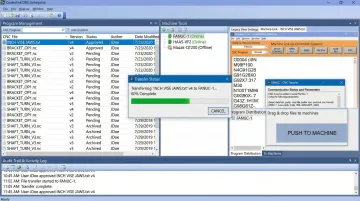
One of the most overlooked data integrity issues is ensuring machinists are always running the latest engineering-approved CNC programs—not outdated revisions stored locally on machines. This is both a data integrity issue and a scrap reduction practice.
When machinists run outdated programs, you get scrap. When they run unapproved revisions, you lose traceability. Running an outdated program, loading a tool in the wrong pocket, or entering an incorrect tool length offset can cost shops $8,000 to $20,000 per year in scrap alone.
CNC/DNC (Distributed Numerical Control) communication software addresses this directly — it manages and distributes engineering-approved program files to machine tools, eliminating wrong-revision risk and creating an audit trail for traceability. Controlink's DNC software, built specifically for machining environments, handles exactly this kind of program distribution and version control.
Establish Data Review Cadences and Accountability
Collected data only drives improvement when someone reviews it on a schedule and owns the follow-through.
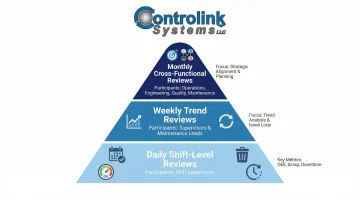
Recommended cadences:
- Daily shift-level reviews: Key metrics (OEE, scrap rate, unplanned downtime) reviewed by shift supervisors
- Weekly trend reviews: Supervisors and maintenance leads review trends and identify recurring issues
- Monthly cross-functional reviews: Operations, engineering, quality, and maintenance meet to review strategic metrics and plan improvements
Use Dashboards and Visual Displays on the Shop Floor to Close the Feedback Loop with Operators
Scheduled reviews handle trends and planning, but real-time visibility on the shop floor closes the loop where it matters most. When workers can see live performance data — their machine's uptime, current job progress, quality pass rate — they become active participants in improvement rather than passive data sources.
Benefits:
- Operators can self-correct when they see performance dipping
- Teams can see how they're performing against goals
- Transparency builds trust and engagement
Tools and Technologies That Power Shop Floor Data Collection
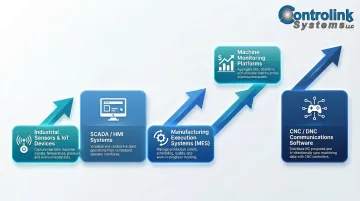
Main Technology Categories
- Industrial sensors and IoT devices — capture physical signals: temperature, vibration, pressure, and position
- SCADA/HMI systems — provide local supervisory control and operator-facing monitoring interfaces
- Manufacturing Execution Systems (MES) — automate work execution, scheduling, and tracking; only 8% of plants globally use a commercial MES, with most relying on homegrown tools, ERP add-ons, or spreadsheets
- Machine monitoring platforms — track machine states, cycle counts, and performance metrics in real time
- CNC/DNC communications software — interface directly with CNC controllers to distribute programs and capture execution data, cycle counts, and machine states
Why CNC Connectivity Is Foundational
In CNC-heavy environments, direct controller interfaces provide the highest-fidelity data with the least operator burden. Rather than relying on manual logging or workarounds, software that talks natively to the CNC captures what actually happened — cycle times, program numbers, overrides — without adding steps for the operator. Controlink Systems has been building this type of CNC/DNC communication and shop-floor automation software since 1998, with tools designed specifically for machining environments.
Key connectivity standards:
- MTConnect (ANSI/MTC1.4-2018) — open standard for reading real-time data from CNC machine tools
- OPC UA — machine-to-machine protocol; the OPC 40501-1 Companion Specification defines a common CNC interface
- FANUC FOCAS — proprietary Ethernet API for developing applications that communicate directly with FANUC controllers
The Integration Question
The most effective data collection setups connect the shop floor layer — sensors, machines, CNC controllers — directly to mid-level systems like MES and ERP. When that connection exists, production data flows automatically instead of being re-entered at every system boundary. Transcription errors disappear, and decision-makers see accurate data without waiting on manual updates.
Common Mistakes to Avoid
Even well-intentioned data programs go sideways. Here are the three most common mistakes shops make — and how to sidestep them.
Collecting Too Much Data Without a Plan to Use It
The "data hoarding" trap is real. Shops that instrument everything but have no analytical workflow end up with storage costs and alert fatigue, not insights. NIST IR 8228 warns that IoT devices may indiscriminately collect data, leading to decentralized processing that challenges traditional data management and raises cybersecurity and privacy risks.
Start with fewer, better-defined metrics. Add instrumentation only when you have a clear use case and someone accountable for acting on the data.
Treating Data Collection as a One-Time Implementation Project
Machines change, processes evolve, and product mixes shift. What worked last year may be measuring the wrong things today. Revisit your setup on a regular cadence:
- Audit collected data quarterly
- Confirm each metric still drives a current decision
- Verify the collection method is still accurate
- Retire anything that isn't being used
Neglecting Operator Buy-In
When workers view data collection as surveillance rather than a tool to make their jobs easier, they find ways to game or ignore it.
Getting operators on board comes down to three things:
- Make the purpose clear — data identifies training needs, not poor performers
- Share the results — show operators the dashboards and involve them in reading trends
- Let them shape what gets measured — operators know what actually matters on the floor
Frequently Asked Questions
What is shop floor data collection?
Shop floor data collection is the process of systematically capturing operational data—from machines, operators, and workflows—on the production floor to monitor performance, improve quality, and support faster decision-making.
What is the shop floor information system?
A shop floor information system is the combination of hardware, software, and data flows that captures, organizes, and presents production data to managers and operators. It typically spans machine monitoring, MES, and ERP integrations.
What are the three phases of shop floor control?
The three phases are: order release (dispatching work to the floor), order scheduling (sequencing jobs across workcenters), and order progress monitoring (tracking actual vs. planned performance and adjusting as needed).
What is MES vs shop floor control?
Shop floor control refers to the operational layer of managing and tracking work orders and production activities, while a Manufacturing Execution System (MES) is the software platform that handles those activities digitally. In short, MES is the software that makes shop floor control possible.
Which software is best for data collection?
The right choice depends on your environment. CNC-heavy shops typically benefit from dedicated machine monitoring or CNC/DNC communication software, while larger operations may need a full MES or ERP with shop floor modules. Either way, prioritize direct machine connectivity and minimal manual entry.