Introduction
Ask most CNC machine shop managers to rattle off product specs, and they'll answer without hesitation. But ask them three critical operational questions—What job should run next? Where is that job right now? When will it be done?—and you'll often hear silence, guesswork, or "let me check the spreadsheet."
The inability to answer these questions confidently isn't a talent problem. It traces back to a weak or absent shop floor scheduling process. Without real-time visibility into the floor, machine capacities go ignored during planning. Jobs pile up at bottlenecks, other machines sit idle, and on-time delivery suffers—taking profitability with it.
This guide covers the complete picture: a clear definition of shop floor scheduling, how the process works through three phases and five steps, the challenges that derail it, and the measurable benefits of getting scheduling right.
Key Takeaways
- Shop floor scheduling sequences, assigns, and times production tasks across machines and workers to meet delivery commitments
- Execution runs through three phases — planning, scheduling, and control — from order release to performance monitoring
- Most breakdowns trace back to inaccurate run times, outdated floor status, and spreadsheets that can't respond to real-time disruptions
- Done well, it reduces lead times, cuts machine downtime, and protects on-time delivery rates
What Is Shop Floor Scheduling?
Shop floor scheduling is the operational discipline of organizing and managing manufacturing activities on the shop floor—specifically, determining which jobs run on which machines, in what order, at what time, and with which workers and materials. It sits at the intersection of planning (what needs to be made) and execution (actually making it).
How It Differs from Production Planning
Production planning answers "what do we need to produce and by when?" Shop floor scheduling answers "how exactly will we produce it, given the machines, people, and materials available right now?" Scheduling is the bridge between a customer order and a finished part—it translates demand into executable work instructions.
Infinite vs. Finite Capacity Scheduling
Historically, shop floor scheduling has followed two approaches:
| Approach | Core Assumption | Outcome |
|---|---|---|
| Infinite Capacity Scheduling | Assumes unlimited machine, labor, and facility capacity | Generates schedules that may be impossible to execute; stacks all jobs on the same day without checking if resources are already full |
| Finite Capacity Scheduling | Respects actual available hours per resource | Produces executable schedules with specific start/finish times; pushes operations to the next available slot when a resource is full |
Finite scheduling is more realistic but harder to maintain accurately. It requires continuous visibility into machine availability, operator skills, and job status—data most shops don't have in real time. That data gap is precisely why manual methods remain the norm.
The Manual Scheduling Challenge
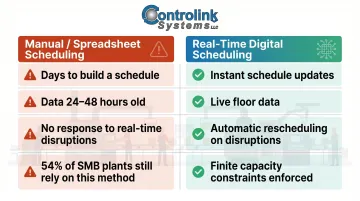
Most shops still rely on planners using spreadsheets to build schedules. According to IoT Analytics' 2025 MES Market Report, 54% of small and medium manufacturing plants globally use pen, paper, or spreadsheets as their primary manufacturing execution system. These schedules often take days to generate and become obsolete the moment a machine goes down, an operator calls in sick, or a customer changes a due date.
The data problem runs deeper still. The Manufacturing Leadership Council (NAM) reports that 70% of manufacturers still collect data manually, meaning schedulers are working from information that may be 24 to 48 hours old by the time it reaches them.
The Three Phases of the Shop Floor Scheduling Process
Shop floor scheduling operates through three sequential but continuous phases: planning, scheduling, and control. Shops cycle through them repeatedly as new orders arrive and conditions change.
Shop Floor Planning
Planning involves creating or receiving the master production schedule (MPS), releasing work orders, and establishing the order release document that specifies the materials, routing instructions, and resources needed. This phase answers "what needs to be made and what do we need to make it?"
Two documents carry most of the weight here:
- Bill of Materials (BOM): Lists every component, subassembly, and raw material a job requires
- Routing instructions: Map the exact sequence of operations, which work centers handle each step, and the standard setup and run times
Get either one wrong — a BOM with missing materials or a routing with inflated run times — and the downstream schedule collapses before a single job hits the floor.
Shop Floor Scheduling
This is where the plan becomes a sequence. Planners assign work orders to specific machines and work centers, set start and completion dates for each operation, and publish a dispatch list — the prioritized queue of jobs for each work center. Machine capacity, operator availability, and job priorities all compete for the planner's attention at once.
The quality of a schedule depends on three inputs being accurate:
- Run and setup time estimates
- Available capacity (machines and labor)
- Real-time work completion data
When any one of these is off by more than 10-15%, the dispatch list becomes unreliable and jobs miss their due dates.
Shop Floor Control
Control is the monitoring phase — tracking actual progress against the planned schedule, identifying deviations (machine breakdowns, material shortages, operator absences), and making real-time adjustments. Effective control requires real-time data flowing back from the floor, not end-of-shift manual reporting.
Zebra Technologies' 2024 Manufacturing Vision Study, which surveyed 1,200 manufacturing leaders globally, found that only 16% have real-time work-in-progress visibility across the full production process. Without that visibility, schedulers are reacting to problems hours after they've already cascaded through the schedule.
The Five Steps of Shop Floor Scheduling
Here's the practical step-by-step execution of the scheduling process, from order entry to performance review.
Step 1 — Order Release and Work Order Creation
When a sales order is confirmed, the MRP or ERP system creates a planned work order (PWO), calculates required components via the BOM, and determines when each sub-order must start or be received to meet the delivery date.
The planner must "firm" the PWO after verifying accuracy before releasing it to the shop floor.
Step 2 — Routing and Operation Sequencing
Each work order is assigned a routing—the step-by-step sequence of operations (e.g., turning, milling, grinding, inspection) across specific work centers. The sequence must account for:
- Operation dependencies
- Machine-specific capabilities
- Setup time variations
- Downstream bottleneck constraints
Poor sequencing creates bottlenecks that ripple through the entire schedule.
Step 3 — Resource and Capacity Assignment
This step involves assigning the specific machines, tools, fixtures, and operators required for each operation, and checking that sufficient capacity exists during the scheduled window. Load balancing—distributing work across work centers so no single machine is overloaded while others sit idle—is critical here.
Traditional MRP systems often fail at this step. Research by Rossi et al. (2016) documented a case where standard MRP loaded a bottleneck resource to 88,800 minutes against only 48,000 available minutes—an 85% overload. Finite capacity scheduling resolves this by integrating capacity constraints into the planning process.
Step 4 — Dispatch and Job Prioritization
The dispatch list is the shop floor's daily action plan—a prioritized list of jobs for each work center showing what to run next. Common prioritization rules include:
| Rule | Logic | Best For | Weakness |
|---|---|---|---|
| FIFO (First In, First Out) | Process jobs in arrival order | Simplicity, perceived fairness | Performs poorly on flow time and tardiness |
| SPT (Shortest Processing Time) | Prioritize shortest job first | Minimizing mean flow time and WIP | Starves long jobs; high tardiness variance |
| EDD (Earliest Due Date) | Prioritize nearest due date | Minimizing maximum lateness | Ignores processing time |
| CR (Critical Ratio) | (Due Date - Now) / Remaining Time | Dynamic responsiveness to changing conditions | More complex to compute |
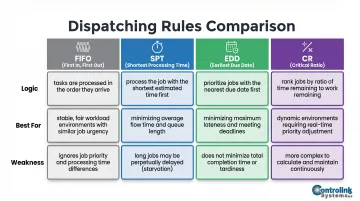
Mohan et al. (2019) confirm that no single dispatching rule performs best across all criteria — the right choice depends on your shop's goals and should directly reflect how you measure on-time delivery performance.
Step 5 — Monitoring, Feedback, and Rescheduling
Once jobs are running, supervisors and schedulers must track actual progress against the plan: logging operation completions, flagging delays, and triggering reschedules when disruptions occur. This feedback loop is what separates a living schedule from a static plan that goes stale by midday.
CNC/DNC communication software plays a direct role here. Controlink Systems' DNC software, for example, delivers NC programs directly to CNC machines without operators leaving their stations — eliminating unplanned downtime and scrap caused by wrong-revision files.
Common Challenges in Shop Floor Scheduling
Inaccurate Time Estimates
Standard run times and setup times in ERP systems are often based on historical averages or engineering estimates that don't reflect real-world variability—operator experience levels, tooling condition, or material variations. When actual times deviate significantly from planned times, the entire downstream schedule collapses.
Lack of Real-Time Visibility
Many shops still rely on end-of-shift reporting or paper travelers to communicate job status, meaning schedulers are always working from stale data. A machine breakdown or material shortage at 8 AM may not reach the planner until 3 PM—by which time several jobs have been delayed.
As noted earlier, the Zebra study found that only 16% of manufacturers have real-time WIP monitoring across full production. Without live shop floor data, schedules degrade within hours of release.
Constant Disruptions Invalidating the Schedule
One unplanned event—machine breakdown, late supplier delivery, urgent customer change—forces the planner to manually adjust dates and quantities across multiple work orders and purchase orders simultaneously. This cascade effect compounds quickly: one missed adjustment can push three downstream jobs past their due dates before anyone catches it.
Common disruption triggers include:
- Unplanned machine downtime or tooling failure
- Late raw material deliveries from suppliers
- Last-minute engineering changes or customer rush orders
- Operator absences shifting workload to slower or less experienced staff
ERP systems inherited their scheduling logic from 1960s MRP models that assumed stable, make-to-stock conditions. They struggle with the dynamic, make-to-order reality of most modern job shops.
As Wikipedia's Advanced Planning and Scheduling article notes, traditional MRP plans materials and capacity separately. The result: production schedules that look valid on paper but can't actually be executed because real capacity constraints were never factored in.
These challenges don't exist in isolation — inaccurate data, limited visibility, and constant disruptions reinforce each other, making reactive scheduling the default mode for most shops.
Key Benefits of Effective Shop Floor Scheduling
Improved On-Time Delivery and Customer Confidence
A reliable scheduling process lets shop managers answer confidently when a customer asks for a delivery date—because the schedule accounts for current machine loads, open jobs, and realistic lead times rather than guesswork. McKinsey documented a case where advanced scheduling for a battery cell facility shaved more than 6 weeks off the project schedule, unlocking over $60 million in savings through earlier production start.
Higher Machine-Tool Utilization and Reduced Downtime
Proper job sequencing keeps machines running productive hours instead of sitting idle. This means:
- Grouping similar setups to cut preparation time
- Minimizing changeover times between jobs
- Eliminating gaps where machines wait on materials or instructions
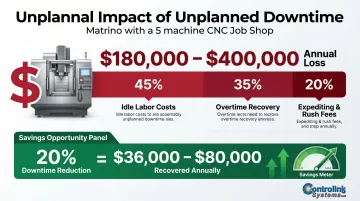
Flowstate Industrial's 2026 analysis estimates that a typical 5-machine CNC job shop loses $180,000 to $400,000 per year in unplanned downtime costs, including idle labor, overtime recovery, and expediting. Scheduling improvements that reduce even 20% of unplanned downtime can recover $36,000–$80,000 annually.
Automation software reinforces scheduling gains at the machine level. Controlink Systems' Machine Link™ QUICK Serve, for example, delivers NC programs directly to CNC machines so operators never leave their stations to retrieve files — cutting both idle time and scrap from wrong-revision errors.
Reduced Scrap, WIP, and Lead Times
Effective scheduling targets three compounding problems at once:
- WIP accumulation — fewer jobs queued between operations means less capital tied up on the floor
- Scrap from stale files — controlled job release reduces the chance machinists run outdated engineering revisions
- Extended lead times — eliminating queue wait time directly shortens how long jobs take from start to ship
The Project Production Institute (2016) explains Little's Law: Throughput = WIP / Cycle Time. Any WIP above a system's "critical WIP" level does not increase throughput—it only increases cycle time. Controlling job release to keep WIP at or below the critical level directly shortens lead times without sacrificing throughput.
Frequently Asked Questions
What is shop floor scheduling?
Shop floor scheduling is the process of organizing, sequencing, and timing manufacturing tasks on the shop floor—assigning jobs to machines, work centers, and operators to ensure orders are completed on time and resources are used efficiently.
What are the five steps of scheduling?
Shop floor scheduling follows five steps:
- Order release and work order creation
- Routing and operation sequencing
- Resource and capacity assignment
- Dispatch and job prioritization
- Monitoring with feedback and rescheduling
What is the shop floor management process?
Shop floor management runs through three phases: planning, scheduling, and control. Planning creates the master production schedule and work orders. Scheduling assigns those jobs to machines with sequenced operations, and control monitors actual progress—adjusting for deviations in real time.
What is the difference between shop floor scheduling and production planning?
Production planning determines what needs to be made and by when. Shop floor scheduling takes it further—determining how and when each specific operation executes, given real constraints like machine capacity, labor availability, and material readiness.
What are the most common causes of shop floor scheduling failures?
Three causes account for most scheduling failures:
- Inaccurate run and setup time estimates in the ERP system
- No real-time visibility into job status or machine availability
- Over-reliance on manual spreadsheets that can't adapt to machine breakdowns or urgent order changes