Introduction
Manufacturers face a costly reality: 83% of industry leaders report that unplanned downtime costs at least $10,000 per hour, with 76% estimating losses up to $500,000 per hour. Poor shop floor planning is a root cause of many these disruptions. Without a structured approach, production floors suffer from missed deadlines, excess scrap, machine downtime, and operators working from outdated or incorrect instructions.
Shop floor planning is the system that determines how production orders are created, sequenced, resourced, and monitored from start to finish. This guide covers:
- The three core phases of shop floor control
- Key elements every effective plan must include
- Proven best practices like the 5S method and visual management
- Automation tools that help shops eliminate waste and keep machinists on the correct, approved programs
Key Takeaways
- Shop floor planning spans three phases: planning (schedule creation), scheduling (routing and sequencing), and control (real-time monitoring)
- Structured planning reduces waste and improves machine utilization — operators always work from current, engineering-approved instructions
- Effective plans tie together layout design, resource allocation, and SOPs, then track performance through KPIs like OEE and first-pass yield
- Practices like 5S, visual management, and standardized program distribution measurably cut scrap and keep production moving
What Is Shop Floor Planning and Why Does It Matter?
Shop floor planning is the structured process of managing all production floor activities—including operations sequencing, material flow, resource assignment, and workforce coordination—to ensure manufacturing orders are fulfilled efficiently and on time. In short, it's what turns a production schedule from a document into a working reality on the floor.
Without formalized planning, production environments experience bottlenecks, unplanned downtime, quality defects, and rising costs. 61% of manufacturers experienced unplanned downtime in the prior year, with global costs reaching $852 million per week. These disruptions rarely stop at one problem. The downstream effects compound quickly:
- Production schedules fall behind and rarely self-correct
- Quality defects spike during machine restarts
- Overtime labor costs climb to cover lost capacity
- Customer deliveries slip, damaging hard-earned relationships
Shop floor planning bridges strategic production targets and daily floor-level execution. It links demand forecasting and master scheduling to the physical reality of machines, materials, and people. When done well, it shifts the shop from constant crisis response to a rhythm where the right job runs on the right machine at the right time—every shift, not just the good ones.
The Three Phases of Shop Floor Control
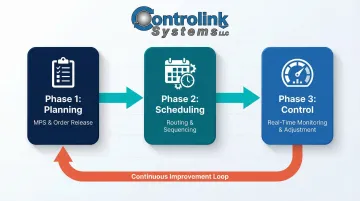
Shop floor control operates as a sequential, interdependent framework. Planning sets the foundation, scheduling routes the work, and control monitors and adjusts execution in real time. All three must function together for manufacturing to run smoothly.
Shop Floor Planning
The planning phase begins with the master production schedule (MPS), which defines which manufacturing orders will be produced and in what priority. The output is an order release document that communicates required resources, materials, and processes to the floor.
Key planning activities include:
- Reviewing demand forecasts and customer orders
- Determining production quantities and priorities
- Identifying required raw materials and components
- Confirming machine and operator availability
- Releasing work orders to the scheduling phase
When this phase is rushed or skipped, the consequences are immediate: unclear priorities leave supervisors guessing which jobs matter most, material shortfalls halt production mid-run, and workers wait idle for instructions that should have been prepared in advance.
Shop Floor Scheduling
The scheduling phase assigns work orders to specific machines or workstations, establishes a detailed manufacturing route, and confirms the bill of materials. The schedule specifies who does what, with which materials, in what sequence.
Effective scheduling requires:
- Matching orders to machine capabilities and capacity
- Sequencing jobs to minimize setup time and changeovers
- Allocating operators based on skill requirements
- Coordinating material delivery to workstations
- Building in realistic buffer time for variability
Unrealistic scheduling—ignoring machine capacity constraints, operator availability, or setup requirements—creates an unachievable plan that causes floor-level chaos. Backwards scheduling based on due dates leaves almost no buffer for shop floor variability, leading to severe production delays. Conversely, forward scheduling that floods the floor with work-in-process creates bottlenecks, confuses priorities, and ties up cash flow in early material investments.
Shop Floor Control
The control phase monitors progress against the schedule continuously, identifies deviations early, and triggers corrective actions: reassigning work, adjusting priorities, or expediting materials. Real-time data collection drives this visibility, showing what's actually happening on the floor versus what was planned.
Shop floor control serves two critical functions:
- On-time execution: Tracking whether operations hit their scheduled completion targets
- In-process quality checks: Catching rework or scrap at the source before it blocks downstream operations
Without active control, small deviations snowball into major disruptions. A delayed setup becomes a missed shift target. A quality issue on one operation triggers rework that backs up the entire downstream sequence.
That's the difference between managing the floor and reacting to it. When all three phases work in sync, supervisors spend less time firefighting and more time driving output.
Key Elements of an Effective Shop Floor Plan
Floor Layout and Design
The physical arrangement of workstations, pathways, and storage areas directly impacts production flow. A well-designed layout minimizes unnecessary material movement, reduces bottlenecks, and supports the specific production method used—whether discrete manufacturing, process manufacturing, or repetitive assembly.
Layout considerations include:
- Positioning machines in the sequence of operations
- Creating clear pathways for material movement
- Locating tooling and fixtures near points of use
- Designating staging areas for work-in-process
- Ensuring adequate space for maintenance access
Poor layout shows up fast: operators walking excessive distances, congestion at shared resources, and handling steps that consume time without producing value.
Resource and Capacity Planning
An effective shop floor plan accounts for machine capacity, operator availability, and material inventory simultaneously. Capacity planning prevents over-scheduling by ensuring production targets are achievable given current resources.
Capacity planning steps:
- Calculate available machine hours per shift
- Account for planned maintenance and historical downtime
- Match operator skills to job requirements
- Verify material availability before releasing orders
- Build in buffer capacity for variability and rush jobs
Ignoring capacity constraints creates a plan that looks good on paper but fails in execution, leading to missed commitments and frustrated teams.
Standard Operating Procedures (SOPs)
Documented SOPs give operators clear, step-by-step instructions for each task—reducing errors, shortening training time, and ensuring consistent output quality.
Research backs this up:
- Deploying digital SOP modules reduced documentation errors by 67% and cut average training duration from 14 days to 7 days
- Standard work implementation drove a 20% productivity gain and 25% reduction in process variation
- Bad tool setup costs small-to-mid-size CNC shops between $50,000 and $250,000 per year, with average scrap costs per machined part ranging from $35 to $120
SOPs ensure machinists follow the latest engineering-approved process—not outdated memory or obsolete documents. In CNC environments, that distinction directly determines whether a part ships or gets scrapped.
Performance KPIs
KPIs measure whether the shop floor plan is working. Without defined metrics, managers cannot identify where the plan is failing or where improvements will have the greatest impact.
Key manufacturing KPIs to track:
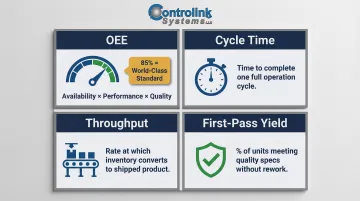
- Overall Equipment Effectiveness (OEE): Measures productive uptime as Availability × Performance × Quality. World-class discrete manufacturers hit 85% OEE; 60% is typical—a gap that signals where capacity is leaking.
- Cycle Time: The time required to complete one cycle of an operation
- Throughput: The rate the system generates money through sales, or the conversion rate of inventory into shipped product
- First-Pass Yield (FPY): The percentage of units that complete a process and meet quality guidelines without being scrapped, rerun, retested, returned, or diverted into offline repair
Companies with real-time visibility of quality metrics outperform others by 6% in OEE, demonstrating the power of tracking and acting on performance data.
Material Flow and Inventory Control
Material flow—moving raw materials, WIP, and finished goods through the floor efficiently—determines whether machines stay running or sit idle. Breakdowns here show up as excess WIP piling up, missed delivery windows, and machines waiting on parts that should already be staged.
Effective material flow requires:
- Delivering materials to workstations just-in-time
- Minimizing handling and transport steps
- Tracking WIP location and status
- Preventing bottlenecks from inventory buildup
- Moving finished goods to shipping on schedule
Getting material flow right is often what separates a shop that hits its schedule from one that's constantly firefighting. The other elements of the plan can only perform as well as the material feeding them.
Shop Floor Planning Best Practices
Implement the 5S Method
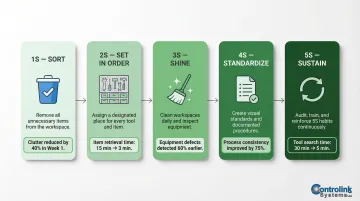
The 5S framework—Sort, Set in Order, Shine, Standardize, Sustain—creates an organized, safe, and productive shop floor environment. It's not a one-time activity but a continuous discipline that supports all other planning efforts.
The five pillars:
- Sort: Pull anything that doesn't belong in the work area — broken tools, obsolete fixtures, excess stock
- Set in Order: Position tools and materials so operators grab what they need without hunting
- Shine: Clean equipment during downtime; cleaning reveals wear and defects before they cause failures
- Standardize: Document the best-known method for each workstation and hold everyone to it
- Sustain: Run regular audits and training to keep the first four S's from slipping
Implementation of 5S in a scientific instruments company reduced tool searching time from 30 minutes to 5 minutes, with the 5S audit score increasing from 7 to 55 over 20 weeks. In a plastic manufacturing environment, 5S improved production system efficiency from 67% to 88.8% in 10 weeks.
Use Visual Management Tools
Making production status visible to everyone on the floor—through kanban boards, Andon systems, production tracking displays, or scheduling boards—reduces the need for verbal check-ins, speeds up problem identification, and keeps operators aligned with the current plan.
Visual management benefits:
- Operators immediately see current priorities
- Problems trigger visible alerts for rapid response
- Progress tracking happens at a glance
- Supervisors spend less time answering status questions
Response time to incidents can be reduced by 70% through an effective Andon system. Implementation of a Kanban-CONWIP pull system resulted in a 27.79% reduction in WIP inventory, demonstrating how visual controls improve material flow and inventory management.
Conduct Regular Shop Floor Meetings (Gemba Walks)
Daily or shift-level meetings where supervisors review progress, surface bottlenecks, and align the team to the day's priorities keep everyone synchronized. Physically walking the floor (Gemba) helps managers identify issues that data alone doesn't reveal—such as an operator struggling with a setup or a machine running slower than reported.
Effective shop floor meetings:
- Happen at the same time each shift
- Last 10-15 minutes maximum
- Focus on current problems and priorities
- Engage operators in problem-solving
- Result in clear action items with owners
When operators consistently surface problems in these meetings, the schedule stops being a static document and starts reflecting what's actually happening on the floor.
Standardize the Process for Program and Document Distribution
In CNC machining environments, one of the most common sources of scrap is machinists running outdated or incorrect CNC programs. Loading a tool in the wrong pocket or running an incorrect program can cause machine crashes costing $12,000 to $40,000 in spindle damage, destroyed holders, and lost production time.
A standardized process for distributing engineering-approved files to each machine—without requiring operators to walk across the shop—cuts scrap and rework at the source. DNC software like Controlink Systems' solution handles this by digitally transmitting the correct CNC programs to each machine on demand, eliminating manual file transfers and ensuring every machinist runs from the right version.
The results are measurable: networking machinery with DNC software saved a valve manufacturer 9 minutes of programming time per part, eliminating $12,000 a month in excess programming costs caused by manual upload/download errors.
Tools and Technology for Shop Floor Management
Overview of Shop Floor Software Systems
Digital tools used in shop floor management range from Manufacturing Execution Systems (MES) that track production in real time, to ERP systems that link floor activity to inventory and procurement, to specialized DNC/CNC communication software that ensures the right programs reach the right machines.
Common shop floor software categories:
- MES tracks work orders, collects production data, monitors quality, and gives managers real-time visibility into the floor
- ERP connects shop floor activity to purchasing, inventory, accounting, and customer orders in a single system
- DNC centrally stores and distributes CNC programs directly to machines via network, eliminating version errors and unsecured file transfers
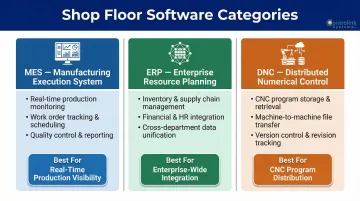
The right technology depends on shop size, complexity, and existing infrastructure. Small shops may start with DNC software to solve immediate program distribution problems, while larger facilities implement integrated MES-ERP systems for enterprise-wide visibility.
How Automation and Real-Time Data Improve Decision-Making
Shop floor automation reduces reliance on manual tracking and human memory, provides managers with live visibility into machine status and order progress, and enables faster responses to deviations.
Manufacturers report an average efficiency increase of 10-20% after implementing MES, with defect rates lowering by up to 40%. Companies that collect and feed real-time sensor data experience 39% greater OEE through faster decision-making and fewer unplanned stops.
Real-time data transforms shop floor management from periodic status checks to continuous monitoring, enabling proactive intervention before small issues become major disruptions.
Choosing the Right Tools for Your Shop
Evaluate tools based on compatibility with existing machines and systems, ease of use for operators, and integration flexibility. User-friendly HMI interfaces reduce training costs and improve adoption. Support for communication protocols like Modbus, Serial, Profinet, and EtherCAT — along with PLC and SQL database connectivity — ensures the tool fits your existing setup rather than forcing a costly overhaul.
Selection criteria:
- Does it solve a real floor-level problem?
- Can operators use it without extensive training?
- Does it integrate with current machines and software?
- What is the total cost of ownership (software, hardware, training, maintenance)?
- Can it scale as the shop grows?
These criteria matter because the goal is simplification, not added complexity. Start with your most pressing pain point — program distribution or production tracking, for instance — and choose a solution that delivers measurable improvement there before expanding to broader systems. Controlink Systems LLC, for example, focuses specifically on this kind of targeted integration: connecting CNC/DNC software, PLCs, and data acquisition hardware into a cohesive shop floor environment rather than pushing unnecessary enterprise-wide overhauls.
Conclusion
Effective shop floor planning is an ongoing management discipline, not a project with a finish line. It requires structured planning, realistic scheduling, and real-time control — all backed by clear SOPs, measurable KPIs, and the right tools.
Manufacturers who commit to this approach consistently report improvements across the metrics that matter most:
- Higher machine utilization and on-time delivery rates
- Reduced scrap and unplanned downtime
- Better product quality through standardized, repeatable processes
The three-phase framework of planning, scheduling, and control gives your operation a solid foundation. Pair that with practices like 5S, visual management, and reliable program distribution, and the gap between what's planned and what actually runs on the floor gets much smaller.
Frequently Asked Questions
What is shop floor planning?
Shop floor planning is the process of organizing, sequencing, and managing all production floor activities—including work orders, resources, materials, and operator assignments—to ensure manufacturing runs efficiently and on schedule.
What are the three phases in shop floor control?
The three phases are planning (creating the production schedule and order releases), scheduling (routing orders through workstations with material and sequence detail), and control (monitoring progress and adjusting in real time).
What is the difference between a shop floor plan and a production schedule?
A production schedule defines what needs to be made and when, while a shop floor plan is the broader management framework that also covers how it will be made—including layout, resource allocation, routing, SOPs, and execution oversight.
What does a shop floor manager do?
A shop floor manager oversees all production floor activities, including enforcing SOPs, monitoring order progress, resolving bottlenecks, coordinating workers and machines, and ensuring quality and safety standards are met.
How can DNC software improve shop floor efficiency?
DNC (Direct Numerical Control) software automates the distribution of CNC programs from a central server directly to individual machines, eliminating manual file transfers, reducing the risk of machinists running outdated programs, and cutting scrap caused by version errors.
What KPIs should be tracked for shop floor performance?
Key manufacturing KPIs include Overall Equipment Effectiveness (OEE), cycle time, throughput, first-pass yield, and on-time delivery rate. These metrics help managers identify where the shop floor plan is underperforming and where to focus improvement efforts.