This article breaks down what PROFINET is, how its performance variants differ, the major categories of PROFINET software and tools, and what to look for when selecting them for a manufacturing environment—especially facilities running multi-protocol automation systems.
Key Takeaways
- PROFINET runs real-time device-to-controller communication over standard Ethernet infrastructure
- Three performance classes (TCP/IP, RT, IRT) cover different cycle time and determinism requirements
- Key software categories include protocol stacks, configuration platforms, diagnostic tools, and conformance testers
- Evaluate tools on RT class support, GSDML compliance, diagnostic depth, and multi-protocol capability
- Gateways connect legacy Modbus and serial devices to PROFINET networks without replacing hardware
What Is PROFINET and Why It Dominates Industrial Ethernet
PROFINET (Process Field Network) is an open industrial Ethernet standard developed and maintained by PROFIBUS & PROFINET International (PI)—not a proprietary Siemens standard, despite Siemens leading its development.
Unlike traditional fieldbuses such as PROFIBUS or Modbus RTU, PROFINET runs over standard Ethernet infrastructure while adding deterministic, real-time communication capabilities on top of the TCP/IP stack. This allows manufacturers to build on existing network hardware while achieving the cycle times and synchronization required for industrial automation.
Market Leadership: PROFINET captured 27% of all new factory automation nodes in 2024, up from 23% in 2023, making it the largest industrial network protocol globally. The installed base reached 78.8 million nodes as of 2024.
The Controller/Device Architecture
PROFINET uses a specific provider/consumer model with three device roles:
- IO-Controllers — Typically PLCs running the automation program, providing output data to devices and consuming input data
- IO-Devices — Distributed field devices (sensors, drives, actuators) that provide input data and consume output data
- IO-Supervisors — Engineering tools, PCs, or HMIs used temporarily for commissioning and diagnostics
All PROFINET software tools are built around this architecture.
Key Industries Driving Adoption
PROFINET adoption is concentrated in:
- Automotive assembly lines
- Discrete manufacturing facilities
- Process automation plants
- Robotics and motion control applications
- CNC machining and stamping operations
Each of these environments demands sub-millisecond cycle times and tight synchronization — exactly the performance gap that traditional fieldbuses couldn't close on standard Ethernet.
PROFINET Protocol Variants: RT, IRT, and TCP/IP Class
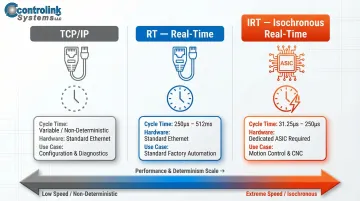
PROFINET offers three communication classes, each optimized for different performance requirements:
| Communication Class | Cycle Time Range | Hardware Requirement | Primary Use Case |
|---|---|---|---|
| TCP/IP (or UDP/IP) | Variable/Non-deterministic | Standard Ethernet | Configuration, parameterization, diagnostics |
| RT (Real-Time) | 512 ms down to 250 µs | Standard Ethernet | Standard factory automation tasks |
| IRT (Isochronous Real-Time) | 250 µs down to 31.25 µs | Dedicated ASICs/switches | Motion control, CNC synchronization |
Understanding the Hardware Implications
TCP/IP and RT can run on standard Ethernet network interface cards (NICs) without specialized hardware. RT achieves faster processing by bypassing TCP/IP layers and using EtherType 0x8892 for direct frame handling.
IRT, by contrast, requires dedicated ASICs or chips with cut-through switching capability. Hardware-level time synchronization and bandwidth reservation are necessary to achieve sub-millisecond, jitter-free cycles. That hardware dependency directly affects which software stack or tool you should select.
When Each Variant Applies
- Use RT for standard PLC-to-sensor and PLC-to-actuator communication in typical manufacturing environments — millisecond-range cycle times handle these reliably.
- Use IRT for CNC axis synchronization, robotic motion control, and press control applications where microsecond-level precision and deterministic timing are non-negotiable.
Essential Categories of PROFINET Software and Tools
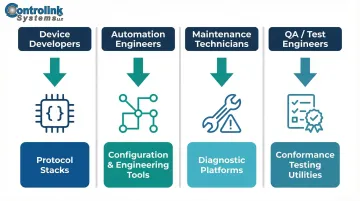
Not all PROFINET tools are built for the same job. A device developer integrating PROFINET into a new sensor has completely different needs than a maintenance tech troubleshooting a dropped connection on the shop floor. Here's how the tooling breaks down by role:
- Device developers — protocol stacks for embedded implementation
- Automation engineers — configuration and engineering tools for network setup
- Maintenance technicians — diagnostics platforms for fault isolation
- QA/test engineers — conformance testing utilities for certification prep
PROFINET Protocol Stacks
A PROFINET protocol stack is the software library that implements the PROFINET standard on an embedded device or controller, enabling it to participate as an IO-Device or IO-Controller on the network.
The table below compares the most widely used options:
| Stack/Vendor | Licensing Model | Conformance Support | Hardware Dependency |
|---|---|---|---|
| p-net (RT-Labs) | Dual: GPLv3 evaluation or commercial license | Class A & B, RT | Hardware-independent C code |
| Anybus CompactCom 40 (HMS) | Commercial hardware module | Class A, B, and C (IRT) | NP40 network processor module |
| netX/comX (Hilscher) | Commercial SoC/module | Class C (IRT) | netX SoC or comX modules |
Open-source stacks like p-net offer flexibility and no per-unit royalties during evaluation, but require commercial licensing for production deployment. Commercial stacks ship with pre-certified conformance and vendor support — essential for IRT Class C applications where timing determinism is non-negotiable.
PROFINET Configuration and Engineering Tools
Before a PROFINET network goes live, someone has to define its topology, name every device, and map all the I/O data. Configuration tools handle that setup work.
Key capabilities include:
- Network topology definition and visualization
- Station name assignment via DCP (Discovery and Configuration Protocol)
- GSDML file import and device catalog management
- I/O data mapping between controllers and devices
- IP address configuration and parameter assignment (including module-level settings)
GSDML Files Are Mandatory: Every PROFINET device must provide a GSDML (General Station Description Markup Language) file—an XML-based device description that tells the IO-Controller exactly how to communicate with the device, including module structure, I/O data sizes, parameters, and capabilities.
Siemens TIA Portal serves as the primary engineering framework for PROFINET networks, particularly in Siemens PLC environments. Vendor-neutral alternatives exist for facilities running mixed-vendor automation systems.
PROFINET Diagnostic and Network Analysis Tools
When a device drops off the network at 2 AM, the last thing a maintenance tech needs is a full PLC programming environment just to check alarm status. Dedicated diagnostic tools provide that visibility without the overhead.
PROFINET Commander (developed by Panoramix Services) provides vendor-independent IO-Controller functions including:
- DCP network browsing and device discovery
- Station name and IP address assignment
- Real-time I/O data read/write
- Alarm monitoring and diagnostics
- Data record access
Wireshark with PROFINET dissectors enables protocol-level network capture and deep packet inspection, allowing engineers to analyze PROFINET RT/IRT frames, DCP discovery multicasts, and alarm packets for troubleshooting.
Conformance and Simulation Testing Tools
Automated RT Tester (ART) is provided to PI members for conformance testing PROFINET device implementations against the specification. Certification is mandatory for all PROFINET devices, and using ART during the R&D phase helps developers identify issues before official lab certification.
Simulation tools round out this category by allowing testing of IO-Device behavior without physical hardware. Key use cases include:
- Validating device firmware logic before first hardware spin
- Running pre-production regression tests on updated stacks
- Giving software developers a testbed independent of physical lab availability
Key Features to Evaluate When Selecting PROFINET Software
Real-Time Class Support
Verify whether the software stack or tool supports the required communication class for your application. A stack supporting only TCP/IP class will not meet the cycle time requirements of motion control applications requiring RT or IRT performance.
Device Interoperability and GSDML Compliance
Manufacturing environments typically include devices from multiple manufacturers. Look for tools that correctly import and parse GSDML files from any vendor—incompatibility here causes failed device integrations and commissioning delays.
Note: PI introduced the GSDX container format, which applies certificate-based digital signatures to GSDML files to verify authenticity and integrity across multi-vendor environments.
Diagnostics Depth and Alarm Handling
Evaluate whether the tool surfaces:
- Channel-level diagnostics (not just device-level status)
- Manufacturer-specific alarms and error codes
- I&M (Identification and Maintenance) data
- Real-time alarm notifications
Deep diagnostics reduce mean time to repair on the shop floor by pinpointing fault locations quickly.
Integration with Existing Automation Ecosystems
Once diagnostics are in place, the next consideration is how well PROFINET software fits into your broader automation stack. For facilities running mixed-protocol environments—Modbus, EtherCAT, CAN, or serial communications—prioritize platforms that handle multi-protocol communication natively.
Controlink Systems LLC has supported PROFINET alongside Modbus, EtherCAT, CAN, and serial protocols since 1998, specifically for shop-floor environments where replacing legacy equipment isn't an option. Their work focuses on linking these protocols together without requiring a full infrastructure overhaul.
Implementing PROFINET in Your Manufacturing Environment
Start with a Network Assessment
Conduct a thorough assessment to:
- Map existing devices and their communication protocols
- Determine required real-time performance class for each application
- Identify which devices already support PROFINET
- Flag devices needing protocol gateways or hardware replacement
Critical First Step: Naming and Addressing Setup
PROFINET devices require unique station names assigned via DCP. Unlike traditional Ethernet devices, the IO-Controller configures IP addresses — not the device itself.
Device Replacement Advantage: This approach enables "tool-less" device replacement:
- Automatically assigns IP and parameters based on topological position and station name
- Eliminates manual reconfiguration during device swaps
- Reduces maintenance downtime with no specialized tools required
Improper naming is a top cause of commissioning delays. Establish a clear naming convention before deployment.
Integrating Legacy Equipment
Once your PROFINET naming structure is set, the next challenge is connecting devices that don't speak PROFINET natively. Many CNC machines and sensors communicate via Modbus RTU or serial protocols. Protocol conversion gateways allow these devices to appear as PROFINET IO-Devices on the network without hardware replacement.
Leading gateway solutions include:
| Vendor | Product | Legacy Protocol | Data Capacity |
|---|---|---|---|
| HMS Anybus | ABC4027-A | Modbus RTU Server | Up to 1024 bytes each direction |
| Moxa | MGate 5103/5134 | Modbus RTU/ASCII/TCP | Up to 1440 bytes per controller |
| Hilscher | netTAP 50 | Serial/Modbus RTU | Cost-optimized conversion |
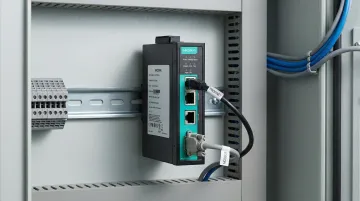
This lets you preserve existing equipment while connecting it to a PROFINET network — a practical upgrade route for shops that can't justify full hardware replacement. Controlink Systems has direct experience integrating multi-protocol environments, including PROFINET alongside Modbus and serial communications, for manufacturing facilities across the US.
Frequently Asked Questions
Which software is best for industrial automation?
There is no single best software—the right choice depends on the protocol (PROFINET, EtherCAT, Modbus), application requirements, and PLC ecosystem. Siemens TIA Portal dominates PROFINET-heavy environments, while vendor-neutral platforms suit mixed-protocol facilities.
Which PLC uses PROFINET?
Siemens S7 series (S7-1200, S7-1500, S7-300/400 with CP modules) are the most common PROFINET PLCs. Other manufacturers including Beckhoff, Phoenix Contact, B&R, and Allen-Bradley (via gateways) also support PROFINET IO-Controller or IO-Device roles.
Is PROFINET developed by Siemens?
PROFINET was originally developed by Siemens but is now an open standard governed by PI (PROFIBUS & PROFINET International), a global industry organization. Any vendor can implement PROFINET without Siemens involvement.
What is the difference between PROFINET RT and IRT?
RT delivers cycle times in the 1–10ms range for standard automation; IRT achieves sub-millisecond, jitter-controlled cycles for motion control. IRT requires dedicated hardware with cut-through switching and time synchronization support.
What is a GSDML file in PROFINET?
A GSDML file is an XML-based device description that every PROFINET IO-Device must provide. It tells the IO-Controller the device's module structure, I/O data sizes, parameters, and communication capabilities—enabling configuration without physical hardware present.
Can PROFINET integrate with other industrial protocols like Modbus or EtherCAT?
Yes, PROFINET interfaces with other protocols through protocol gateways and multi-protocol software platforms. This allows facilities to connect legacy Modbus, CAN, or serial devices into a PROFINET network without full hardware replacement, preserving existing equipment investments.
Need help implementing PROFINET in a multi-protocol manufacturing environment? Controlink Systems LLC builds CNC/DNC communication software and custom shop-floor integration solutions—including multi-protocol environments running PROFINET alongside Modbus, EtherCAT, CAN, and serial. Call (800) 838-3479 to talk through your specific setup.