Introduction
Walk into almost any machine shop today, and you'll likely see a familiar scene: machinists crossing the shop floor with USB sticks, floppy disks, or even paper tape in hand, manually loading NC programs one machine at a time. This "sneakerware" workflow creates costly inefficiencies that drain productivity and profits.
Every trip to retrieve a program means lost machining time. Worse, manually transferring files introduces serious risks — operators may accidentally load outdated or unapproved program versions, leading to scrapped parts and expensive rework. According to industry data, scrap and rework cost the average manufacturer up to 2.2% of annual revenue, with a large share stemming from process errors like running incorrect NC programs.
DNC (Distributed Numerical Control) software eliminates these problems by managing NC program distribution from a central server — giving every machine access to the correct, engineering-approved file without anyone walking the floor. It logs every transfer: which file, which machine, which operator, and when.
This guide walks you through what DNC software is, how it works, which features and reporting capabilities matter most, and how to choose a solution that fits your shop.
TLDR:
- DNC software eliminates manual USB/floppy disk program transfers, reducing errors and saving time
- It centralizes NC file storage and ensures operators always run the latest engineering-approved versions
- Key features: revision control, audit trails, remote program requests, and legacy machine support
- Shops typically see reduced scrap rates, improved machine utilization, and better compliance traceability
- Implementation can take days to weeks depending on shop size and file organization
What Is DNC Software and Why Does It Matter?
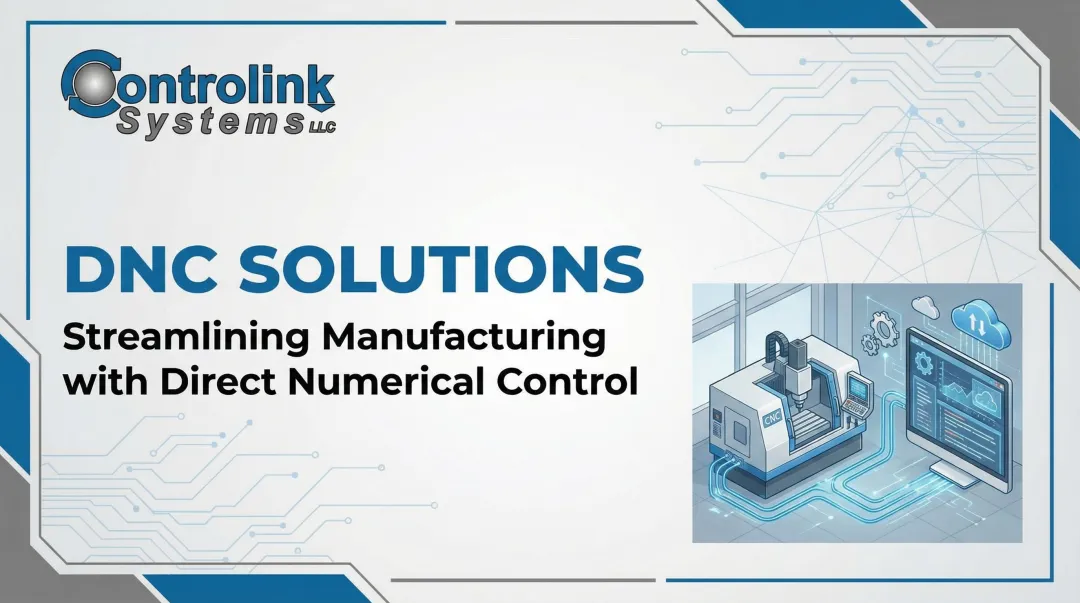
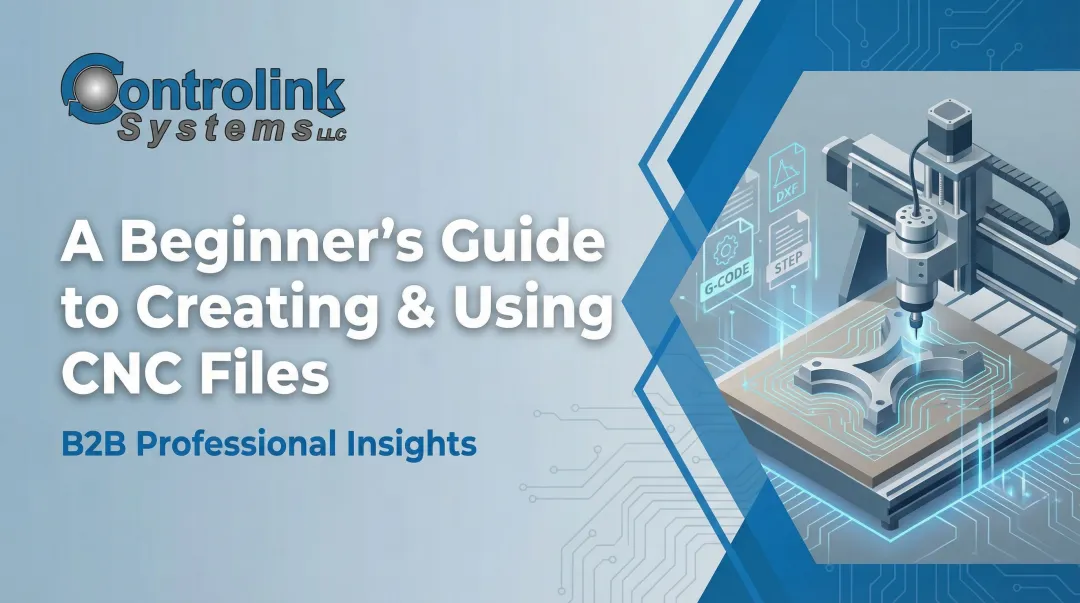
DNC stands for Distributed Numerical Control (or Direct Numerical Control). In plain language, it's software that manages the transfer of NC programs—the G-code instructions that tell CNC machines how to cut parts—from a central computer or server to machine tools on the shop floor. DNC acts as the critical bridge between your programming office (where CAD/CAM software creates toolpaths) and your production floor (where CNC machines execute those toolpaths).
The CAM-to-DNC Workflow
Here's where DNC fits in your manufacturing software stack. CAM (Computer-Aided Manufacturing) software generates the NC file by converting your part design into G-code toolpaths. Once that file is complete, DNC software picks up where CAM leaves off—it doesn't create programs; it delivers and manages them. CAM produces the instructions. DNC makes sure the right version reaches the right machine at the right time.
The Central Repository Concept
Instead of NC programs living on individual machines, portable USB drives, or scattered across multiple computers, DNC software stores all approved files in one central location. This single source of truth makes programs accessible to authorized operators without manual intervention. When a machinist needs a program, they request it electronically, and the DNC system delivers the current approved version directly to their machine control.
CNC vs. DNC: Understanding the Difference
CNC (Computer Numerical Control) refers to how individual machines interpret and execute programs—it's the onboard computer that reads G-code and controls the machine's movements. DNC refers to the network-level system that manages program distribution across multiple machines simultaneously. Your CNC controls run the programs; your DNC system ensures they're running the correct programs.
Why DNC Matters for Quality
DNC software acts as a gatekeeper for revision control. By controlling which program versions reach the shop floor, it directly reduces three common production problems:
- Scrap from wrong revisions — operators run the current approved file, not whatever's on a USB stick
- Rework from outdated code — engineering releases a new revision, and DNC makes it the only downloadable version
- Unapproved program use — access controls prevent machinists from bypassing the system with old files
How DNC Software Works: Connectivity and File Transfers
Supporting Both Modern and Legacy Equipment
DNC systems use two main connectivity types:
- Ethernet (RJ45): Modern CNC machines increasingly feature Ethernet ports, enabling fast file transfers and network-based program management
- RS-232 Serial: Legacy equipment relies on serial communication, often using specific parameters like 4800 or 9600 baud rate, even parity, and 7 data bits with XON/XOFF flow control
A good DNC solution supports both protocols, because most shops run a mix of old and new machines. You shouldn't have to replace perfectly functional legacy equipment just to implement modern program management.
Wired vs. Wireless Connections
Wired connections (Ethernet cables or serial cables) offer the highest reliability and are the standard for mission-critical production environments. Wireless (Wi-Fi) connections provide flexibility for shop layouts where running cables is impractical—such as machines that move frequently or facilities with challenging physical layouts.
Connecting CNC machines to networks does introduce cybersecurity risks. According to the 2022 Honeywell USB Threat Report, 52% of cyber threats are specifically designed to exploit removable media, and 81% can disrupt operational technology systems.
To address this, most IT policies segment the CNC network from the main corporate network using VLANs and VPNs. This follows NIST SP 800-82 guidelines for industrial control system security.
How File Transfers Actually Happen
The most common transfer method is the Remote Request:
- The operator needs a specific NC program to run a job
- From the CNC control (or a nearby terminal/tablet), they send a request with the program name or part number
- The DNC software receives the request and validates the operator's permissions
- The system pushes the correct engineering-approved file directly to that machine
- The file loads into the CNC control's memory, ready to run
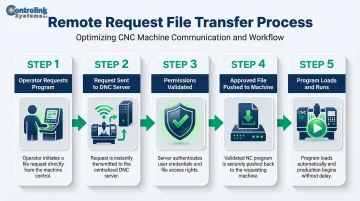
This eliminates the need to walk to the programming office, search for the right file, copy it to a USB stick, and walk back to the machine. The entire process takes seconds instead of minutes.
Alternative Transfer Methods
Remote Request is the most common method, but modern DNC systems support several ways to kick off a transfer:
- Shop floor terminals: Dedicated PCs or touchscreen kiosks near machine clusters
- Tablets: Mobile devices that operators carry to multiple workstations
- Barcode scanners: Scanning a barcode on the shop traveler or work order automatically requests the correct program
Handling the Reverse Flow (Uploading)
Sometimes machinists need to modify a program during production—adjusting feeds, speeds, or tool offsets to optimize the process. DNC software can capture that edited file back into a central inbox for review. The modified program doesn't automatically become the new official version. Instead, a programmer or engineer reviews the changes, validates them, and either approves the new version or rejects it. This workflow maintains engineering control while capturing valuable shop-floor improvements.
Key Features to Look for in DNC Software
Revision and Version Control
This is the most critical feature of any DNC system. The software should track every version of every NC file, recording:
- What changed between versions
- Who made the change
- When the change was made
- Which version is the current engineering-approved file
This audit trail ensures your shop knows which program version is official, preventing operators from running outdated code. In regulated industries like aerospace and medical device manufacturing, this traceability isn't just useful—it's often a compliance requirement.
Remote Request and Program Distribution
Operators should be able to call for programs directly from the machine control or a nearby terminal without leaving their workstation. This capability directly impacts machine utilization and uptime. According to industry research, average CNC machine utilization sits at just 23.9%, with significant time lost to setups and manual data handling. Eliminating program retrieval trips recovers valuable production time.
File Editing and Backplot Verification
Built-in G-code editing allows programmers to make quick adjustments without returning to CAM software. Graphical backplot — a visual simulation of the toolpath — lets programmers verify a program is correct before it runs on a machine, catching potential collisions, gouges, or incorrect tool movements before they cause expensive damage.
Security and Access Control
DNC software should enforce user-level permissions that protect data integrity and support traceability:
- Operators can download and run programs but cannot modify or delete them
- Programmers have edit rights and can approve new versions
- Engineers hold full administrative control over the system
That layered access model matters most when a single wrong program version can mean scrapped parts or a failed audit.
Scalability and Machine Compatibility
Your chosen DNC software should support:
- Both modern Ethernet-connected machines and legacy RS-232 serial equipment
- The ability to grow as your shop adds machines
- A range of CNC control brands and types (Fanuc, Haas, Mazak, Siemens, etc.)
You shouldn't need a complete system overhaul every time you purchase a new machine or upgrade existing equipment.
The Reporting Side: Audit Trails and Data Visibility
What Is a DNC Audit Trail?
A DNC audit trail is a time-stamped log of every file transfer event, recording:
- Which NC file was sent
- To which machine (by ID or name)
- By which operator or system user
- When the transfer occurred
- Which version of the file was transferred
This creates full accountability for what ran on the shop floor, answering the critical question: "What exact program was used to make this part?"
Compliance and Quality Value
In industries like aerospace, automotive, medical device manufacturing, and precision machining, proving which program version produced a specific part isn't optional. Quality standards mandate this traceability:
| Standard | Requirement |
|---|---|
| AS9100D (Aerospace) | Requires identification and traceability of outputs to track processes used in production |
| IATF 16949 (Automotive) | Requires documented traceability plans to identify root causes of defects |
| FDA 21 CFR Part 820 (Medical) | Requires Device History Records proving each unit was manufactured per approved specifications |
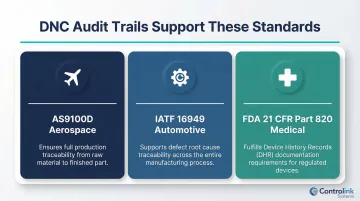
While these standards don't always explicitly mention "NC program version," auditors now routinely expect documented proof of the exact software versions used to manufacture parts — and production records without that detail don't pass scrutiny.
Production Intelligence from DNC Reporting
Beyond compliance, transfer logs unlock valuable production intelligence:
- Programs revised frequently often point to recurring tooling problems or unstable processes worth investigating
- Machines that repeatedly request the same file may have insufficient memory or inefficient operator setup routines
- Transfer timestamps give you a factual baseline for cycle time analysis and pinpointing shift-level bottlenecks
Most shops are sitting on this data already — a DNC system with solid reporting just makes it visible and usable.
Benefits Your Shop Can Expect from DNC Software
Reduced Scrap and Rework
By ensuring machinists always run the latest engineering-approved file, DNC software eliminates a major source of defects. As mentioned earlier, scrap and rework cost the average manufacturer up to 2.2% of annual revenue. A 2020 case study of Clearwater Engineering showed a 45% reduction in scrap simply by implementing software that ensured correct programs and tools matched to machines.
Elite manufacturers in the 2024 Modern Machine Shop Top Shops survey achieved scrap and rework costs of just 0.9% of sales, compared to 2.4% for other shops—a difference driven largely by process automation and strict revision control.
Improved Machine Utilization and Productivity
When operators no longer leave machines to retrieve programs, they spend more time cutting parts. The productivity gap between top shops and average ones illustrates the stakes:
| Metric | Top Shops | Other Shops |
|---|---|---|
| Spindle Utilization | 85% | Below 85% |
| Average Setup Time | 120 minutes | 240 minutes |
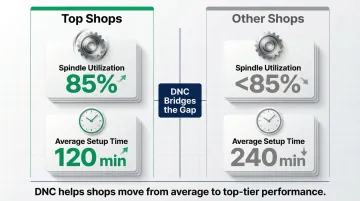
DNC isn't the only factor behind these numbers, but eliminating manual program retrieval is a direct contributor to both metrics.
Elimination of Sneakerware Risks
Removing USB drives and portable media from the file transfer process eliminates multiple risks:
- Security vulnerabilities: USB drives are a primary vector for malware and ransomware
- Data corruption: Physical media can fail or become corrupted
- Version chaos: No more wondering which USB stick has the current program
- Physical damage: Repeated insertion/removal can damage CNC equipment ports
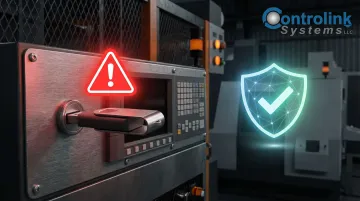
The 2025 NIST SP 1334 draft explicitly warns that using USB flash drives in operational technology environments poses severe risks, as malware can spread to industrial control systems and disrupt operations. The mean cost for a manufacturing organization to recover from ransomware is $1.67 million.
How to Choose the Right DNC Solution for Your Shop
Assess Your Shop's Specific Needs First
Before evaluating vendors, define your requirements. Start with connectivity — then move to operations.
Connectivity questions to answer:
- How many machines need to connect?
- What communication protocols do they use (RS-232, Ethernet, or both)?
- Is your shop floor layout suited for wired connections, or is wireless necessary?
- Do any machines require drip-feeding due to limited memory?
Operational questions to answer:
- How many operators will use the system?
- What level of access control do you need?
- Do you require integration with existing ERP or MES systems?
- What reporting and compliance capabilities are mandatory?
Once you've mapped your requirements, use them as a filter when evaluating vendors.
Evaluate Vendor Experience and Support
Look for a provider with proven experience in manufacturing environments, not just generic software development. Controlink Systems LLC, for instance, has been developing CNC/DNC communication software since 1998 — serving small job shops and major manufacturers like 3M, Kodak, and Timken alike. That depth of experience translates directly into software built around how shop floors actually operate: legacy equipment support, operator-friendly interfaces, and minimal training overhead.
Ask the Right Questions Before Buying
Before committing to a vendor, run through these questions across three areas: technical fit, integration potential, and ongoing support.
Technical fit:
- Does the software support both RS-232 serial and modern Ethernet connections?
- What CNC control brands and types are compatible?
Integration and scalability:
- Does the system support Open API integration for future MES or ERP connectivity?
- Can the software grow with your shop as you add machines?
- What is the licensing model — per-PC, per-machine, or site license?
Usability and support:
- Is the interface designed for shop floor operators, or does it require IT expertise?
- What training and onboarding support is included?
- What is the vendor's update schedule, and what's the typical implementation timeline for a shop your size?
Frequently Asked Questions
What is the difference between DNC and CNC?
CNC refers to how a single machine tool interprets and executes numerical control programs. It's the onboard computer that reads G-code and controls the machine's movements. DNC is the broader network system that distributes and manages NC programs across multiple machines from a central server.
Do I still need DNC software if my CNC machines have enough onboard memory?
Yes. Even machines with sufficient memory benefit from DNC because the value goes beyond storage. Onboard memory can't prevent operators from loading outdated programs or generate the compliance documentation showing which version was actually used.
What types of CNC machines are compatible with DNC software?
Most DNC software supports both modern Ethernet-connected machines and legacy RS-232 serial machines, meaning shops with a mix of old and new equipment can use a single DNC system. Compatibility typically extends across major control brands including Fanuc, Haas, Mazak, Siemens, and others.
How does DNC software prevent machinists from running outdated NC programs?
DNC software serves as the single source of truth for approved files. Operators can only download files from the central repository, so the most current engineering-approved version is always what reaches the machine. When engineering releases a new revision, that becomes the only available version.
What reporting data does DNC software typically provide?
Most DNC systems generate three core report types:
- File transfer logs — who sent which program to which machine and when
- Version history records — a full change log for each NC file
- Audit trails — every action taken on a file, from edit to download
This data supports quality audits, regulatory compliance, and production traceability.
How long does it take to implement a DNC system in a machine shop?
Implementation timelines vary by shop size and machine count, but many shops can be up and running within days to a few weeks. The larger time investment is typically in organizing existing NC file libraries, setting up user permissions, and training operators—not in the software installation itself.
Ready to eliminate sneakerware and improve your shop's efficiency? Contact Controlink Systems LLC at (800) 838-3479 to discuss how DNC software can reduce scrap, improve traceability, and boost machine utilization in your facility.