Introduction
Walk into any CNC machine shop on first shift and the routine is familiar: a machinist retrieves a program file, loads it onto a USB drive, walks it to the machine, and manually keys in job details—then does it again for the next setup. Meanwhile, a supervisor logs machine status by hand on a clipboard, quality inspectors transcribe measurements into spreadsheets, and engineering releases a program revision that three machines won't see until scrap parts start appearing.
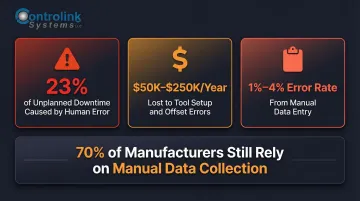
That routine has a price. Manufacturing shops face rising demand for precision, tighter lead times, and the compounding cost of scrap and downtime. User error accounts for 23% of unplanned manufacturing downtime, a rate higher than other industries. Manual processes—walking programs to machines, hand-keying job data, chasing down paperwork—directly increase scrap, labor costs, and the likelihood of running outdated program revisions.
Shop management software eliminates these inefficiencies by automating repetitive, error-prone tasks across CNC program distribution, machine monitoring, quality tracking, and administrative reporting. This article breaks down the main types of tasks that shop management software automates, what each delivers, and how to determine where automation makes the most sense for your operation.
Key Takeaways
- Shop management software automates repetitive tasks across CNC program distribution, machine monitoring, quality tracking, and reporting
- Manual processes drive up scrap, downtime, and labor costs; tool setup errors alone cost shops $50,000 to $250,000 annually
- Automation covers three core areas: CNC/DNC program management, machine monitoring and production tracking, and quality control and reporting
- Start with the task causing the most measurable pain—typically program distribution or machine monitoring
- Choose software built for manufacturing environments with direct CNC, PLC, and shop-floor integration
What Is Shop Management Software?
Shop management software is a system that connects the people, machines, and data in a manufacturing or machining environment to coordinate workflows, distribute information, and capture operational data automatically—without relying on manual intervention at each step.
Generic business management software—designed for retail, service, or distribution—functions purely as an administrative tool. Manufacturing-specific shop management software is different. It integrates directly with CNC machines, PLCs, and shop-floor equipment, and handles the specifics that general platforms can't:
- Communicates in ISO 6983 G-code with CNC controllers
- Transfers programs over serial RS-232 and Ethernet connections
- Captures machine state data in real time without manual logging
Controlink Systems LLC builds DNC and shop-floor automation software in this category, developed specifically for machining environments where these protocol-level integrations are non-negotiable.
Why Automating Shop Floor Tasks Matters in Manufacturing
Manual processes in production environments compound errors across shifts and orders. Three scenarios play out constantly in shops that haven't automated:
A machinist runs an outdated CNC program because the latest revision wasn't distributed. A supervisor logs downtime in a spreadsheet — already 30 minutes behind reality. A quality check gets recorded on paper, transcribed into Excel at shift end, and flagged out of spec only after the full batch is complete.
Each introduces delay, inconsistency, and risk. Without automation, typical problems include:
- Scrap from incorrect program versions: Machinists run unapproved or outdated revisions, leading to costly rework
- Invisible production bottlenecks: Downtime goes undetected until output is already behind schedule
- Reactive reporting: Management receives data one step behind reality instead of live visibility
The financial impact is severe. Manual tool setup and offset errors cost small-to-mid-size CNC shops between $50,000 and $250,000 per year. Manual data entry carries error rates of 1% to 4%. Meanwhile, 70% of manufacturers still rely on manual shop-floor data collection — consuming 50% to 85% of operator administrative time.
Types of Tasks Automated with Shop Management Software
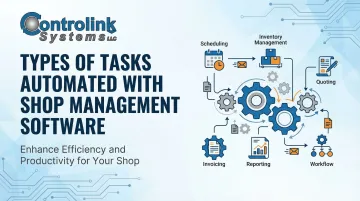
Shop management software does not automate one single process—it spans multiple distinct task categories, each addressing a different operational pain point. Understanding these categories helps managers and shop owners evaluate software options based on what their floor actually needs, rather than selecting based on feature lists alone. Shops can prioritize or implement them in phases based on their specific challenges.
CNC/DNC Program Management Automation
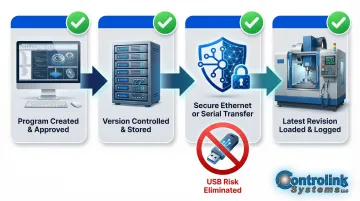
CNC/DNC (Distributed Numerical Control) program management automation transfers, stores, version-controls, and distributes CNC part programs from a central server or engineering workstation directly to the appropriate machine tool—eliminating the need for machinists to physically carry programs via USB, floppy disk, or memory card.
How it differs: Unlike general file-sharing tools, DNC automation enforces version control so machinists can only access the latest engineering-approved program for each job. Every transfer is logged with a timestamp and machine ID for traceability—something manual distribution cannot guarantee.
Best suited for:
- Machine shops running a high mix of part numbers across multiple CNC machines
- Facilities where engineering updates programs frequently
- Environments where running an incorrect revision creates costly scrap or rework risk
Key strengths:
- Eliminates the "wrong program" scrap problem
- Removes time machinists spend walking to and from a shared computer
- Ensures engineering changes propagate to the floor immediately
- Creates an auditable trail of which program ran on which machine and when
Limitations / trade-offs: Requires reliable network connectivity throughout the shop floor. Older CNC machines with legacy communication interfaces (serial, RS-232) may need hardware adapters or protocol bridging to connect to the DNC system.
Security considerations: 52% of industrial cyber threats are designed to exploit removable media, and the 2025 NIST SP 1334 draft explicitly warns against USB use in Operational Technology (OT) environments. DNC software eliminates this risk by replacing USB transfers with network-secured program distribution.
Machine Monitoring and Production Tracking Automation
Machine monitoring automation continuously captures real-time data from CNC machines and production equipment—including machine state (running, idle, alarm, setup), cycle counts, actual cycle times versus standard, and operator-reported downtime reasons—and presents this information in dashboards without requiring manual logging.
How it differs: Traditional production tracking relies on operators or supervisors recording job status on clipboards, whiteboards, or spreadsheets at intervals. Automated monitoring collects data continuously and at the machine level, giving supervisors an accurate, current picture of floor activity from any location.
Best suited for:
- Mid-to-large machine shops with multiple spindles running simultaneously
- Facilities trying to improve Overall Equipment Effectiveness (OEE)
- Any shop where supervisors currently walk the floor repeatedly to assess job progress or machine availability
Key strengths:
- Surfaces hidden inefficiencies—machines that appear busy but are actually idle
- Supports data-driven scheduling and staffing decisions
- Reduces management overhead of manually chasing job status updates
Real-world impact: Implementing a Manufacturing Execution System (MES) improves on-time delivery rates by an average of 22%. In one aerospace case study, toolpath-level machine monitoring reduced program cycle times by 10% and improved OEE by 10 points.
Limitations / trade-offs: The value of machine monitoring data depends on the consistency of how operators log downtime categories. Shops without a culture of accurate data entry may find the system reflects incomplete information until operator habits improve.
Quality Control, Process Data, and Administrative Task Automation
This category covers automation of tasks that bridge production execution with compliance, quality, and business operations—including in-process measurement data capture (SPC), end-of-line test result logging, work order generation and closure, job costing, and management reporting. Instead of manually recording inspection results or compiling reports from multiple spreadsheets, the software captures and aggregates this data in real time.
How it differs: This category addresses the administrative burden that falls on supervisors, quality technicians, and shop managers—reducing the time spent assembling data after the fact and replacing it with automated data collection at the point of production and inspection.
Best suited for:
- Shops with quality compliance requirements (automotive, aerospace, medical)
- Facilities running end-of-line functional tests
- Operations where job costing accuracy is critical to quoting and profitability analysis
Key strengths:
- Eliminates manual transcription errors in quality records
- Accelerates reporting from hours to seconds
- Provides management with real-time visibility into yield, scrap rates, and job profitability without waiting for end-of-shift summaries
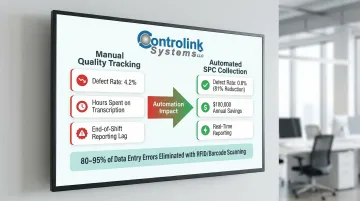
Quality impact: Implementing real-time Statistical Process Control (SPC) in CNC environments reduced defect rates from 4.2% to 0.8%—an 81% reduction—saving $180,000 annually. Automated data collection technologies like RFID and barcode scanning eliminate 80% to 95% of data entry errors.
Limitations / trade-offs: Automating quality data collection often requires integration between the shop management software and measurement devices or test equipment. Not all platforms support this out of the box, and custom integration work may be needed depending on the equipment in use.
How to Prioritize Which Shop Tasks to Automate First
The best starting point for automation is the task causing the most measurable pain right now — scrap from wrong programs, missed deadlines from poor production visibility, or hours lost to manual reporting. Complexity doesn't drive priority. Cost does.
Simple prioritization framework:
- Frequency: How often is this task performed?
- Error rate: How often does the manual version produce a mistake?
- Downstream cost: What does a wrong CNC program or missed alarm actually cost?
- Current staff time: How many hours per week are consumed by this task?
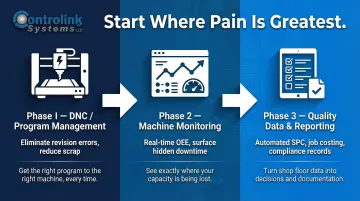
What high-performing shops automate first: According to Modern Machine Shop's Top Shops benchmarking data, installing a web-enabled, shop-wide machine monitoring system is widely recognized as the critical first step toward data-driven manufacturing. By establishing DNC and machine monitoring first, shops gain the accurate baseline data required to justify further investments.
Phased approach: That DNC-first finding points to a broader principle. Shops that try to automate everything at once spread teams too thin and see slower results from each initiative. Starting with DNC/program management or machine monitoring, then layering in quality data and reporting, builds on each win and keeps budgets focused where they deliver the most impact.
Common Mistakes When Automating Shop Floor Tasks
Even well-intentioned automation projects fail when the foundation is wrong. These four mistakes account for the majority of stalled or abandoned shop floor implementations:
Generic business software: Platforms built for retail or distribution lack direct integration with CNC controllers, PLCs, or shop-floor communication protocols — forcing workarounds that defeat the purpose of automation.
Automating a broken process: If work orders are inconsistently created or job routing is unclear, layering automation on top amplifies the problem. Fix the process first: understand how it actually runs, simplify it, then automate. Skipping those first two steps is where most shops go wrong.
Interfaces that require too much training: Only 20% of lagging manufacturers deploy digital tools specifically to support frontline workers. Tools that demand complex operator interaction get ignored. Software designed around the machinist's actual workflow gets used from day one.
Underestimating change management: 72% of manufacturers report negative operational impacts from poor change management during technology rollouts. Cross-functional teams and clear communication about day-to-day benefits make the difference between adoption and abandonment.
Conclusion
Shop management software automates tasks across three core areas—CNC/DNC program distribution, machine monitoring and production tracking, and quality/administrative reporting—each of which directly reduces scrap, downtime, and the administrative overhead that erodes margins and machine utilization:
- Program distribution — engineers push verified files directly to machines, cutting revision errors at the source
- Machine monitoring — real-time status and utilization data replace manual floor checks and paper logs
- Reporting — quality records and production summaries generate automatically, without spreadsheet assembly
The highest-performing shops are not necessarily the largest. They are the ones that have eliminated the manual, error-prone steps between engineering, the machine, and management. Choosing automation software built specifically for manufacturing environments—with direct CNC integration, protocol support for legacy machines, and interfaces designed for the shop floor—is the most direct path to faster, more reliable production.
Frequently Asked Questions
What are the 4 types of automation?
The four traditional types of industrial automation are:
- Fixed (hard) automation — preset sequence for high-volume, repetitive production
- Programmable automation — software-reconfigurable operations for batch production (for example, CNC machines)
- Flexible automation — handles product variety with minimal changeover time
- Integrated automation — connects business functions, design, and shop-floor execution
Shop management software typically falls into the programmable or integrated category, coordinating multiple processes across the floor.
What are examples of automating tasks in a machine shop?
Concrete examples include automatically sending the correct CNC program to a machine when a job is loaded, triggering a low-stock alert when tooling inventory drops below a set threshold, and generating a shift production report without any manual data entry. Other examples include automated quality data capture from measurement devices and real-time machine status dashboards that eliminate manual clipboard logging.
What tasks should a CNC machine shop automate first?
Start with the task causing the most visible and costly errors—typically CNC program distribution (to prevent scrap from wrong revisions) or machine monitoring (to surface downtime that is currently invisible). These foundational systems provide the baseline data needed to justify further automation in quality control and administrative reporting.
How does shop management software reduce scrap?
Scrap reduction comes primarily from ensuring machinists always run the latest approved program version, eliminating revision errors. Automated monitoring catches in-process anomalies earlier, and real-time quality data flags deviations before a full batch is affected. Case studies show defect rate reductions of up to 81% when real-time SPC is implemented.
Can shop management software integrate with existing CNC machines?
Most manufacturing-focused shop management platforms support a range of CNC communication protocols (serial, DNC, Ethernet). Experienced vendors can bridge legacy machines alongside modern controllers within the same system, using hardware adapters or protocol converters for RS-232 and similar interfaces.
Does automating shop tasks require replacing existing equipment?
No. Automation software typically layers on top of existing machines and infrastructure rather than replacing them. It connects to current CNC controllers, measurement devices, and ERP/accounting systems through software interfaces and adapters rather than requiring new capital equipment purchases.