Integrating automation into a live industrial environment is far from plug-and-play. Results vary widely depending on legacy equipment compatibility, protocol support, phasing strategy, and workforce readiness. Without a structured approach, integration projects spiral into budget overruns, extended downtime, and underperforming systems that fail to deliver promised ROI.
This guide walks through the exact steps, pre-integration requirements, critical success factors, and mistakes to avoid when adding automation to an already-running industrial operation. Whether you're targeting CNC communications, process monitoring, or end-of-line inspection, the principles remain the same: audit first, scope tightly, integrate in phases, and validate relentlessly.
Key Takeaways
- Audit current systems thoroughly before selecting any new technology
- Use a phased integration approach to minimize downtime and production disruption
- Confirm protocol compatibility (Modbus, Profinet, EtherCAT, Serial) before connecting new and legacy equipment
- Common failures stem from skipping assessments, choosing incompatible systems, or underinvesting in operator training
- Set clear goals, choose compatible tools, and monitor performance continuously after go-live
How to Integrate Automation Systems Into an Existing Industrial Setup
Step 1: Audit and Map Your Existing Systems
A rigorous system audit is your only defense against catastrophic project delays. NIST SP 800-82r3 provides authoritative guidance on mapping data flows and establishing accurate hardware and software inventories for industrial control systems.
What a comprehensive audit covers:
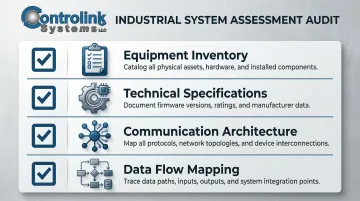
- Equipment inventory: Document every machine, controller, sensor, and communication link currently in use
- Technical specifications: Record makes, models, ages, and communication capabilities (RS-232, Ethernet, analog I/O)
- Communication architecture: Identify which protocols each device speaks and how they currently connect
- Data flow mapping: Trace where data is generated, stored, and used across the shop floor
Integration-ready versus integration-hostile equipment:
Machines with open communication ports, PLC compatibility, and documented protocols integrate smoothly. Equipment with proprietary or closed architectures requires middleware, protocol converters, or retrofitting.
Older facilities frequently lack documentation for existing control systems and wiring. That makes the audit more time-consuming — and even more critical.
The cost of skipping this step:
Skipping this step creates two predictable problems:
- Undocumented legacy control programs conflict with new machinery, causing failures at commissioning
- Purchasing equipment before inventory is complete leads to compatibility surprises requiring expensive mid-project engineering workarounds
Step 2: Define Automation Goals and Scope
Goals must be specific and measurable before any purchase or engineering decision. "Improve efficiency" is not a goal—it's a wish. "Reduce manual NC file transfers by 80%" or "Automate end-of-line inspection on Line 3 to catch 95% of defects" are goals.
Why scope discipline matters:
Scope creep is the most common project management challenge, cited by 59% of managed service providers. In automation projects, scope creep causes budget overruns and timeline failures. Start with one production cell or bottleneck area rather than multiple systems simultaneously.
That focus also makes ROI easier to measure. Some of the highest-payback targets in CNC and machining environments include:
High-ROI targets in CNC/machining environments:
- DNC/CNC communications: Eliminate manual program transfers, reduce file version errors
- Tool offset automation: Cut setup time and scrap from incorrect offsets
- Real-time process monitoring: Detect deviations before they produce defective parts
Targeted automation projects deliver rapid payback. One electronics manufacturer achieved 280% ROI with a 4.3-month payback period by implementing automated visual inspection in a single cell, increasing throughput by 32% and reducing defect escape rates by 94%.
Step 3: Select Compatible Automation Technology
Protocol compatibility is non-negotiable:
The chosen hardware and software must support the communication protocols already in use—or require minimal bridging. Legacy protocols like Modbus transmit data in clear text and lack user authentication. Modern systems use encrypted standards like OPC UA.
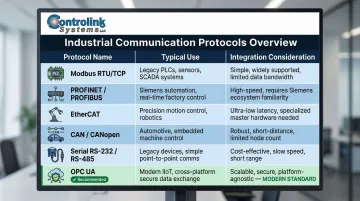
Common industrial protocols for brownfield integration:
| Protocol | Typical Use | Integration Consideration |
|---|---|---|
| Modbus (RTU/TCP) | Simple master-slave serial/TCP communication | Lacks native security; requires gateway for secure integration |
| PROFINET/PROFIBUS | Leading Industrial Ethernet standard | Legacy PROFIBUS systems migrate to PROFINET using proxy devices |
| EtherCAT | Deterministic real-time performance | Handles 1000 I/Os in 30µs; excellent for motion control |
| CAN/CANopen | Embedded networks, automotive | Data rates from 10 kbit/s to 1000 kbit/s |
| Serial (RS-232/485) | Legacy point-to-point or multipoint | Highly susceptible to noise without proper grounding |
| OPC UA | Secure, platform-independent | Uses X.509 certificates and semantic data modeling |
Software layer selection matters equally:
Automation software must interface with existing PLCs, SQL databases, motion controllers, and HMI screens without requiring complete control system replacement. To integrate insecure legacy protocols safely, facilities must deploy industrial edge gateways that act as translation engines, physically separating OT traffic from IT networks and wrapping legacy protocols in encrypted envelopes.
Controlink Systems LLC's shop-floor automation solutions are built specifically to interface with existing CNC machines, PLCs, and databases—supporting protocols including CAN, UDS, Modbus, Serial, Profinet, and EtherCAT to connect legacy equipment without ripping out existing infrastructure.
Step 4: Execute Integration in Phases
Why phased rollout reduces risk:
A "big bang" cutover carries high risks of unpredicted technical problems and severe failure impacts. Phased rollouts allow facilities to maintain production during implementation and limit the scope of any single failure.
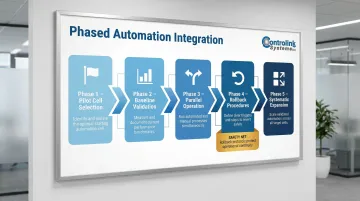
Phased integration approach:
- Start with a pilot cell — select one production area as your test bed
- Validate against baseline metrics — measure improvements versus pre-automation benchmarks
- Run parallel operation — run new and existing systems simultaneously before full cutover
- Define rollback procedures — maintain the ability to bypass the automated system if failures occur
- Expand systematically — apply lessons learned before moving to subsequent cells
Completing each phase sequentially also generates the documentation that makes commissioning and validation faster for later cells.
Commissioning and validation requirements:
IEC 61508 dictates a strict safety lifecycle for commissioning and validation to prevent failures from being "built into" the system. Before go-live sign-off, validate:
- Verify every I/O point operates correctly (functional testing)
- Confirm data exchange between all connected systems (communication handshakes)
- Test emergency stop procedures and safety circuits (alarm and interlock validation)
- Define clear, measurable performance thresholds before sign-off (acceptance criteria)
Operator training starts before go-live:
Operators and maintenance staff need training before go-live, not after. Cover HMI navigation, error response procedures, and basic troubleshooting at minimum. Poorly designed HMIs that lack situational awareness increase operator fatigue and raise the likelihood of safety incidents — a risk that training alone can't fully offset if the interface itself is poorly designed.
What You Need Before You Start: Pre-Integration Checklist
Skipping pre-integration preparation is the single biggest reason integration projects go over budget and fail to deliver expected results. Even well-chosen technology cannot compensate for a poorly understood starting environment. Before touching a single cable, confirm readiness across three areas: equipment and infrastructure, communication protocols, and team skills.
Equipment and Infrastructure Requirements
What must be in place:
- Sufficient electrical capacity for new control panels and devices
- Industrial Ethernet, wireless, or serial cabling between control systems
- Compatible physical mounting and enclosure space for new hardware
- Reliable, redundant network if cloud or database connectivity is planned
- Proper cooling, contamination protection, and environmental monitoring
The NIST MEP highlights a mandatory checklist including assessing maintenance resources, computer/network communications (IT/OT personnel), cybersecurity infrastructure, and servers/backup systems.
Communication and Protocol Readiness
Each machine in the existing setup must be confirmed to support — or be retrofittable to support — the target protocol. Document which machines speak which protocols and identify any that require a protocol converter or gateway device.
Protocol compatibility assessment:
- Confirm baud rates, data bits, stop bits, and parity settings for serial devices
- Verify IP addressing schemes and subnet compatibility for Ethernet-based protocols
- Identify machines using proprietary protocols that require custom drivers or OPC-UA bridges
- Test physical connections and cable integrity before assuming compatibility
Unsupported legacy machines rarely require full replacement. RS-232 to Ethernet converters or wireless adapters can extend connectivity to older equipment without touching the controller.
Skill and Safety Readiness
Operator and technician knowledge requirements:
- Familiarity with PLC ladder logic or HMI operation
- Understanding of lockout/tagout (LOTO) procedures during installation
- Basic troubleshooting skills for communication failures and sensor issues
- Knowledge of change control documentation requirements in regulated industries (aerospace, medical)
ISA-101's lifecycle framework for HMI design sets the benchmark here: operators trained on human-centered interfaces detect and respond to abnormal conditions faster, which directly reduces unplanned downtime during and after integration.
Key Factors That Determine Integration Success
Two facilities can follow the same integration steps and get vastly different results. What separates a smooth deployment from a costly one is how well four specific variables are managed: protocol compatibility, data quality, operator adoption, and rollback planning.
Protocol and System Compatibility
Incompatible protocols between old and new equipment force workarounds — custom drivers, OPC-UA bridges, or manual data entry — that introduce latency, error risk, and maintenance overhead. Legacy protocols transmit data in clear text and lack user authentication, creating cybersecurity vulnerabilities when connected to modern networks.
Protocol mismatches delay timelines and increase costs. Edge gateways that translate insecure legacy protocols into secure OPC UA streams add hardware expense upfront, but they prevent the need for wholesale infrastructure replacement down the line.
Data Quality and Sensor Accuracy
Automation decisions are only as reliable as the data feeding them. Dirty, delayed, or uncalibrated sensor data produces false alarms, missed defects, or incorrect machine commands.
In-situ monitoring studies show that sensor selection and signal quality drastically alter detection accuracy. At a 0.5% porosity threshold, camera-based systems detected 43% of compromised parts compared to only 20% for photodiode systems. Detectability improves as the Signal-to-Noise Ratio increases.
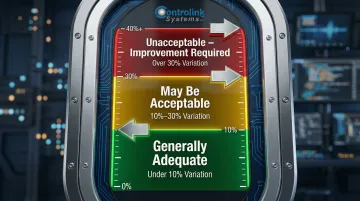
Measurement Systems Analysis (MSA) and Gage R&R studies are the standard for validating machine vision and sensor systems:
- Under 10% study variation: Generally adequate measurement system
- 10% to 30% variation: May be acceptable for some applications
- Over 30% variation: Unacceptable; improvement required
Change Management and Operator Buy-In
Operators who distrust the new system will work around it — entering false data, bypassing interlocks, or reverting to manual methods — which defeats the automation's purpose. The integration of robotics and advanced technologies increases the cognitive overload of operators, making intuitive interface design non-negotiable.
User-friendly HMI design and upfront operator training reduce resistance and directly improve system utilization rates post-integration. That's precisely what ISA-101 codifies: intuitive user interaction and structured training so operators can detect and respond to abnormal situations faster.
Phasing and Rollback Planning
Without a defined rollback plan, any malfunction during go-live can halt production indefinitely while the team troubleshoots. Phasing limits the blast radius of any single failure and provides a safety net through parallel operation.
Integrations with tested rollback procedures recover faster from unexpected issues than all-at-once deployments. The gap is significant: traditional backup restoration can take hours or days, while high-availability clustering with built-in failover mechanisms typically limits unplanned downtime to seconds or minutes.
Common Mistakes When Integrating Industrial Automation Into Existing Setups
Compatibility problems that derail timelines:
Purchasing automation equipment before completing a full inventory and communication audit of existing machines leads to expensive engineering workarounds mid-project. Older facilities frequently lack complete documentation — which makes the audit time-consuming, but skipping it is more costly.
No clear success criteria:
Integrations scoped around "improving efficiency" rather than specific, quantifiable targets have no acceptance criteria — making it impossible to confirm success or identify underperformance. Without measurable goals, teams can't validate whether the automation delivered the expected ROI.
Treating software as an afterthought:
Facilities often budget for hardware but underestimate what it takes to make that hardware actually work — custom programming, database connectivity, and HMI development all add up. The gap is significant: according to a 2026 factory automation report, 65% of successful firms have fully integrated automation systems, compared to only 8–21% of less successful ones.
Going live without a monitoring plan:
Going live without a monitoring and maintenance plan means early-stage issues — sensor calibration drift, communication timeouts, file transfer errors — go undetected until they cause production disruptions. Poor data quality is the most commonly reported barrier to industrial analytics, which makes post-integration monitoring a critical step, not an optional one.
Troubleshooting Common Integration Issues
Even well-planned integrations hit snags during and after go-live. The three issues below — communication failures, false alarms, and post-integration slowdowns — account for most of what shops encounter. Diagnosing them methodically keeps minor hiccups from turning into line stoppages.
Communication Failures Between Old and New Equipment
Likely causes:
- Protocol mismatch or incorrect configuration (baud rate, IP address, subnet)
- Faulty gateway or converter device between legacy and new control systems
- Physical connection issues (damaged cables, loose connectors)
- Electrical noise from nearby machinery interfering with signal lines
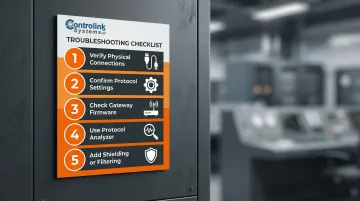
What to check or adjust:
- Verify physical connections and cable integrity first
- Confirm protocol settings match on both ends (baud rate, data bits, stop bits, parity)
- Check gateway device firmware and configuration
- Use a protocol analyzer to confirm data packets are transmitting correctly
- Add shielding or filtering to signal cables in electrically noisy environments
Automation System Triggers False Alarms or Incorrect Outputs
Likely causes:
- Sensor miscalibration or drift over time
- Incorrect threshold values in the control software
- Poor Signal-to-Noise Ratio from inadequate sensor selection for the application
Diagnostic steps:
- Recalibrate sensors against a known reference
- Review and tighten control software alarm setpoints
- Conduct Gage R&R studies to validate measurement system accuracy
- Upgrade sensors if the current selection cannot achieve required SNR or detection accuracy — add shielding as a secondary measure if swapping hardware isn't immediately feasible
Production Slowdown After Integration
Likely causes:
- New system adds latency to the process loop (slower PLC scan time, database write delays)
- Operators reverting to manual steps due to unfamiliarity with new workflow
- Network congestion or insufficient bandwidth for data transmission
- Inadequate training leading to inefficient system use
How to fix it:
- Measure control loop timing at each stage to pinpoint latency sources
- Optimize database query frequency and batch data writes
- Identify operator workarounds through observation and address with targeted retraining
- Review network traffic and upgrade infrastructure if bandwidth is insufficient
- Simplify HMI workflows to reduce operator decision time
Frequently Asked Questions
What is automation system integration?
Automation system integration connects new automated components—controllers, sensors, robots, and software—into an existing facility so all systems communicate as a unified whole. ISA-95 defines a Purdue Reference Model architecture for safe, cost-effective information exchange between business and manufacturing control systems.
What are the 5 basic components of an automated system?
The five core components are: input sensors (data acquisition), processors/controllers (PLCs, PCs), output actuators (motors, valves, robots), communication networks that connect all components, and the human-machine interface (HMI) that operators use to monitor and control the system.
What are the 4 types of industrial automation?
The four types are fixed (hard) automation for high-volume repetitive production, programmable automation for batch production using PLCs and CNC machines, flexible automation for low-changeover variety production, and integrated automation that combines all types into one cohesive system across the full production process.
How long does it typically take to integrate automation into an existing industrial setup?
Timelines vary by scope: a single-cell implementation typically completes in about 10 weeks after pilot testing, while a facility-wide rollout can take several months. Phased approaches take longer overall but reduce risk and maintain production continuity at each stage.
How do you ensure minimal downtime during automation integration?
Key practices include starting with a pilot cell, running new and existing systems in parallel before full cutover, and scheduling installation during planned maintenance windows. Define rollback procedures upfront so the automated system can be bypassed quickly if failures occur.
What communication protocols are used in industrial automation integration?
Common industrial protocols include Modbus, Profinet, EtherCAT, CAN, UDS, OPC-UA, and Serial (RS-232/485). Protocol compatibility between legacy equipment and new automation systems must be confirmed during the pre-integration audit, and gateway devices may be required to bridge incompatible protocols.