Introduction
Picture this: a machinist walks across the shop floor, USB drive in hand, to load a new program onto a CNC machine. The machine sits idle while the operator navigates menus, selects the file, and waits for the upload.
Multiply that by dozens of machines and hundreds of program changes per week. The hidden cost: lost spindle time, version control chaos, and scrap parts cut from outdated files.
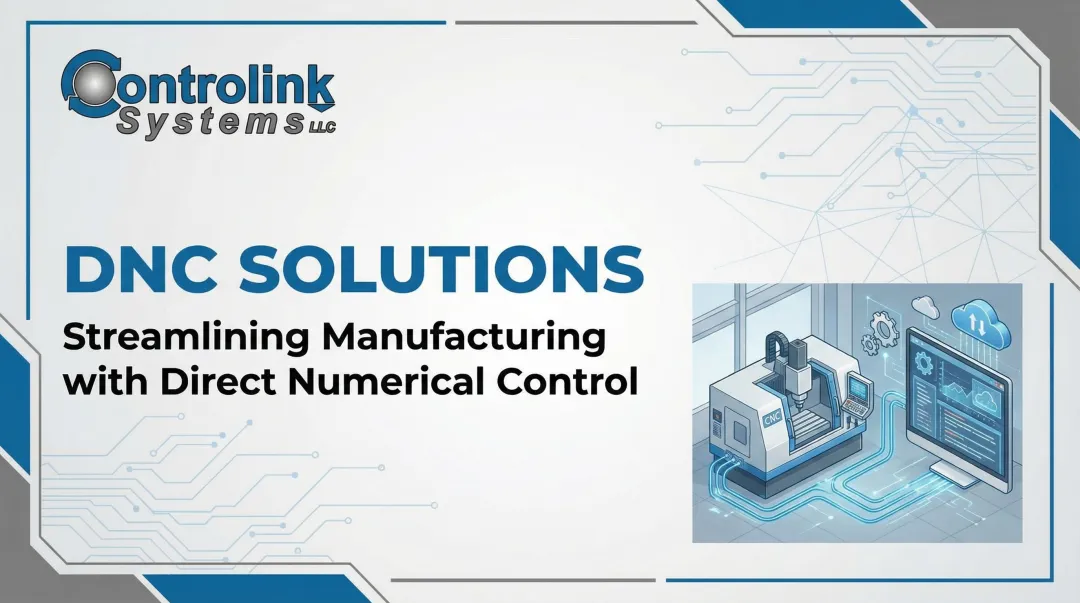
Direct Numerical Control (DNC) solves this directly. Instead of manual transfers, DNC systems send programs from a central computer to any machine on the floor—no walking, no waiting, no outdated files running on the wrong machine.
This guide covers the two meanings of the acronym, how DNC differs from NC and CNC, how modern systems work, the measurable benefits for your shop, and what to look for when choosing a solution.
TLDR: Key Takeaways
- DNC stands for both "Direct" and "Distributed" Numerical Control—two related but distinct concepts
- DNC connects CNC machines to a central computer for instant program transfer and version control
- "Drip feeding" streams large programs block-by-block, bypassing machine memory limits for complex parts
- DNC reduces scrap, downtime, and program errors by ensuring operators always run the latest approved file
- Modern DNC systems also handle machine monitoring, audit trails, and shop floor automation
What Is a DNC Machine? Understanding the Two Definitions
DNC Is a System, Not a Machine Type
When people say "DNC machine," they're using shorthand. DNC is actually a network or system that connects CNC machines to a central computer—it's not a standalone machine type. A "DNC machine" typically refers to a CNC machine operating within a DNC network, where program transfer and management are handled centrally rather than manually.
Definition 1: Direct Numerical Control
This definition describes the network topology: one or more CNC machines are networked to a central computer for uploading and downloading NC programs. Communication happens through dedicated ports:
- RS-232 serial (legacy standard)
- USB (modern controls)
- Ethernet (most common today)
The central computer acts as the program library and distribution hub, eliminating the need for operators to carry physical media between machines.
Definition 2: Distributed Numerical Control
This definition describes the program-delivery method: "drip feeding" or "block feeding" large NC programs from a computer to a CNC machine one block at a time during execution.
Why this matters: Complex 5-axis machining and surface finishing generate programs with hundreds of thousands of lines—far exceeding the internal memory of many CNC controls, especially older machines. Drip feeding bypasses this limitation by streaming the program in real time as the machine executes it, preventing memory overflow errors and enabling programs of unlimited size.
In practice, modern DNC systems do both simultaneously: they manage a central program library (Direct) and stream large files as needed (Distributed). Understanding how these two functions evolved together explains why DNC looks very different today than it did in a 1970s machine shop.
The Evolution of DNC Technology
| Era | Technology | Key Impact |
|---|---|---|
| 1950s–1970s | Paper tape and mainframes | One mainframe failure shut down the entire floor |
| 1980s | RS-232 serial communication | Operators modified programs at terminals; fewer broken-tape delays |
| 1990s–Present | PC networks, Ethernet, wireless | Affordable for small shops; integrates with CAD/CAM, ERP, and MES |
NC, CNC, and DNC: How They Differ
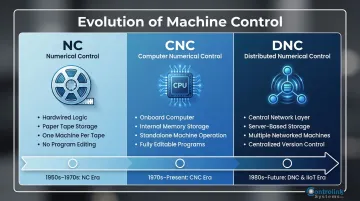
NC, CNC, and DNC represent three generations of machine automation — each solving a problem the previous generation couldn't.
Numerical Control (NC)
The earliest form of machine automation, NC machines used hardwired instructions fed sequentially via punched paper tape. No onboard computer meant no ability to store, edit, or reuse programs—each run required the physical tape.
Computer Numerical Control (CNC)
CNC machines added an onboard microcomputer to the control unit. Programs are stored in internal memory, can be edited at the machine, and the CNC operates as a standalone, self-contained unit. By the 1980s, CNC had become the industry standard — but managing dozens of standalone machines across a shop floor still posed a challenge.
Direct/Distributed Numerical Control (DNC)
DNC is a layer on top of CNC that connects multiple CNC machines to a central server or computer. It enables:
- Centralized program storage and version control
- Instant distribution across the shop floor
- Audit trails for regulatory compliance
- Real-time machine monitoring (in advanced systems)
Side-by-Side Comparison
| Feature | NC | CNC | DNC |
|---|---|---|---|
| Control Type | Hardwired, tape-fed | Onboard computer | Network layer above CNC |
| Program Storage | Paper tape (external) | Internal machine memory | Central server/computer |
| Machines Managed | One machine per tape | One standalone machine | Multiple networked machines |
| Flexibility | No editing, no reuse | Editable, reusable | Centralized version control, instant distribution |
| Ideal Use Case | Legacy/historical | Standalone machining | Multi-machine shops, complex programs, regulatory environments |
How DNC Systems Work: Components and Communication
Core Architecture
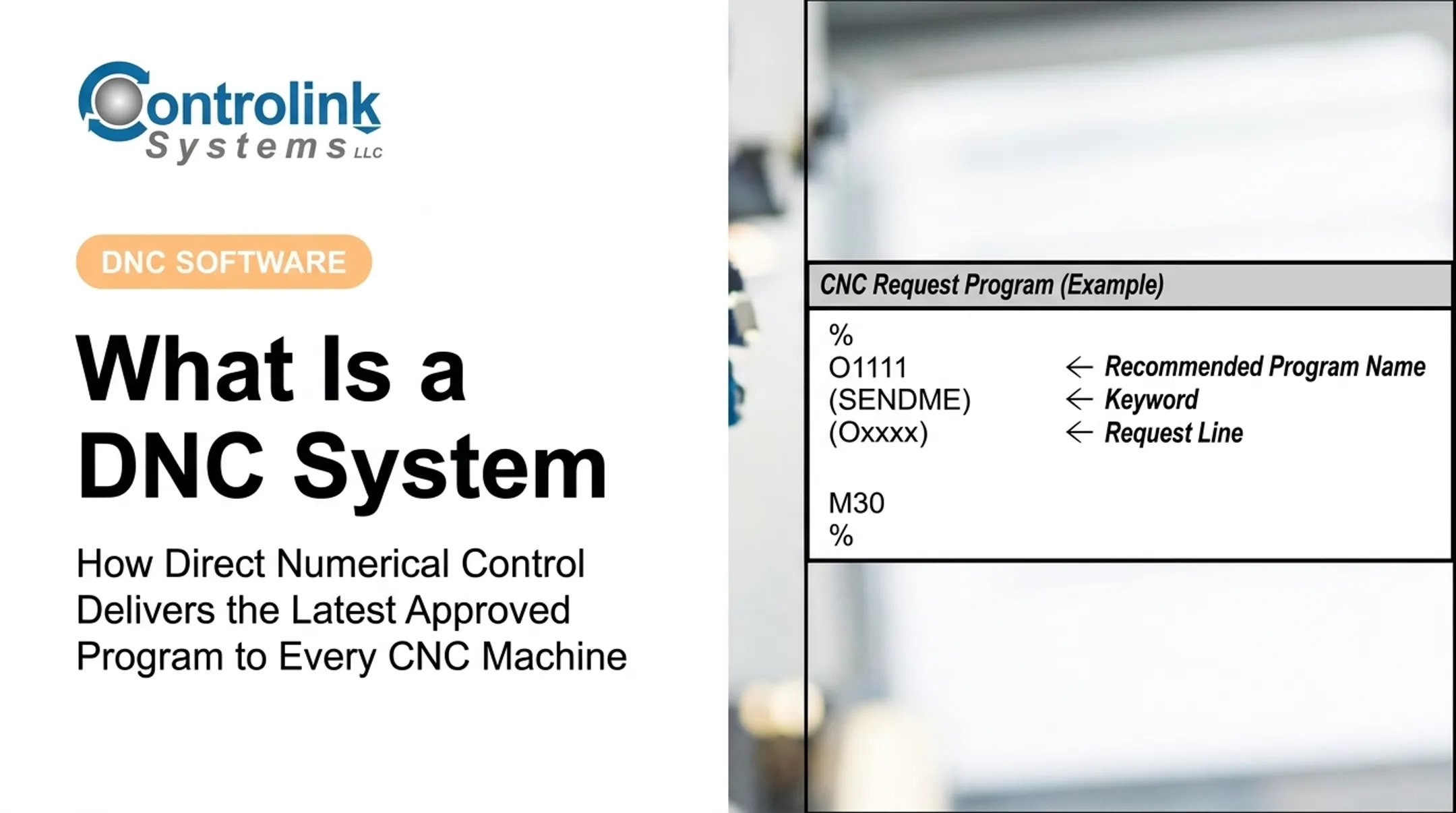
A central DNC computer (server or PC) holds the master library of NC programs and communicates with each CNC machine through dedicated channels—wired (RS-232, Ethernet) or wireless (Wi-Fi). The DNC software manages requests, streams programs, and tracks revisions.
Communication Protocols
Standard Protocols:
- RS-232 serial: Legacy standard on older CNC controls; operates at 4800–115200 bps with specific handshaking (XON/XOFF or RTS/CTS)
- Ethernet (TCP/IP): Built into modern CNCs; enables FTP file access and network storage at 10–100+ Mbps
- USB: Supported by modern controls for manual file handling, though limited by FAT32 size constraints
- Wi-Fi: Suits shops with large floor areas or frequent cell reconfigurations
Proprietary Protocols:
Some machine brands use proprietary formats that require protocol-aware DNC software:
- Fanuc DNC2: Enables two-way transfer of tooling offsets, tool life data, and machine status
- Heidenhain LSV-2: Complex infrastructure protocol for remote control and diagnostics
- Mazak Mazatrol: Conversational programming format requiring specific handling to avoid file corruption
Quality DNC software must natively support these protocols to handle the nuances of multiple machine brands and legacy equipment. Controlink Systems LLC has been developing protocol-aware DNC software since 1998, built specifically for mixed-machine shop environments.
Drip-Feeding Mechanism
Instead of downloading an entire multi-megabyte program into a machine's limited memory, the DNC software streams the program block by block in real time as the machine executes it.
Technical process:
- CNC requests the next block of code
- DNC software sends it over the serial or Ethernet connection
- CNC buffers upcoming moves to prevent mid-cut stops, which cause vibration and degrade surface finish
- Process repeats until program completes
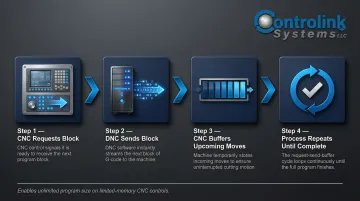
This enables programs of unlimited size to run on machines with minimal internal memory.
DNC Software Functionality
Modern DNC software manages:
- Program library: Version control, revision history, engineering approval workflows
- Upload/download requests: Operator-initiated or automatic, scheduled transfers
- Integration: Links to CAD/CAM, ERP, and MES systems for seamless data flow
- Machine monitoring: Tracks machine status (running, idle, faulted), cycle times, and production data
The hardware supporting these software functions is just as critical as the software itself.
Hardware Components
DNC systems may include:
- DNC communication servers: Dedicated PCs or industrial servers
- Serial-to-Ethernet converters: Bridge legacy RS-232 machines to modern networks
- Wireless access points: Enable Wi-Fi connectivity in large facilities
- Behind-the-Reader (BTR) cards: Retrofit older NC machines lacking standard communication ports by emulating paper tape signals
Key Benefits of Implementing DNC in Your Shop
Operational Benefits
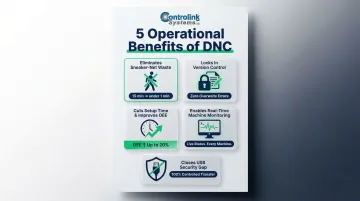
DNC delivers measurable gains across five operational areas:
- Eliminates "sneaker-net" waste — Machinists stop walking the floor with USB drives or paper tape, cutting idle machine time. At Allied Signal Aerospace, DNC reduced a 15-minute paper tape load to under one minute—across 70 daily transfers, that adds up fast.
- Locks in version control — A central program library ensures machinists always pull the latest engineering-approved file. Allied Signal found that operators editing their own floppy disks caused shift-to-shift confusion and machine damage. DNC enforced "file integrity using one server."
- Cuts setup time and improves OEE — Chandler Evans reduced setup on a typical 50-tool job from 13.38 hours to 8.38 hours, and part completion dropped from 44 hours to 18 by pairing DNC with offline tool presetting. ROI came in under one year.
- Enables real-time machine monitoring — Advanced DNC systems track machine status (running, idle, faulted), cycle times, and production counts. That data feeds OEE analysis and continuous improvement decisions directly.
- Closes the USB security gap — Manual USB transfers can introduce malware to CNC controls that were never designed with network security in mind. A hardwired DNC network keeps legacy equipment connected without exposing controllers to broader network threats.
These benefits apply broadly, but certain industries see especially high returns based on their regulatory requirements and production complexity.
Industries That Benefit Most
| Industry | Primary DNC Driver | Operational Context |
|---|---|---|
| Automotive | High-volume, multi-machine operations | Production lines require instant program availability across dozens of identical CNCs without operator delay |
| Aerospace | Large, complex programs for 5-axis machining | AS9100 Rev D mandates strict configuration management and traceability; drip-feeding handles programs exceeding CNC memory |
| Medical Device | Strict revision control requirements | FDA 21 CFR Part 11 requires secure, validated electronic records with time-stamped audit trails—DNC provides required electronic signature and revision lock capabilities |
| Precision Job Shops | Frequent program changeovers across many machine types | High-mix, low-volume orders require constant program changes; DNC eliminates "hunting" for the next traveler or program |
How to Choose and Implement a DNC Solution
Key Evaluation Factors
Evaluate any DNC solution across these five areas before committing:
Controller Compatibility — confirm support for your machine brands, communication protocols, and proprietary controls (Fanuc DNC2, Mazatrol, Heidenhain LSV2) — especially for older legacy equipment.
Ease of Use — shop floor operators need an intuitive interface, not just IT staff. Look for minimal training requirements and clear documentation.
Scalability — verify the licensing structure (per-PC, per-machine, or site-wide) and confirm performance holds up at 10, 20, or 50+ machines as your shop grows.
Integration Capability — check whether the system connects to your existing CAD/CAM software, ERP for job tracking, and MES for production reporting.
Revision Control and Security — the system should lock approved programs against unauthorized edits, maintain an audit trail for AS9100 or FDA compliance, and support role-based access control.
Typical Implementation Steps
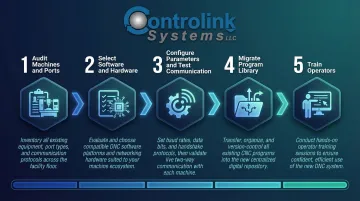
Once you've selected a solution, most shops complete implementation in five stages:
- Audit existing machines and communication ports: Document machine brands, control types, and available communication interfaces (RS-232, Ethernet, USB)
- Select software and hardware: Choose between wired and wireless; specify serial-to-Ethernet converters or BTR cards for legacy machines
- Configure machine parameters and test communication: Set baud rates, handshaking, and protocol options; verify bidirectional transfer
- Migrate program library and establish naming/versioning conventions: Import existing programs, define folder structure, set approval workflows
- Train operators: Hands-on training for program request, upload, and troubleshooting procedures
Working with a specialist shortens this process considerably. Common pitfalls to watch for include:
- Protocol mismatches between software and controller firmware
- Cable length limitations on RS-232 runs
- Buffer starvation during drip-feeding on older controls
Controlink Systems LLC has navigated these challenges across deployments at facilities like The Timken Company and Oak Ridge National Laboratory — experience that translates directly into faster, cleaner implementations.
Do I Need Full DNC or Just a Portable Solution?
The right architecture depends on your shop size and compliance requirements:
| Laptop-Based (Portable) | Fully Networked DNC | |
|---|---|---|
| Best for | Small shops, handful of machines | 10+ machines, regulated industries |
| Setup | One PC, USB or serial cable as needed | Dedicated server, Ethernet drops to each machine |
| Program control | Manual file management | Centralized version control, automated audit trails |
| Compliance | Low traceability requirements | AS9100, FDA, automotive IATF ready |
If your shop handles infrequent program changes at low volume, portable works fine. Once you cross into aerospace, medical device, or high-volume automotive production, a fully networked system isn't optional — it's how you stay compliant and avoid costly scrap from outdated programs.
Frequently Asked Questions
What is a DNC machine?
A "DNC machine" is shorthand for a CNC machine operating within a DNC (Direct/Distributed Numerical Control) network, where a central computer manages program transfer to and from the machine. DNC is not a machine type — it's the network layer that connects and manages multiple CNC machines from a central server.
What is the difference between CNC, NC, and DNC?
NC uses hardwired, tape-fed instructions with no onboard computer. CNC adds an onboard computer for standalone program storage and execution. DNC is a network layer connecting multiple CNC machines to a central server for centralized program management, version control, and distribution.
What is a CNC machine used for?
CNC machines automate cutting, milling, turning, and drilling across industries like automotive, aerospace, and medical device manufacturing. DNC builds on this by centralizing program management — ensuring every machine runs the correct, approved version without manual transfers.
What is drip feeding in DNC?
Drip feeding (also called block feeding) is the process of streaming a large NC program from the DNC computer to a CNC machine one block at a time during execution. It's used when the program is too large to fit in the machine's internal memory, enabling complex 5-axis and surface machining programs to run on machines with limited memory buffers.
What communication protocols does DNC software use?
DNC software must support multiple protocols: RS-232 serial (legacy standard), Ethernet and USB (modern controls), wireless Wi-Fi, and proprietary protocols such as Fanuc DNC2, Mazak Mazatrol, and Heidenhain LSV2. Full protocol coverage is essential for compatibility across mixed machine fleets that include both legacy and modern equipment.
Eliminate manual program transfers and reduce scrap in your shop. Contact Controlink Systems LLC at (800) 838-3479 to discuss how DNC software can increase machine utilization, tighten version control, and build the foundation for smart manufacturing in your facility.